Operation
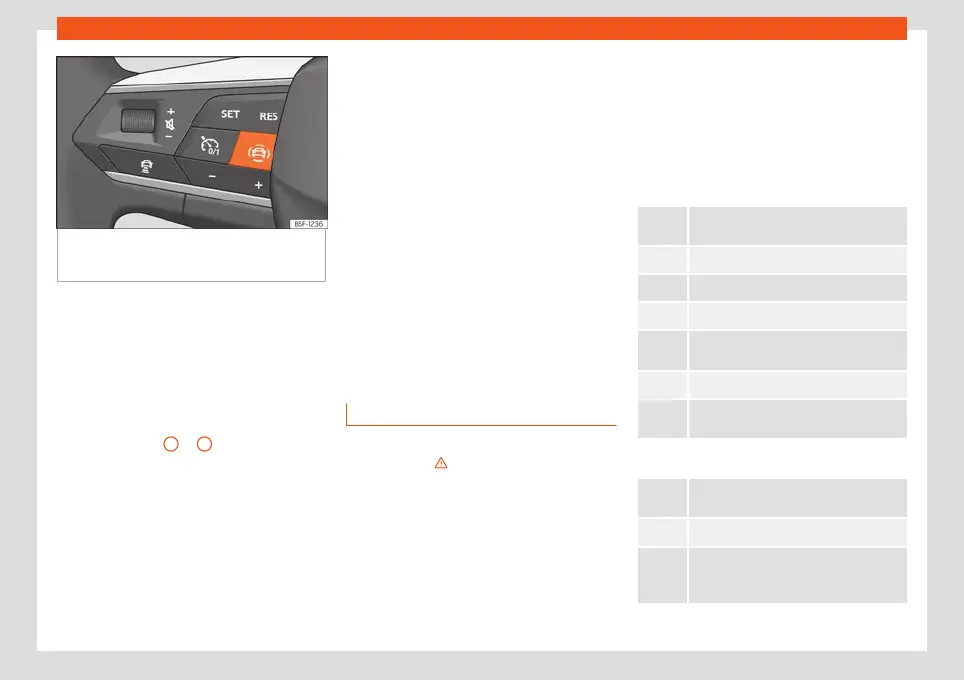
Fig. 64 Left side of the multifunction steering
wheel: button f
or driver assistance systems
(depending on versions).
With the turn signal and main beam headlight
l
e
v
er button, you can activate or deactivate
the driver assistance systems displayed in the
Assistance systems menu .
Activating or deactivating a driver assis-
tance system using the turn signal lever
and main beam headlight
●
Press
›››
Fig. 63
1
or
2
briefly to open the
Driving aids menu.
●
Select the driver assistance system and ac-
tiv
at
e or deactiv
ate it
›››
page 78. A mark in-
dicates that driver assistance system is
switched on.
●
Afterwards, mark or confirm the selection
with button on the windscreen wiper
lever or button
on the multifunction steer-
ing wheel .
Activating or deactivating a driver assis-
tance system using the multifunction
steering wheel*
●
Press the button
›››
Fig. 64 to open the
Aids menu.
●
Select the driver assistance system and ac-
tivate or deactivate it. A mark indicates that
driver assistance system is switched on.
●
Next, confirm the selection by pressing the
button on the multifunction steering wheel.
The driver assistance systems can also be
switched on and off in the infotainment sys-
tem, in the menu Vehicle settings
›››
page 87.
Control lamps
Control and warning lamps
The control and warning lamps are indicators
of w
arnings
›
›
›
, faults or certain functions.
Some contr
ol and w
arning l
amps come on
when the ignition is switched on, and switch
off when the engine starts running, or while
driving.
Depending on the model, additional text
messages may be viewed on the instrument
panel display. These may be purely informa-
tive or they may be advising of the need for
action
›››
page 62, Instrument panel.
Depending upon the equipment fitted in the
vehicle, instead of a warning lamp, some-
times a symbol may be displayed on the in-
strument panel.
When certain control and warning lamps are
lit, an audible warning is also heard.
Red warning lamps
Notification central lamp: additional infor-
mation on the instrument panel display
Parking br
ake on
›››
page 252.
Fault in the brake system
›
›
›
page 252.
Fault in the steering system
›
›
›
page 214.
Driver or passenger has not fastened seat
belt
›››
page 16.
Press the foot brake
›››
page 230.
AdBlue level too low, OR fault in the SCR
system
›
››
page 288.
Yellow warning lamps
Notification central lamp: additional infor-
mation on the instrument panel display
Front br
ake pads worn
›››
page 252.
Fault in ESC or disconnection caused by
the system; OR
ESC or TCS in operation
›››
page 257.
80



 To Next Page