16
Control instruments and warning lamps
Instrument cluster operation
LCD screen
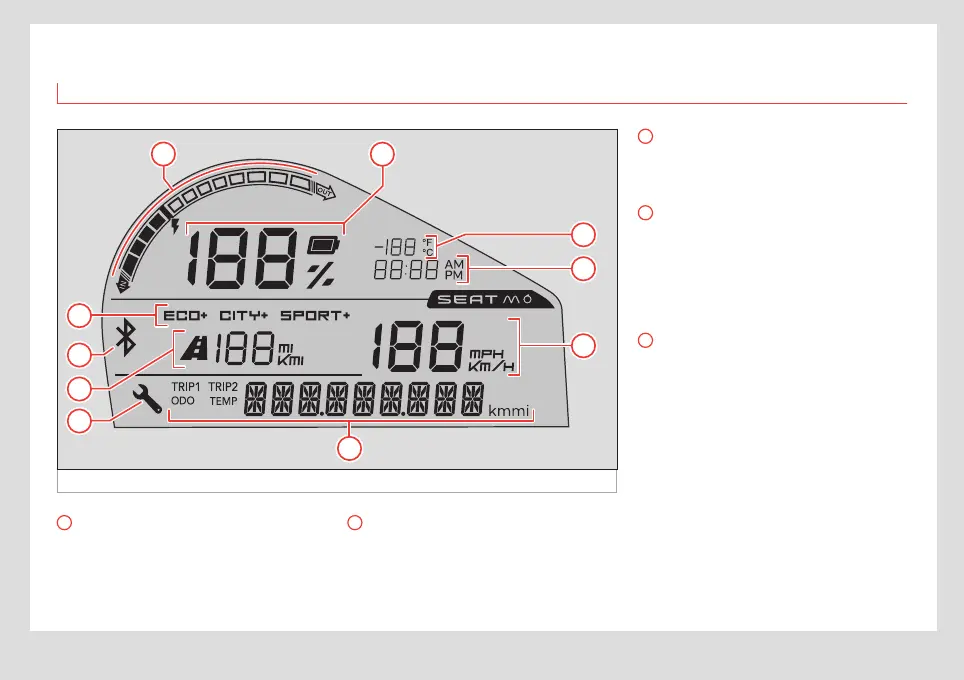
Fig. 9 LCD screen
1
7
8
9
4
6
5
3
10
2
1
Current indicator
It also indicates whether power is flowing out
of the battery (being used) or into it (being
regenerated through the brake motor or
charging).
2
Charge display
The display shows the SoC (State of Charge).
This is shown as a percentage, so when the
battery is completely drained it will read 0%
and when it is fully charged it will show 100%.
3
Driving mode
Shows the driving mode that is currently
active (ECO, CITY or SPORT).
4
Bluetooth connection
This icon shows that the eScooter’s ECU is
paired with the driver’s smartphone. It blinks
when pairing and stays on once the connec-
tion has been made. The light turns o when
the user disconnects their smartphone.
5
Estimated remaining range
Shows information about the remaining
range, in kilometres or miles. This is approx-
imate and depends on driving style and
current use of power.


 To Next Page