22
eScooter controls and driving
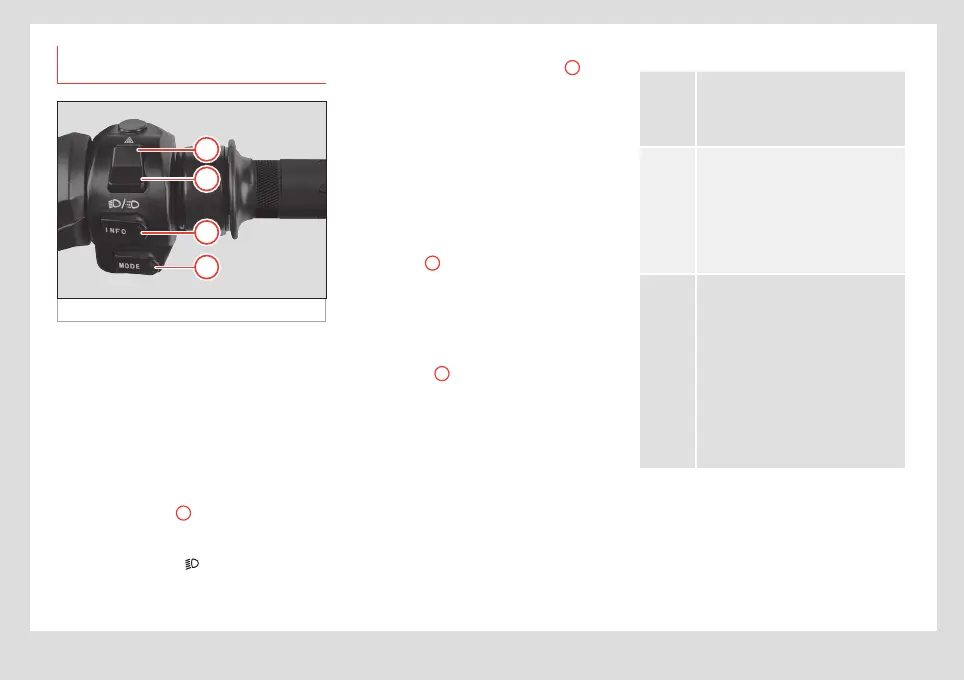
Controls on the right side of the
handlebar
Fig. 18 Right hand side of the handlebar
Accelerator
• To speed up, rotate the accelerator control
downwards.
• To go back to the neutral position, release
the accelerator.
Dipped beam / warning light selector
• To switch on the dipped beam, move the
selector to position
1
(when it is pressed
down, it returns to the rest position by itself).
Whenever these lights are switched on, the
green indicator lamp
on the instrument
cluster will show this.
• To switch on the emergency (hazard)
lights, move the selector to position
2
(the
button returns to the rest position). Switches
on and o the indicator lights on both sides at
the same time.
You can switch on your hazard lights and
leave them on even after taking the key out
of the eScooter. To do so, switch them on with
the key in and then remove it. After they have
been switched o, they can’t be switched on
again without putting the key back in.
INFO button
A
This button is a duplicate of the INFO button
on the instrument cluster and has the same
functionality ››› page15, Instrument
panel.
MODE button
B
Mode selector: this eScooter has three dif-
ferent driving modes, which can be selected
using the MODE button.
These are:
ECO
“E”
This mode is for more relaxed driving,
with limited speed and acceleration.
It gives the vehicle a longer range.
The full regenerative brake is used.
CITY
“C”
The vehicle has been designed to
drive regularly in CITY “C” mode.
This gives it good performance and
balanced consumption. This is the
default mode when you switch on the
eScooter. It includes limited use of
the regenerative brake.
SPORT
“S”
This driving mode gives you more
power and speed at specific mo-
ments. Frequent use of the SPORT
mode decreases the eScooter’s
range (kilometres it can travel with
a full charge) as it uses more power
and can raise the temperature of the
engine/battery, which could have a
negative eect on performance or
cause the eScooter to shut o. The
full regenerative brake is used.


 To Next Page