21
eScooter controls and driving
EN
eScooter controls and
driving
Controls on the left side of the
handlebar
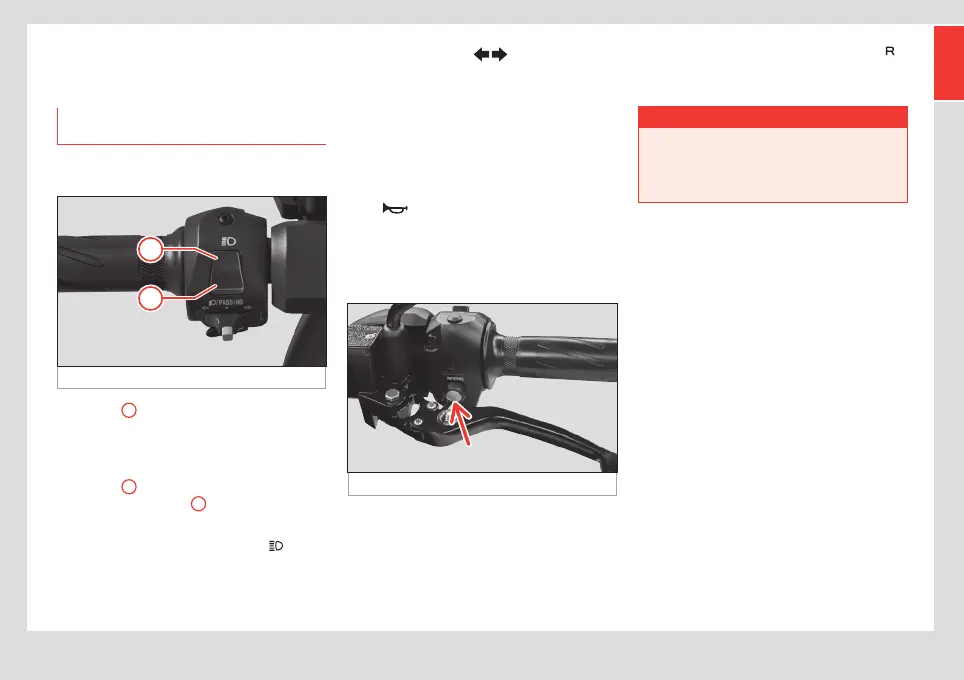
Main beam/flash light selector
Fig. 16 Lamps
• Position
1
: flash (when pressed down, it
returns to the rest position by itself). Allows
you to flash your high beams to warn other
drivers on the road.
• Position
2
: main beam headlight (switch
remains in the position
2
). To switch on the
high beam, hold down the lever at the top.
In any case, the blue indicator lamp
will
remain lit up on the instrument cluster while
the main beam lights are switched on:
Turn signal selector
• To turn on the turn signals, move the selec-
tor switch right to signal a turn to the right,
and to the left to signal a turn to the left.
• Press the white central button to reset the
position of the selector switch and switch the
indicators o.
Horn
Press the button with the horn symbol to
sound the horn.
Reverse switch
Fig. 17 Reverse button
The eScooter has a reverse gear. To use
this function, press the button shown on the
image, behind the left hand brake handle
››› Fig. 17 (arrow) and accelerate smoothly
while pressing it down. The indicator lamp
will light up on the instrument cluster and an
intermittent sound will be heard.
¬ WARNING
Be careful, especially the first time you use
reverse gear.
• This helps you manoeuvre while parking
or to reverse out of a parking spot.


 To Next Page