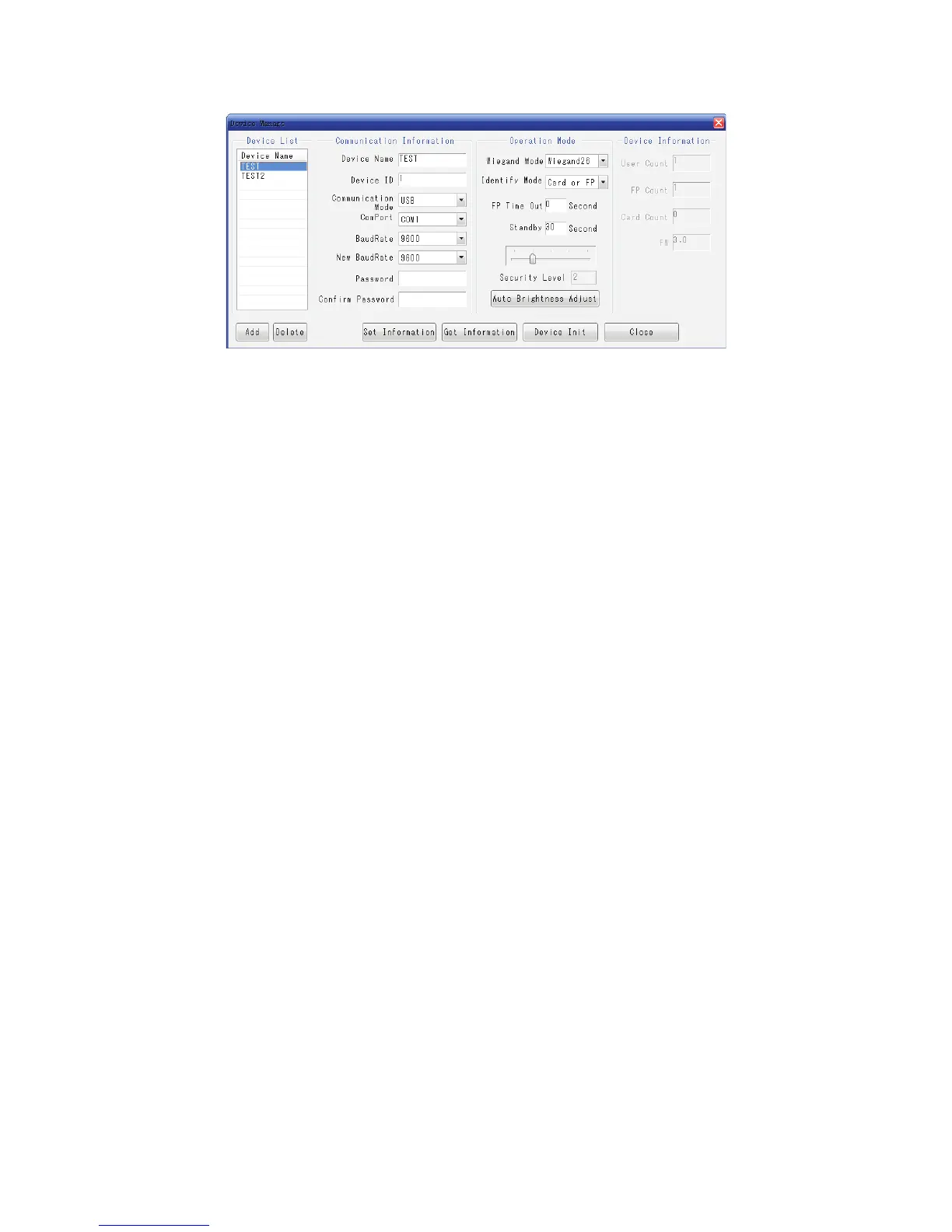
Figure 5
1). To Add Device
Device Name᧶
To set a name for the device.
Device ID
To input Device ID᧤1~255᧥, to make sure ID is unique for each one .
Communication Mode
USB or RS232/RS485.
ComPort
To design the RS232/RS485 COM PORT of PC.
Baud Rate
To set baud rate when choose RS232/RS485 for communication. If to change baud
rate, the baud rate of old device and new baud rate are required to fill, then restart the
device, which will be communicated by new baud rate.
Password
For setting communication password for device and PC, to improve the safety of device.
Password are consist of 14 letters and numbers, please do remember the password after
setting, once forget, it should be sent back to factory to format and all the registration
information will be lost.
Note
For device safety, please do setting the communication password before using.
Wiegand Mode
Wiegand26 or Wiegand34.
Identification Mode
Card or FP᧶Once card or fingerprint verification successful, it will output
wiegand signal.
Card and FP᧶Once card and fingerprint verification successful, it will output
wiegand signal.



 To Next Page