EasyManua.ls Logo

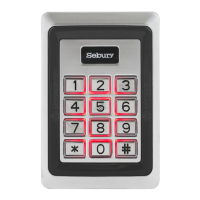
Sebury mKey - User Manual

Sebury mKey
8 pages
Print Icon
To Next Page IconTo Next Page
Loading...
mKey access control
Instruction ManualV1.0
1 Product overview
1.1 Product introduction
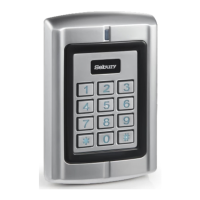
This product uses high-strength zinc alloy body, Proximity card (EM card, also known as ID card)
or password to open the door, built-in highly integrated microcontroller, simple circuit, safe and
reliable, economical and durable, suitable for office, villa etc.
1.2 Features
> 1000 user cards bound with 1000 user passwords, and the user can modify password by himself
> Opening door modes: card, card + PIN, card or PIN, PIN.
> Opening time: 50mS, 1-98 seconds for normal mode, 99 seconds for switch mode;
> Electric lock mode: power-on unlocking (such as electric rim lock, electric strike), power-off
unlocking (such as electric bolt, magnetic lock);
> Built-in high-current MOS tube can directly drive the electric lock, and can resist strong magnetic
unlocking
> Security mode can be set: 10 times invalid card or password will automatically lock the machine
for 10 minutes;
> Can connect with an exit button, convenient to open the door from inside.

Questions and Answers

  • D
    David BryantAug 3, 2025
    Why can't I enter by password on my Sebury IP Access Controller?
    • B
      barry84Aug 3, 2025
      You may need to set the password first. The master setting or users can change the original password '1234' to a new 6-digit password. Alternatively, you might be using the wrong password, so ensure you are using the correct one.
  • M
    Maurice FrancoAug 8, 2025
    What to do if my Sebury IP Access Controller doesn't respond?
    • V
      Vicki CurtisAug 8, 2025
      If your Sebury IP Access Controller is not responding, it might be in lock mode because of continuously swiping the card or inputting the password more than 10 times. Try restarting the power or waiting for 10 minutes.
  • C
    Chad GrayAug 12, 2025
    How to fix can’t enter by card on Sebury mKey IP Access Controllers?
    • A
      anthonykiddAug 12, 2025
      If you can't enter by card, it might be because the mode is set to entry by password only. Set the device to the correct working mode. Too much interference of power or the power voltage being too low can also cause this issue. In this case, change to a qualified power supply or cable.
  • D
    Dr. Robert AndersonAug 17, 2025
    What to do if the digits key is invalid on my Sebury IP Access Controller?
    • K
      krausepaulAug 17, 2025
      If the digits key is invalid, it could be because the entry mode is set to card only or card plus password. Try setting the device to the right working mode.
  • M
    Michael GainesAug 22, 2025
    What to do if my Sebury IP Access Controller is abnormally unlocking?
    • B
      Brian MaciasAug 22, 2025
      If your Sebury IP Access Controller is unlocking abnormally, the electric lock mode might be incorrect. Set it to the correct electric lock mode.
  • C
    Cody SmithAug 28, 2025
    What does unusual indicator light mean on Sebury mKey?
    • A
      Anthony BensonAug 28, 2025
      An unusual indicator light may indicate that the power voltage is too low or there is too much interference. Change to a qualified power supply, cable, or try restarting the power.

Summary

Product Overview

Features

Lists key capabilities including user capacity, opening modes, and security features.

Functional Component and Technical Parameters

Technical Parameters

Specifies operational requirements such as voltage, current, temperature, and humidity.

Installation, Wiring, and Debugging

Installation

Provides step-by-step instructions for physically mounting the access control unit.

Wiring

Details the connection process using color-coded wires for power and locks.

Basic Functions

Enter Administrator Mode

Procedure to access the system's administrative settings using a master code.

Change Master Code

Instructions for modifying the primary security code for administration.

Administrator Mode Operation Summary

Simple Troubleshooting

Fault Phenomenon

Lists common issues, their potential causes, and recommended exclusion methods.

Sebury mKey Specifications

General IconGeneral
Device TypeIP Access Controller
Power Supply12V DC
Weight200 g
CommunicationTCP/IP
IP RatingIP65
ConnectivityWiegand
Relay Output1
Alarm Output1
Reader Input2
Door Sensor Input1 input
Exit Button Input1 input
Humidity10% to 90%

Related product manuals