EasyManua.ls Logo

SEEK Scan - User Manual

SEEK Scan
10 pages
Print Icon
To Next Page IconTo Next Page
Loading...
USER MANUAL
TABLE OF CONTENTS
What’s In The Box.............................................................................................................................
System Setup......................................................................................................................................
Software Overview............................................................................................................................
General Settings & Station Settings...........................................................................................
Email Settings & About Menu.......................................................................................................
Data Options.......................................................................................................................................
Tips For Optimal Performance.....................................................................................................
Skin vs. Body Temperature ...........................................................................................................
Regulatory and Compliance..........................................................................................................
FIXED HEAT SOURCETHERMAL
CAMERA
VISIBLE
CAMERA
Temperature-Controlled
Reference Device
9 cm
9.5 cm
8 cm
9 cm
Patents pending on Seek Scan System and Fixed Heat Source
SEEK SCAN DOES NOT DIAGNOSE COVID-19 OR OTHER DISEASE, ILLNESS OR DISORDERS.
THE SYSTEM MEASURES SKIN TEMPERATURE AS A PROXY FOR BODY TEMPERATURE.
CAMERA
HEAT SOURCE
2
3
4
5
6
7
8
9
10
Question and Answer IconNeed help?

Do you have a question about the SEEK Scan and is the answer not in the manual?

Summary

System Setup

Connect USB Stick for Software Installation

Connect USB stick to PC/tablet to install Seek Scan software.

Positioning Tape for Critical Setup

Position two pieces of tape 5 feet apart for critical system performance.

Set Tripod Heights

Set tripod heights to 5 feet (1.5 m) for optimal positioning.

Heat Source Power-Up Indicator

Heat source powers on automatically; ready when indicator light stops blinking.

Camera and Cable Connection

Connect camera to tripod and PC/tablet; software must be pre-installed.

Maintain Optimal Camera Distance

Ensure heat source and subject are within 5 feet (1.5m) of the camera.

Software Overview

Custom Alarms and Unit Settings

Configure custom alarms and switch temperature units (F/C) in settings.

Face Detection Indicator

Blue box indicates face detection and skin temperature measurement in progress.

Temperature Below Alarm

Green box signifies estimated body temperature is below the set alarm threshold.

Temperature Above Alarm

Red box indicates estimated body temperature exceeds the set alarm threshold.

General Settings

Temperature Unit Selection

Select temperature units between Celsius and Fahrenheit.

Body Temperature Offset Adjustment

Adjust skin to body temperature offset for environmental accuracy.

Station Settings

Set Station Name

Set or change the station name, defaulting to the camera serial number.

Email Settings

Data Options

Tips for Optimal Performance

Prepare Subject for Accurate Scan

Remove glasses, ensure eyes are clearly exposed for accurate measurement.

Consistent Scan Positioning

Ensure subjects and heat source maintain same position for every scan.

Optimal Distance and Separation

Maintain 5 feet (1.5m) distance; allow max 8 inches (0.2m) separation.

Skin Temperature vs Body Temperature

Overview

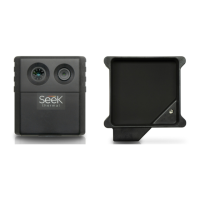
The Seek Scan is a thermal imaging system designed for initial body temperature assessment for triage use. It measures skin temperature as a proxy for body temperature and is intended for indoor use in environmentally controlled rooms. The system is comprised of a thermal camera, a visible camera, and a fixed heat source, which is a temperature-controlled reference device.

Function Description:

The Seek Scan system captures thermal and visible images to measure skin temperature. It then applies an offset to estimate body temperature. The software displays the estimated body temperature and indicates whether it is below or above a user-defined alarm temperature. The system is designed to measure one subject's temperature at a time, primarily focusing on the inner canthus of the eye, though other areas of the face may also be used. It does not diagnose COVID-19 or other diseases, illnesses, or disorders.

Important Technical Specifications:

  • Dimensions: The thermal/visible camera unit measures approximately 9 cm (height) x 8 cm (width) x 9 cm (depth). The fixed heat source measures approximately 9.5 cm (height) x 9 cm (width) x 9 cm (depth).
  • Measurement Range: The ideal screening environment should have a temperature range of 68-76°F (20-24°C) and a relative humidity range of 10-50%.
  • Distance: The optimal distance between the heat source, subject, and camera is 5 feet (1.5 meters). The system can work as close as 4 feet (1.2 meters).
  • Connectivity: The camera connects to a PC or tablet via a USB-A cable. The fixed heat source has its own power cable.
  • Software: The system uses Seek Scan software, provided on a USB stick.
  • Regulatory Compliance: Designed in conjunction with ISO/TR 13154:2017 and IEC 80601-2-59. It is FCC Class A compliant and RoHS compliant. It also complies with Industry Canada ICES-003.

Usage Features:

  • System Setup:
    • Connect the USB stick to a PC or tablet to install the Seek Scan software.
    • Place two pieces of tape 5 feet (1.5 m) apart to mark the subject and heat source positions.
    • Set tripod heights to 5 feet (1.5 m) for both the camera and heat source (tripods not included).
    • Plug in the heat source; it is ready when its light stops blinking.
    • Attach the camera to a tripod and connect it to the PC or tablet.
    • Ensure the heat source and subject are no further than 5 feet (1.5 m) from the camera.
  • Software Interface:
    • Idle State: Indicates when the heat source is not detected or has shifted in temperature.
    • Scanning State: A blue box appears when a face is detected, and skin temperature is being measured.
    • Pass/Fail Indicators: A green box with "PASS" indicates the estimated body temperature is below the alarm temperature. A red box with "FAIL" indicates it is above the alarm temperature.
    • Custom Alarm: Users can set a custom alarm temperature by clicking up/down arrows.
    • Temperature Units: Switch between Fahrenheit (°F) and Celsius (°C) in the settings.
    • Display Options: Show or hide skin temperature measurements alongside estimated body temperature.
    • Estimated Body Temperature Offset:
      • Manual Mode: Uses a fixed offset (default 2.16 °F / 1.2 °C) that can be configured by the user.
      • Adaptive Mode: Automatically adjusts the offset based on the population's scans using statistical analysis.
  • Screening Recommendations:
    • Subjects should look directly at the camera and remain still.
    • Remove glasses, pull down face masks slightly, and lift hat brims to fully expose the eyes for accurate readings.
    • The heat source must remain completely exposed and visible to the camera during every measurement.
    • The heat source and subject should be at the same relative distance from the camera, with no more than 8 inches (0.2 meters) of separation.
  • Email Alerts:
    • Configure email settings to send alerts for scan measurements exceeding the alarm threshold.
    • Includes options for SMTP server, port, username, password, sender address, recipient addresses, and the ability to include a daylight image (.png) of the alert scan.
  • Data Options:
    • JPG Images: Save thermal camera, daylight camera, and software screenshot images for each scan into 'PASS' and 'FAIL' folders. Images are named with a timestamp, pass/fail status, and skin temperature.
    • CSV Temperature Log File: Export a .csv file containing 6 columns of scan information: camera name, skin temperature, estimated body temperature, threshold temperature, pass/fail disposition (1 for PASS, 0 for FAIL), and time of scan.

Maintenance Features:

  • Software Updates: The software can check for the latest updates at startup.
  • Diagnostic Data: Option to send anonymous system data to Seek Thermal to improve software.
  • User Manual Access: The "About" menu provides access to the latest user manual.
  • Support Site: Access to the support site for technical issues and assistance.
  • Product Registration: Option to register the device to activate warranty and receive product information.

SEEK Scan Specifications

General IconGeneral
BrandSEEK
ModelScan
CategoryThermal cameras
LanguageEnglish

Related product manuals