7.
DATA OPTIONS
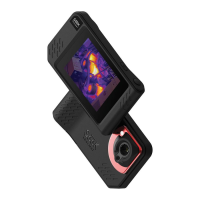
CSV TEMPERATURE LOG FILE
1. The CSV temperature log file is named ‘Temperature Data, date, time of download.’
E.g. Temperature Data 2020-09-01 091937.csv
2. There are six columns of scan information: customizable camera name, skin temperature, estimated
body temperature, customizable threshold temperature, ‘PASS’ or ‘FAIL’ disposition, and time of
scan.
3. ‘PASS or ‘FAIL’ disposition is denoted as follows: 1 = ‘PASS’ and 0 = ‘FAIL’
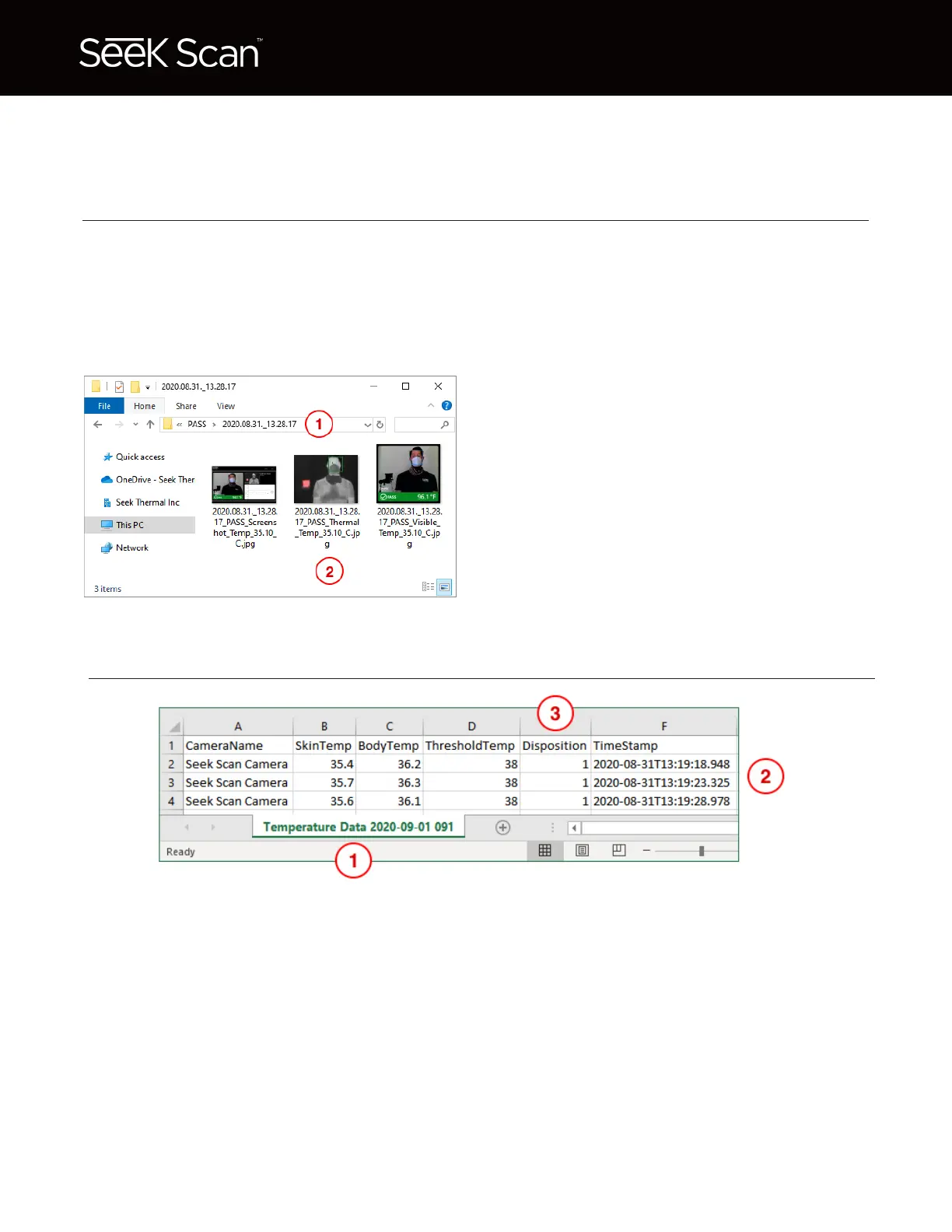
1. Inside the ‘PASS’ & ‘FAIL’ folders, individual
folders are created for each scan and are named
by the date and time of the scan.
2. Three different .jpg images are saved with each
scan: a screenshot of the Seek Scan software, a
thermal image, and a daylight camera image.
Each file name contains the time stamp, ‘PASS’
or ‘FAIL,’ and skin temp in °C.
JPG IMAGES
Seek Scan lets you to save images to its encrypted database running on the Windows PC C-Drive.
From the Station Settings menu, you can export a .zip file containing two folders, ‘PASS’ & ‘FAIL,’ of
scan image data from the last 24 hours.
The zip file will be empty if the ‘Save images’ check box is unchecked in the Station Settings menu.
* Images included in emails are not saved to the Seek Scan database.
Seek Scan saves temperature log data to its encrypted database running on the Windows PC C-Drive.
From the Station Settings menu, you can export a .csv file containing 6 columns of scan information
from the last 24 hours.


 To Next Page