2
• Always ascend according to the speed displayed by the XP EINS and always carry out the necessary safety stops. Should
your dive computer malfunction in any way, ascend at a maximum speed of 10 meters per minute (32 ft. per minute).
• When diving in a group or with a buddy, always follow the most cautious computer instructions.
• Never dive on your own: the XP EINS is no substitute for a dive buddy!
• Avoid repeated ascending and descending or reversing your profile
• Avoid excessive strain or stress at depth
• When diving in cold water, plan shorter dives
• Ascend as slowly as possible through the last meters after decompression or at the end of a non-decompression dive
• Before using the XP EINS you need to be acquainted with the signs and symptoms of DCI: Should you feel any of these signs
or symptoms then seek specialized medical advice IMMEDIATELY. The earlier a diver gets medical treatment after
appearance of symptoms, the more efficient the treatment will be.
• Do not attempt to dive with NITROX without first receiving certified training in this specialty.
Nitrox and repeated dives
• Between repeated dives you must wait until the CNS 02-value drops to below 40%
• Nitrox dives: Ensure that you have a prolonged surface interval (as for compressed air dives). Plan a surface interval of at
least two hours. Desaturation of the body tissues takes some time
• Always choose the gas mixture that most suits the planned dive
• Always adhere to at least one day a week without diving
• Repeated dives with different dive computers: wait at least 48 hours before you dive with a computer you have not used
during your prior dives
High altitude dives
• Do not dive at altitudes of above 4000 metres (13,000 ft.)
• Your XP EINS will indicate the altitude you may not exceed after a dive, by flashing segments.
Flying after diving
You are strongly advised to wait at least 24 hours after your last dive, prior to flying.
1.2 INTRODUCTION
We understand that you hardly can wait to take your XP EINS underwater. As such, we have divided this manual into two sections: In
section one, we explain the basic functions and operations required for the immediate use of your computer. It is very important that you
take the time to read these carefully before diving with your computer. In section two, the additional functions and technical
specifications are described. You can choose whether to read this in advance, or simply as required. We do, however, strongly
recommend reading the entire manual before using your XP EINS.
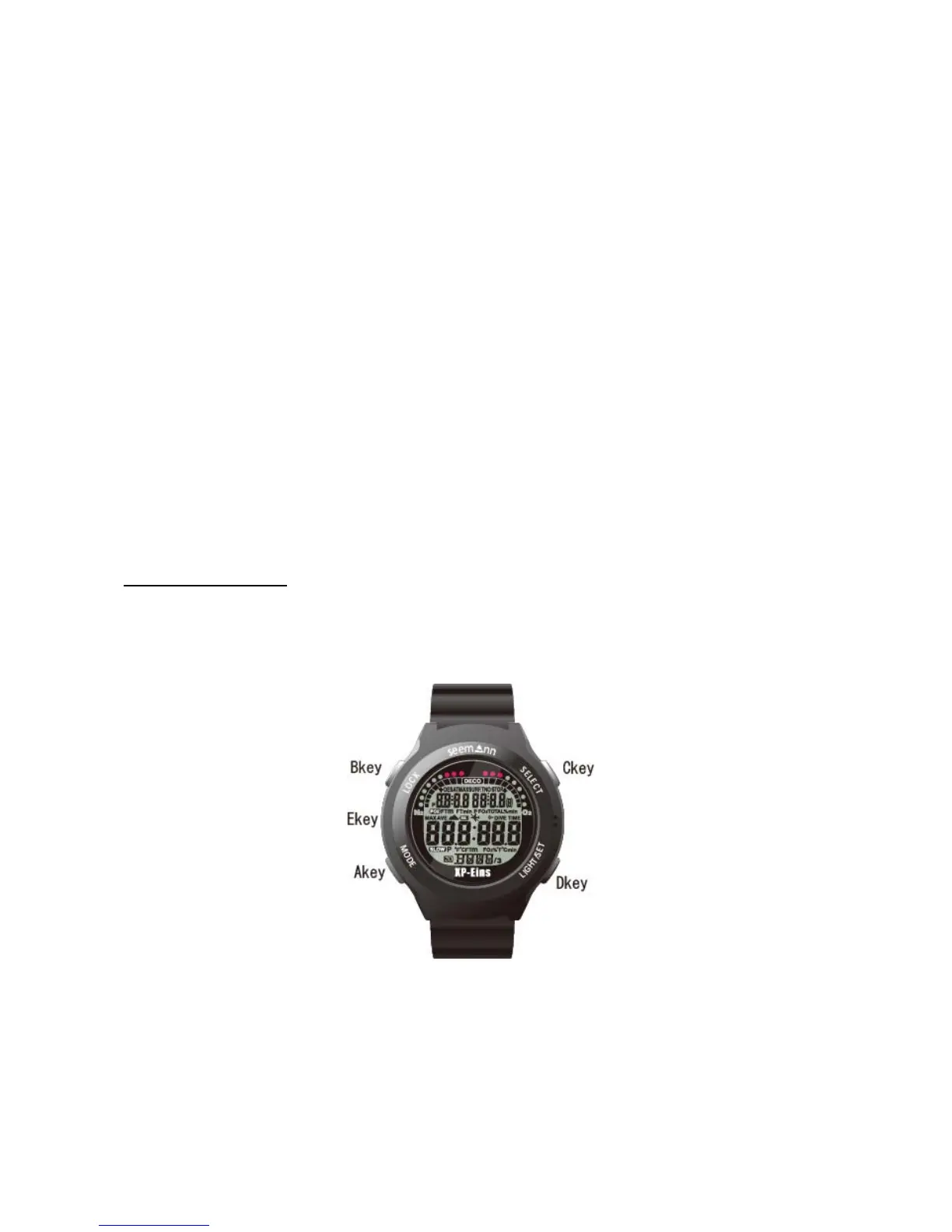
Arrangement of the display and the buttons
Your XP ONE is equipped with four different keys and a water contact. The function of the keys is described by the engraved word on
the ring of the XP EINS housing:
(A-key) MODE to change application mode
(B-Key) LOG changes to logbook mode
(C-Key) SELECT allows you the switch from one value to the next, and to increase the value to be changed
(D-Key) LIGHT/SET enables display illumination and decreases the value to be changed, if changing settings.
(E-Key) WET CONTACT is a metal contact on the left-hand side of the computer. With this contact the XP EINS recognises water entry.
On the surface, the contact has no specific dive-related function, although it can be used as interface for data transfer from the dive
computer to a personal computer.


 To Next Page
 Loading...
