5
Dive Functions
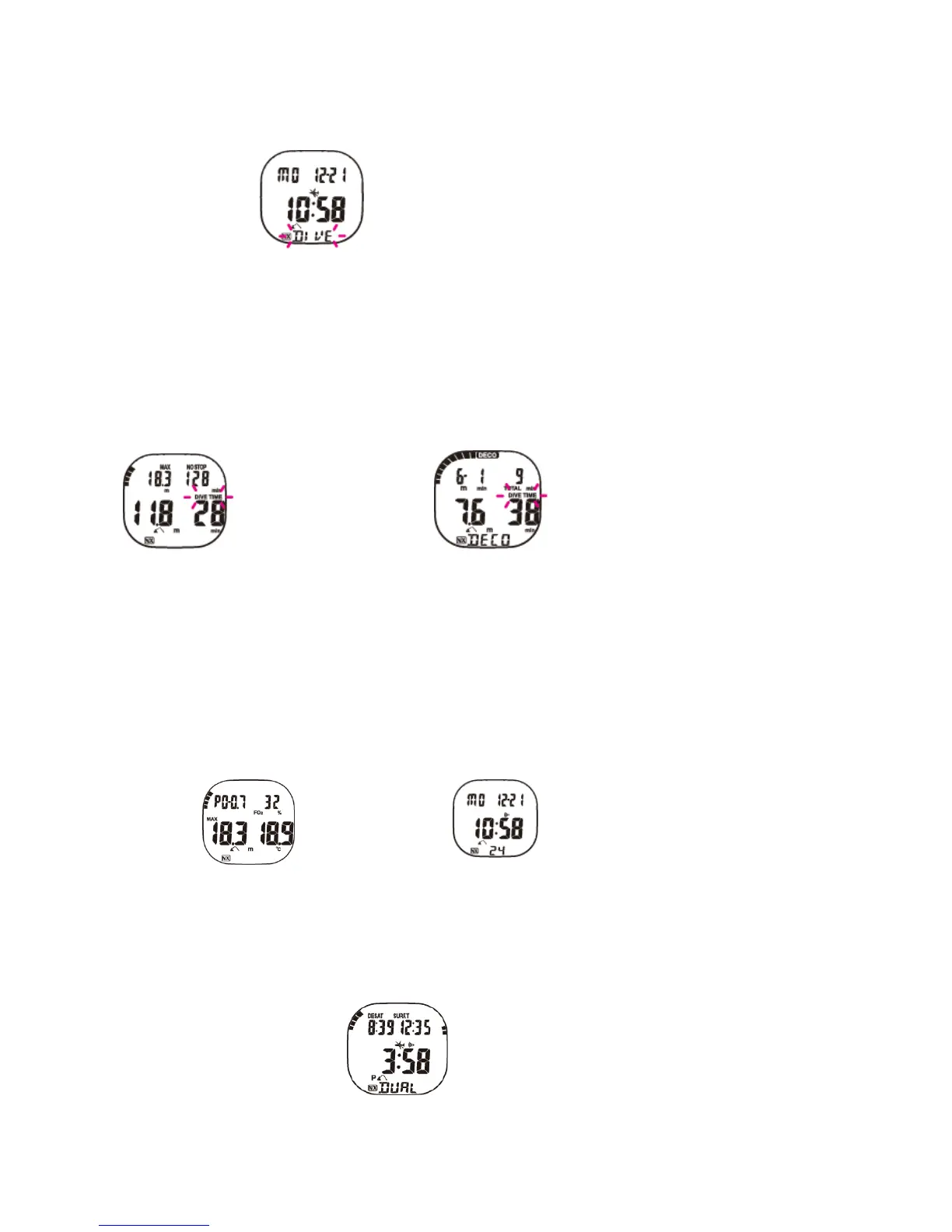
As soon as the XP EINS recognizes contact with water, it automatically turns on and ‘DIVE’ is displayed in the lower part of the screen
(Fig. 1).
Fig. 1
Once the XP EINS reaches a depth of below 1.5 metres (5 ft.), it starts measuring and calculating the dive. The value shown on the
screen will be refreshed every second. The entire dive time is measured up to a maximum duration of 599 minutes. The computer
continues measuring the time until ten minutes after surfacing. After this period, the dive is considered completed, and the data saved to
the log.
The current and maximum depth, remaining dive time for a no-decompression dive or necessary decompression time, ascending speed,
partial oxygen pressure and water temperature are shown as numeric values during the dive. In addition two bar graphs show nitrogen
saturation and oxygen exposure in the central nervous system (CNS O2).
Display information
The display shows two different sets of information depending on whether the dive is within non-decolimits (Fig. 2) or a decompression
dive (Fig. 3).
Fig. 2 NON-DECO DIVE Fig. 3 DECOMPRESSION DIVE
All keys can be used to view further information that is not shown on the main screen in Dive Mode. The following will be displayed on
the main screen (Fig. 2), whatever the type of dive:
Current depth, maximum depth, dive time and the NITROX symbol (provided the percentage of Oxygen is greater than 22%).
On the left-hand side, a bar graph offers a visual display of the level of nitrogen saturation. The bar graph is divided into nine segments.
If all segments are enabled (i.e. the bar reaches the upper rim of the display), the dive is a decompression dive (Fig. 3). A similar bar
graph on the right-hand side of the display shows the level of oxygen toxicity in the CNS. This bar graph, however, is divided into eight
bars. The CNS value slowly increases during compressed air dives at depths of less than 40 metres. You must pay careful attention to
this value during NITROX dives. More detailed information on this topic is provided in the relevant chapter.
The maximum depth, PO2 value, percentage of oxygen (from 22% to 99% or AIR) and water temperature can be viewed by pressing
the ‘mode’ key (Fig. 4).
Fig. 4 Fig. 5
You can view the current time, date and alarm symbol (if set up), by pressing the ‘select’ key (Fig. 5).
Repeated dives
Two dives are repeated dives, when the second dive is carried before enough time has elapsed to entirely de-saturate the nitrogen in
the body’s tissues, that was gathered in the first dive. In this case the XP EINS shows the level of the nitrogen saturation using the bar
graph, as well as desaturation time (Fig. 6). Fig. 6
NITROX dives
If you dive with NITROX gas mixtures, you will need to enter the percentage of oxygen in the gas mixture into your XP EINS. It is very
important that the oxygen percentage of the gas mixture complies with the percentage in the tanks, as this value will be used as a basis
for the calculation of decompression and oxygen toxicity. To set up the percentage of oxygen, you first need to press the ‘mode’ key



 To Next Page
 Loading...