4
‘Select’ key once again, you can now select the minutes-indicator, the hour-indicator, year, month, day as well as 12-24-hour display,
and change them with the ‘light/select’ key.
After having made the desired changes, press and hold the ‘mode’ key for about three seconds. You will then return to Time Mode.
Battery power indicator
If battery current exceeds 2.7 Volts, it will not be shown. If battery power drops to below 2.7 Volts, the symbol flashes and the dive
computer will not change to Dive Mode.
Altitude-Symbol
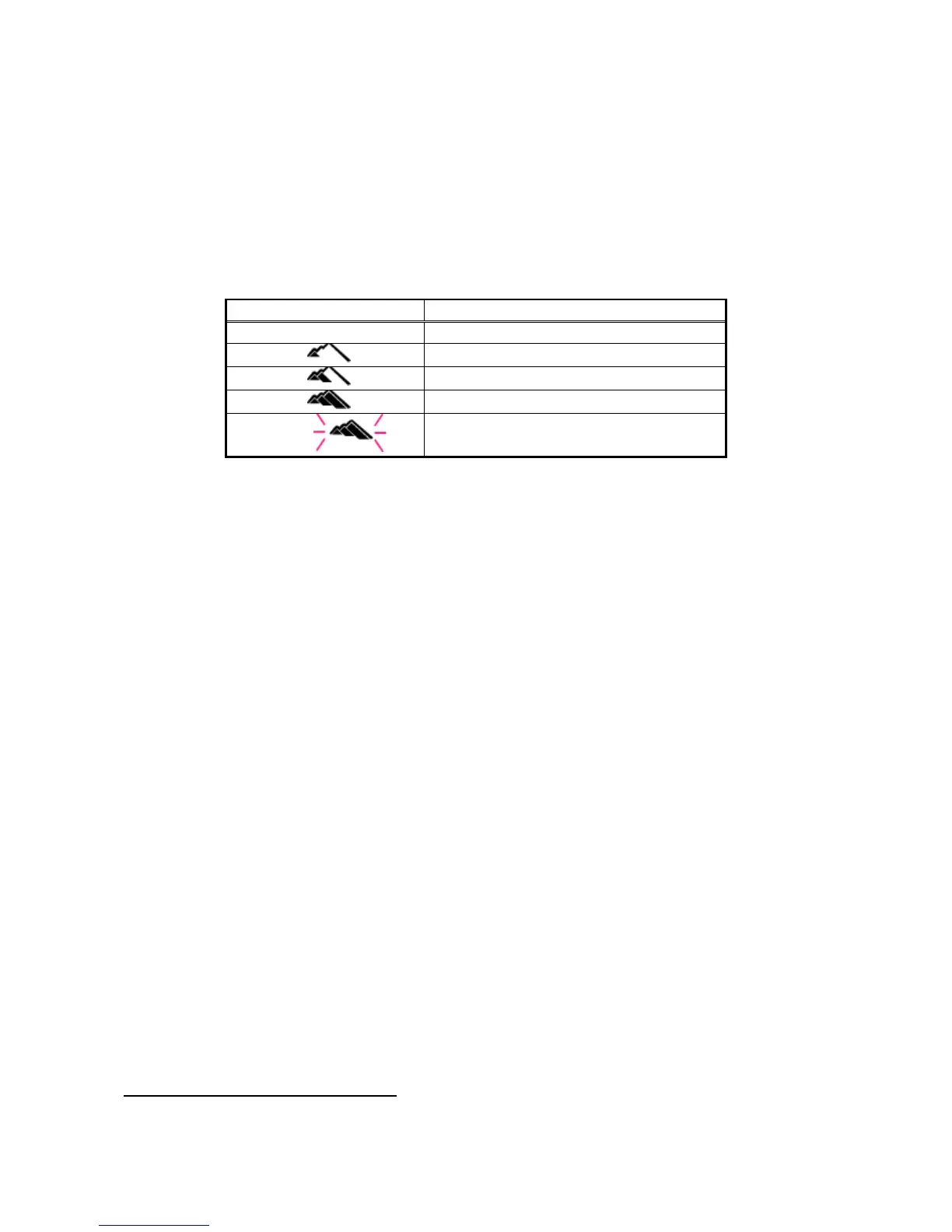
The XP EINS measures current altitude at ten-minute intervals, and shows this with different symbols (see figure). If the computer is in
Dive Mode or PC-Mode (data transfer), this measurement is disabled. The altitude symbol is not available in the following modes: Time-
setup, Alarm-setup, setup of the secondary time zone, deleting of history, dive profile and logbook view mode. If your computer is
located above 6000m, all measurements cease (apart from surface interval), and the word ‘Err’ is displayed.
Altitude level / symbol Altitude range
0 0-900m(0-2.952ft)
1
600-1.800m(1.968-5.904ft)
2
1500-2.600m(4.920-8.528ft)
3
2300-6.000m(7.544-19.680ft)
Err
Above 6.000m(above 19.680ft)
Nitrox-Symbol
This symbol is shown as soon as an FO2-value exceeding 21% (Air) is reached. The figure will flash during entry of the desired value.
Nitrogen bar graph
After a dive, the nitrogen bar graph will display your current saturation level (max. 9 bars).
Automatic return to Time Mode
Your XP EINS will automatically return to Time Mode if your XP EINS is in any mode other than Time Mode (such as alarm, secondary
time zone, planner or logbook), and the mode is changed by pressing the ‘mode’ key after one of the other keys was pressed. In all
other modes (except for dive or time setup), the computer automatically returns to Time Mode if no key is pressed for two to three
minutes (or PC-Mode after 14-15 minutes). After the last automatic refresh of the display in Dive Mode, the computer will return to Time
Mode after two to three minutes.
Display illumination
You can enable display illumination by pressing the ‘light/set’ key. To reduce the use of your battery, illumination will automatically be
deactivated after three seconds.
Secondary time zone
The XP EINS observes current time in two time zones, a great benefit to divers who like to travel. The secondary time zone can differ by
up to 23 hours and 30 minutes from the main time zone and is displayed by pressing the ‘Select’ key. The ‘DUAL’ is also displayed.
To set up the secondary time zone, chose the relevant mode by pressing the ‘mode’ key until the secondary time zone is displayed with
‘DUAL’ appearing at the bottom of the screen. To increase the hour or minute value, press the ‘select’ key. To decrease, press the
‘light/set’ key. If you press and hold either of the two keys, the time will start to scroll and speed will increase. To change the date of your
secondary time zone, you need to run through the entire 24 hours. No more than two days difference between the local and the
secondary time zone, can be input.
If you want to set up the secondary time zone as current time, switch to ‘DUAL-Mode’ (2x) and press and hold the ‘light/set’ key for
about three seconds. For a repeated swap of time zones press the ‘light/select’ key for approx. three seconds.
After you have made the desired changes, press and hold the ‘mode’ key for about three seconds to return to Time Mode.
Remark: You cannot select or set up the secondary time zone within the first ten minutes of a dive. Pressing the ‘select’ key will result in
an audible warning.
3. DIVE COMPUTER FUNCTIONS
If you use your XP EINS as a dive computer, it shows all the necessary information for dives, with or without the need for
decompression, for both compressed air and NITROX mixtures.



 To Next Page
 Loading...