8
Logbook and History
Logbook mode allows you to review information on recent dives. The data will only be saved if the diver has spent more than 3 minutes
at a depth of more than 1.5 metres (5 ft.). The data will be stored in the relevant order until the memory is full. Up to 30 dives can be
stored, after which the oldest dive will be overwritten.
Logbook
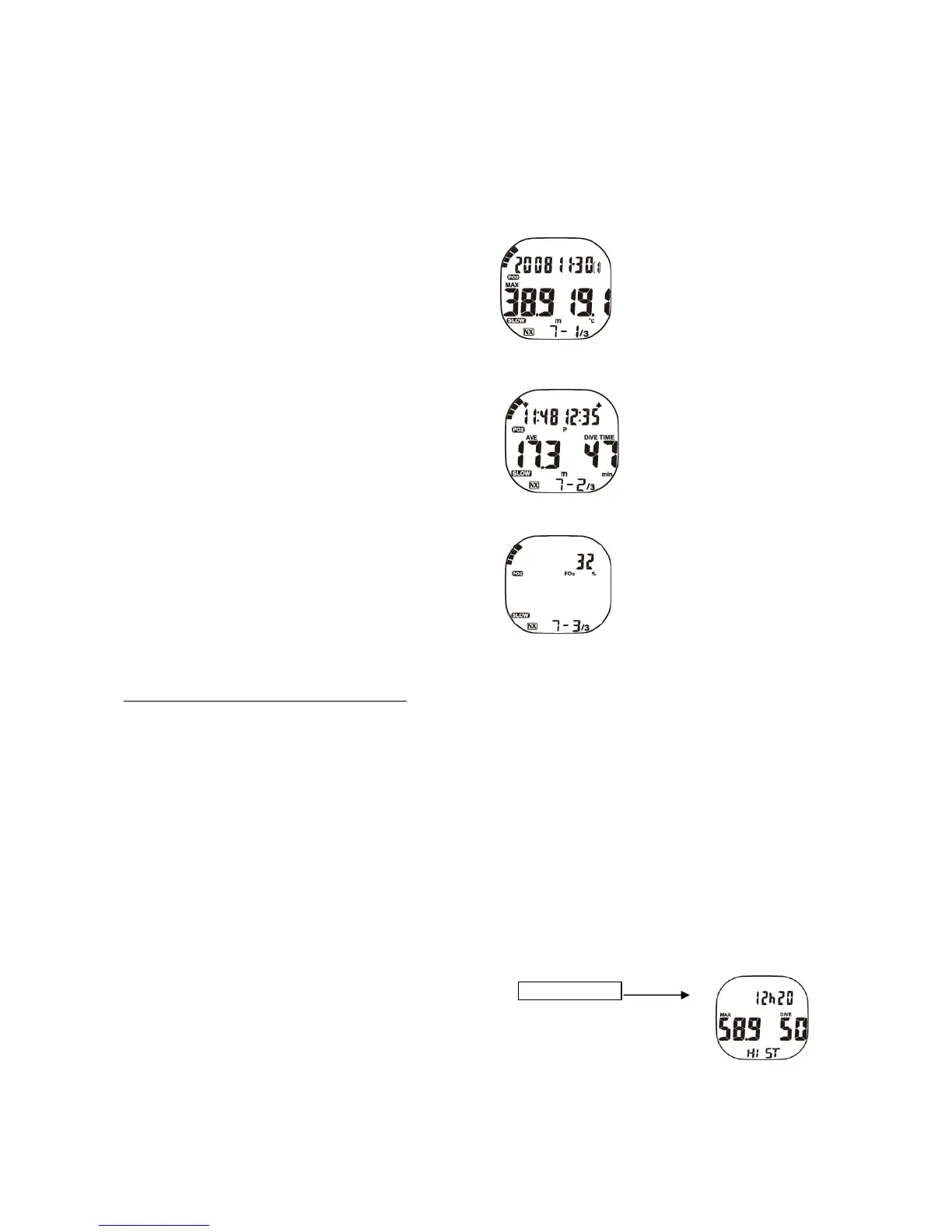
Pressing the ‘log’ key takes you to logbook mode. Dive information is split into three separate displays. After showing the ‘LOG’
indicator, the display will change to ‘1-1/3’ (Fig.11) and the following information will be shown:
- Nitrogen saturation with the bar graph
- Oxygen toxicity with the bar graph
- Date
- Dive Number
- Lowest water temperature
- Ascent speed warning (if exceeded)
- Nitrox symbol (if used) Fig. 11
- Display I - I/3
By pressing the ‘select’ key you are taken to the second logbook display I - 2/3 (Fig. 12), showing the following information:
- Time in (start of dive)
- Time out (End of dive)
- Average depth
- Bottom time
- Ascent speed warning (if exceeded)
- Display I - 2/3
Fig. 12
By pressing the ‘select’ key again you will access the third logbook display I - 3/3 (Fig.13), showing the following information:
- Nitrogen saturation (bar graph)
- Oxygen toxicity limit (bar graph)
- NITROX value (if used)
- Display I - 3/3
Fig. 13
Pressing the ‘light/select’ key will take you back to the display ‘I – 2/3’ or ‘I -1/3’. Failure to press any key for approximately one minute
will automatically change logbook mode to Time Mode.
The following warnings will be displayed in the logbook
:
• Decompression warning
• If you exceed your Non-Deco Time, even if ascending within limits, the decompression warning is saved and will be shown
with the DECO symbol in your logbook.
• Alarm skipped/missed decompression
• If you make a mistake during one of your decompression stops, the alarm will be saved and indicated by the flashing DECO
symbol in your logbook. The alarm will also be saved if the mistake was corrected by returning to the relevant depth.
• Alarm operating limits exceeded. If the diver has exceeded the operating limits of the XP ONE, an alarm is saved that
indicates that limits were exceeded. When viewing this dive in the logbook, the segments on the screen will flash.
• ppO2 alarm (partial Oxygen pressure)
• If the alarm exceeding ppO2 is activated, even for only a short time, the alarm will be registered in the logbook and shown by
a flashing ppO2 symbol.
History
This mode will be indicated by the word ‘HIST’ shown on the screen (Fig. 12). The entire number of dives (up to 999), the maximum
depth and the total dive time (up to 999 hours and 59 minutes) are saved in the history mode. If you are using the computer for the first
time, the logbook contains no data and simply shows ‘ -’. The logbook memory can store up to 30 dives for a total duration of 599
minutes for each dive. Ten repeated dives can be stored per day. The information will only be saved if the diver dives to a depth of at
least 1.5 metres (5 ft.) for a minimum of three minutes.
Fig. 12
Data transfer to a PC
Saved data can be transferred to a computer with PC software LogBook and the relevant interface. You can order an interface and
software from your authorised SEEMANN dealer. As soon as you have installed the interface on your PC with the USB connection, you
can transfer your data as follows:
Mode view



 To Next Page
 Loading...