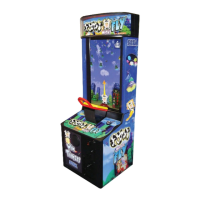
The device described in this manual is an arcade game called "Pigs Might Fly," manufactured by VS Electronic Assembly (Zhuhai) Co. Ltd. and authorized by SEGA SAMMY GROUP Japan. It is a ticket redemption game designed for indoor use.
Function Description
"Pigs Might Fly" is a simple and easy-to-play arcade game. The objective is to launch a pig from a see-saw controller to hit targets on the screen, specifically UFOs and a "Mother ship," to earn scores and tickets. The game involves timing the launch of the pig to hit various tiers of UFOs, each with different ticket values, and avoiding pigeons that obstruct the pig's flight. Hitting the "Mother ship" at the top of the screen awards a "Super Bonus."
Important Technical Specifications
- Machine Name: PIGS MIGHT FLY
- Overall Dimensions: H1950mm x W760mm x L750mm (Height x Width x Length)
- Machine Weight: 160kg
- Voltage:
- For US: 120V, 2.2A, 60Hz
- For UK: 230V, 1.3A, 50Hz
- For other countries: Voltage depends on individual country specifications.
- Power Consumption:
- For US: 264W
- For UK: 299W
- LCD Dimension: Standard 37 inches
- Force Required to Push Handle: 200 N (approximately 44.0 lbs)
Usage Features
The game operates by inserting coins (the exact amount depends on the Credit Board settings) and pressing the Start Button. An arrow moves left and right on the screen, and players must press the see-saw controller handle once when the arrow points at the desired target. This action launches the pig. Successful hits on UFOs or the Mother ship result in scores and tickets. The game features a "Super Bonus" for hitting the Mother ship, with its value dependent on game settings. "Mercy tickets" can also be awarded regardless of hitting a target, unless a Super Bonus is won. The game can display numerical ticket values on UFOs, or "Mystery UFOs" marked with a question mark. The in-game instructions can be set to English, Russian, or Spanish.
Maintenance Features
The manual outlines several maintenance procedures to ensure the machine's longevity and proper functioning:
- Main "Control Panel" Cleaning: The bottom rear wooden panel should be opened and cleaned of dust at least once a month.
- Billboard Area Cleaning: The rear sheet metal panel should be opened, and any dust collected on the billboard cleaned at least once a month.
- Cable Connection Check: All cable connections should be checked monthly.
- Power Off: Always switch off the main power supply before performing any maintenance.
- Water Drips: If water accidentally drips into the machine, temporarily turn it off, open the ticket dispenser door, and clean any water that may have drained into the enclosure.
- Supply Cord: If the supply cord is damaged, it must be replaced with a special cord or assembly available from the manufacturer or its service agent.
- Qualified Personnel: Any adjustment procedures or maintenance services, especially those involving electrical circuitry, must be performed by a qualified and trained engineer or technician.
- Moisture and Dust: Avoid moisture and dust from entering the machine when it is open, as these can cause electrical shock, mechanical failure, or other errors.
The machine includes a comprehensive "Test Menu" accessible via a "Test button" and navigable with a "Service button." This menu allows for various diagnostic and configuration tasks:
- System Information: Displays revision numbers and names of installed system components, including Disk Image Version, Launcher Version, Shell Version, Game Name, Game Version, IO Board Version, and Security Key.
- Input Test: Tests system inputs such as the Start Button, Seesaw Trigger, Ticket Notch, Key Switch, Coin Input, Service Button, and Test Button.
- Output Test: Checks system outputs like Start Lamp, Ticket Vend, and Ticket Meter.
- Coin Test: Displays Coin Count, Credits, Service Credits, and allows toggling Freeplay mode.
- Sound Test: Sets audio levels for the game (Attract Music, Play Music, Play Effect, Music Volume, Effect Volume) and tests speaker functionality.
- Screen Test: Displays various test patterns for the display screen, including Colour Bars (for color balance correction), Brightness (graduated grayscale for brightness adjustment), and Grid Alignment (for screen size alignment).
- Bookkeeping: Provides three pages of bookkeeping meters:
- Page 1: Total Plays, Average Game Time, Credits In, Service Credits In, Tickets Out, Average Tickets, Percentage Payout, and Bookkeeping Last Cleared. It also allows clearing all bookkeeping data.
- Page 2: Plays On Sunday, Monday, Tuesday, Wednesday, Thursday, Friday, and Saturday, showing the total number of plays for each day.
- Page 3: Game Plays Per Hour, displaying total games broken down into 24-hour intervals.
- Clock Settings: Allows setting the PC's real-time clock, including Year (2005 to 2050), Month (1 to 12), Date (1 to 31), Hours (00 to 23), Minutes (00 to 59), and Seconds (00 to 59).
- Game Settings: Configures various game parameters:
- Super Bonus Base: Sets the minimum starting value of tickets for the Super Bonus (options: 10, 20, 50, 100, 200, 300, 500).
- Super Bonus Add: Increases the Super Bonus value each play by a chosen amount (options: None, 1-10). Setting to "None" uses the Super Bonus Base value.
- Super Bonus Limit: Sets the maximum amount of tickets paid out for the Super Bonus (options: 10, 20, 50, 100, 250, 500, 750, 1000).
- Mercy Ticket: Awards mercy tickets to the player regardless of hitting a target (options: 1-10).
- Draw Ticket On UFO: Enables or disables displaying numerical ticket values on UFOs (ON/OFF).
- Language: Changes the language for in-game instructions (English, Russian, Spanish).
- Payout Settings: Configures ticket payout parameters:
- Payout In Freeplay: Enables or disables ticket payout during Freeplay mode (ON/OFF, default OFF).
- Value Of Play: Should match the Credit Board setting and represents the value of a single play (options: 0.01, 0.02, 0.05, 0.10, 0.20, 0.25, 0.30, 0.50, 1.00, 2.00).
- Value Of Ticket: Sets the cash value of one ticket (options: 0.01-0.10, 0.20, 0.25, 0.50, 1.00, 2.00).
- Aiming Percentage of Payout: Uses Value of Play and Value of Ticket settings to calculate a rough guide for payout percentage (options: 20% to 60% in 5% increments).

 Need help?
 General









 To Next Page