EasyManua.ls Logo

Sega Mega Drive - Powering up the System; TV Channel Setting

Sega Mega Drive
82 pages
Print Icon
To Next Page IconTo Next Page
To Previous Page IconTo Previous Page
Loading...
Powering
Up
the
System
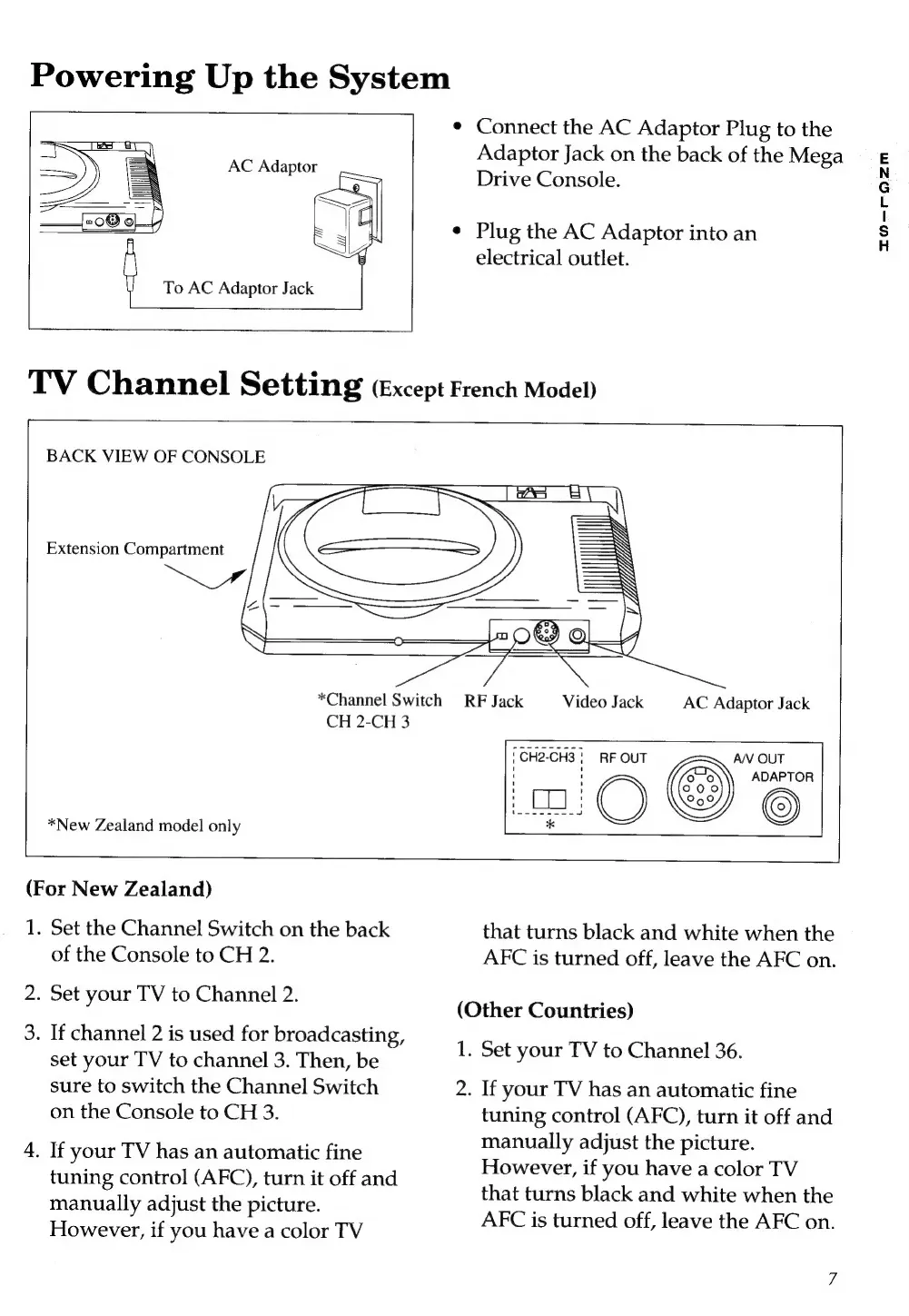
To
AC
Adaptor
Jack
TV
Channel
Setting
(Except
French
Model)
*
Connect
the
AC
Adaptor
Plug
to
the
Adaptor
Jack
on
the
back
of
the
Mega
Drive
Console.
*
Plug
the
AC
Adaptor
into
an
electrical
outlet.
=
BACK
VIEW
OF
CONSOLE
Extension
Compartment
*Channel
Switch
RF
Jack
Video
Jack
AC
Adaptor
Jack
CH
2-CH
3
ÜCH2-CH3!
RF
OUT
AN
OUT
CS
ADAPTOR
i H
o
See
O
>
*New
Zealand
model
only
=
y
(For
New
Zealand)
1.
Set
the
Channel
Switch
on
the
back
that
turns
black
and
white
when
the
of
the
Console
to
CH
2.
AFC
is
turned
off,
leave
the
AFC
on.
2.
Set
your
TV
to
Chamnel
2.
3.
If
channel
2
is
used
for
broadcasting,
set
your
TV
to
channel
3.
Then,
be
sure
to
switch
the
Channel
Switch
on
the
Console
to
CH
3.
4.
If
your
TV
has
an
automatic
fine
tuning
control
(AFC),
turn
it
off
and
manually
adjust
the
picture.
However,
if
you
have
a
color
TV
(Other
Countries)
1.
Set
your
TV
to
Channel
36.
2. If
your
TV
has
an
automatic
fine
tuning
control
(AFC),
turn
it
off
and
manually
adjust
the
picture.
However,
if
you
have
a
color
TV
that
turns
black
and
white
when
the
AFC
is
turned
off,
leave
the
AFC
on.
T0-roz2m

Related product manuals