PREPARATION
Rear View
@ @
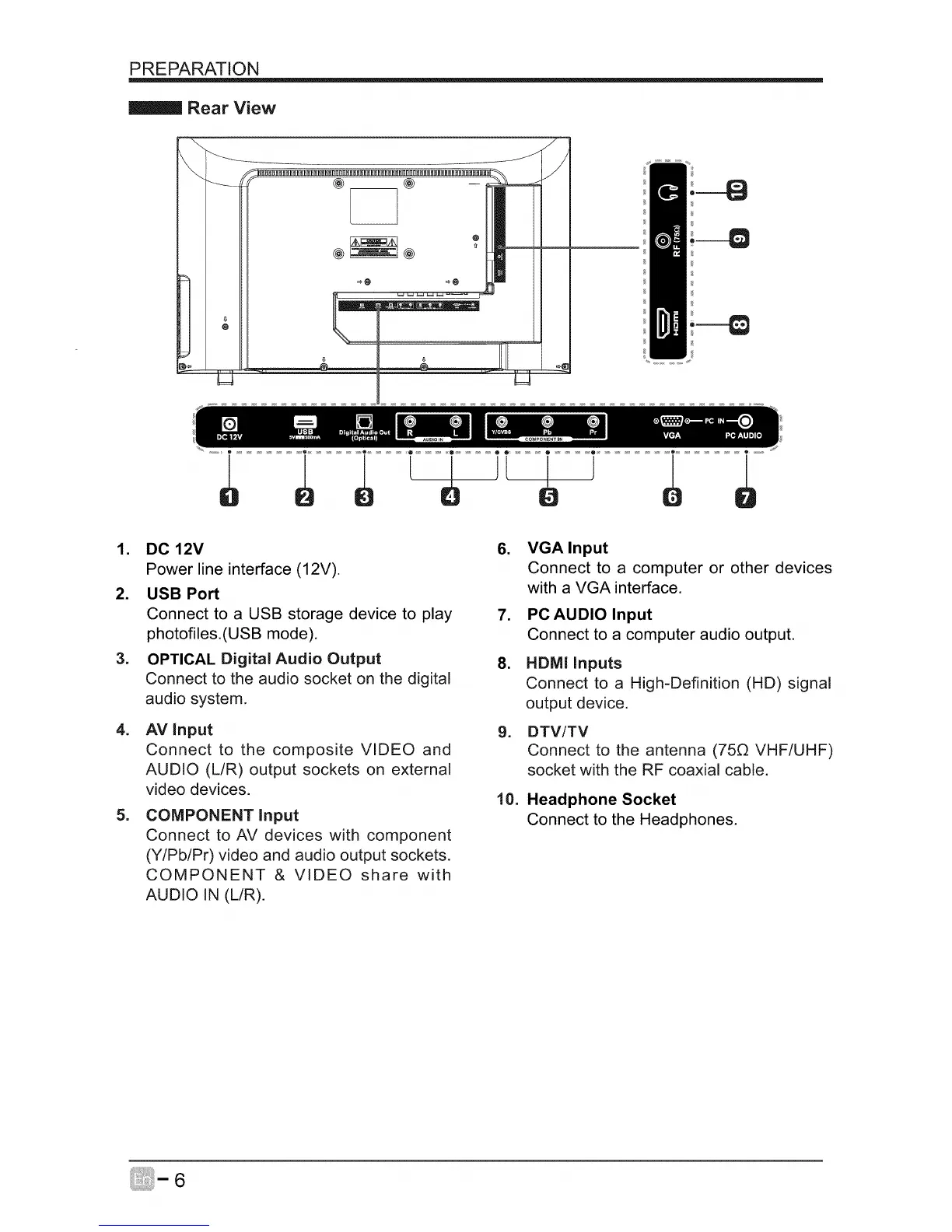
1. DC12V 6.
Power line interface (12V).
2. USB Port
Connect to a USB storage device to play 7.
photofiles.(USB mode).
3. OPTICAL Digital Audio Output 8.
Connect to the audio socket on the digital
audio system.
4. AV input 9.
Connect to the composite VIDEO and
AUDIO (L/R) output sockets on external
video devices.
=
COMPONENT Input
Connect to AV devices with component
(Y/Pb/Pr) video and audio output sockets.
COMPONENT & VIDEO share with
AUDIO IN (L/R).
10.
VGA Input
Connect to a computer or other devices
with a VGA interface.
PC AUDIO Input
Connect to a computer audio output.
HDM! Inputs
Connect to a High-Definition (HD) signal
output device.
DTV/TV
Connect to the antenna (75_ VHF/UHF)
socket with the RF coaxial cable.
Headphone Socket
Connect to the Headphones.
6



 To Next Page