PREPARATION
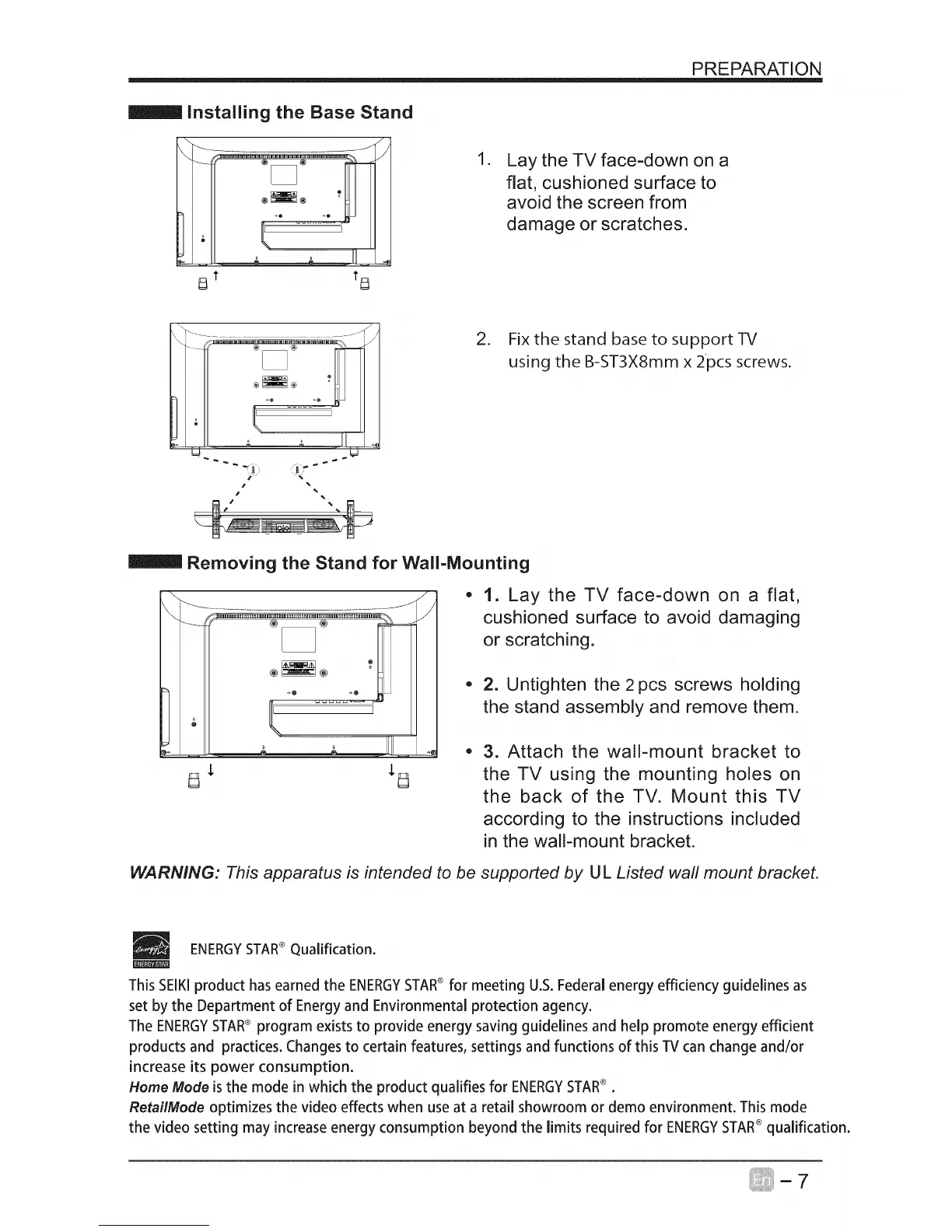
Installing the Base Stand
\
o-:_iy
• .,,,,._ _ IIII.....
8 t tt_
.
Lay the TV face=down on a
flat, cushioned surface to
avoid the screen from
damage or scratches.
2. Fix the stand base to support-R/
using the B-ST3X8mm x 2pcs screws.
Removing the Stand for Wall=Mounting
\
.....................
• ..., 2 11111..
g * *g
J
/
1. Lay the TV face-down on a flat,
cushioned surface to avoid damaging
or scratching.
• 2. Untighten the 2 pcs screws holding
the stand assembly and remove them.
3. Attach the wall-mount bracket to
the TV using the mounting holes on
the back of the TV. Mount this TV
according to the instructions included
in the wall-mount bracket.
WARNING: This apparatus is intended to be supported by U L Listed wall mount bracket.
ENERGYSTAR®Qualification.
This SEIKIproduct has earned the ENERGYSTAR®for meeting U.S. Federal energy efficiency guidelines as
set by the Department of Energy and Environmental protection agency.
The ENERGYSTAR® program exists to provide energy saving guidelines and help promote energy efficient
products and practices. Changes to certain features, settings and functions of this TV can change and/or
increase its power consumption.
Home Mode isthe mode in which the product qualifies for ENERGYSTAR®.
RetailMode optimizes the video effects when use at a retail showroom or demo environment. This mode
the video setting may increase energy consumption beyond the limits required for ENERGYSTAR®qualification.



 To Next Page