EasyManua.ls Logo

Seiko 6M13 - Page 12

Seiko 6M13
20 pages
Print Icon
To Next Page IconTo Next Page
To Previous Page IconTo Previous Page
Loading...
1.
2.
Pull
out
the crown.
*The
tip of the
second
hand
will return
to the 12
o'clock
position,
and
the
tips
of the hour
and minute
hands
indicate
the one-day
alarm
time
you
have
set.
Push
back the
crown
in
to the normal
position.
*while
the
date numeral
is
moving
to indicate
the
current
date,
button
operation is
not
possible.
2I DAITY
A1ARM
'
The
daily alarm
can
be set
to ring regularly
at a designated
time of day.
It is
set on
a
24-hour
basis
and rings
once a
day.
.
'
Turn
the crown
to set
the
mode
indicator
to
"DAlLy
ALARM".
The
tips
of
the hour
and
minute
hands
indicate
the
current time, the
tail
of
the
,
second hand indicates
the
day
of
the week
and the current
date
appears
in the calendar frame.
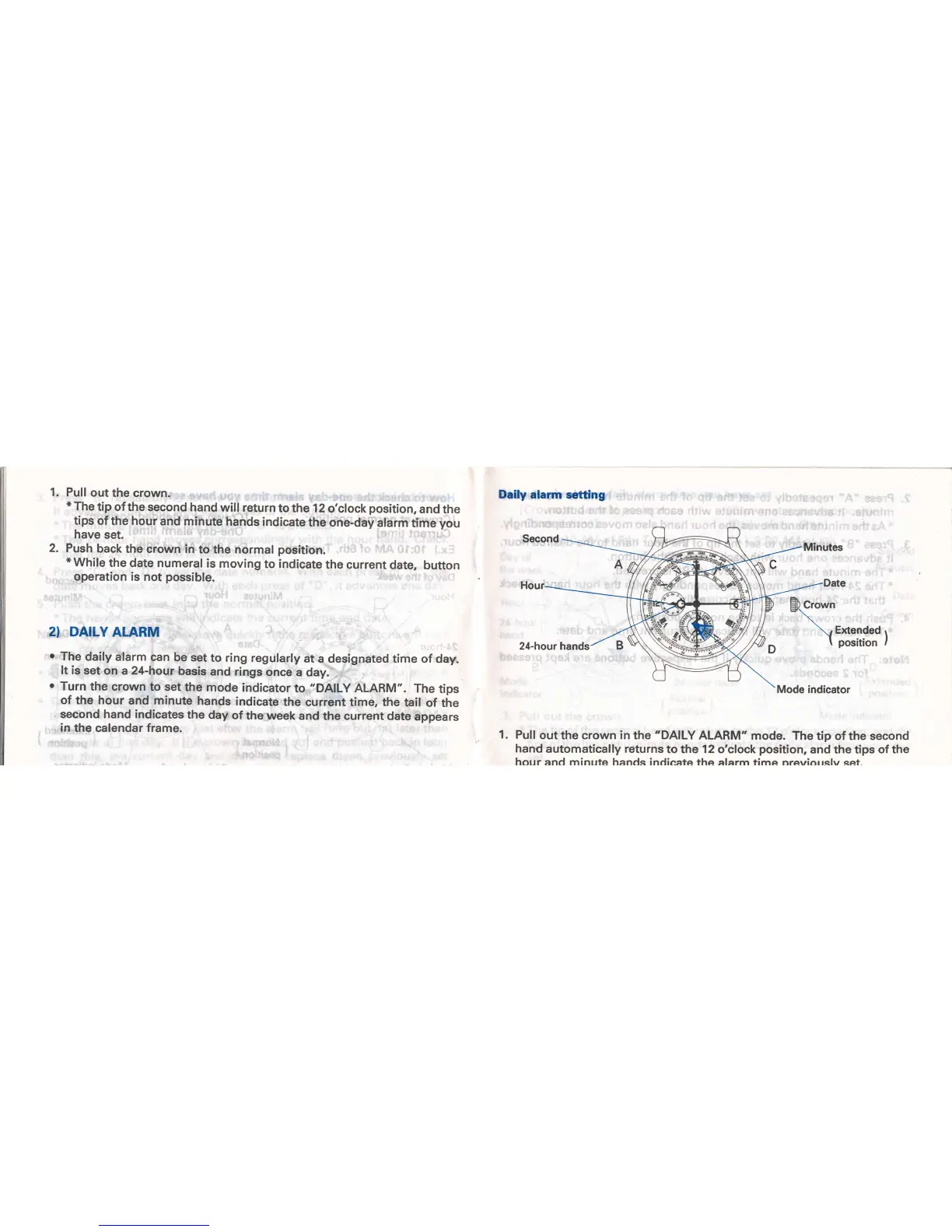
1.
Daily alarm
setting
Pull
out
the crown in the
"DAILY
ALARM"
mode.
The tip of the second
hand
automatically returns
to the 12 o'clock
position,
and the
tips of the
hour ancl minttte hanrls indieafc the alarrn fima nrawiarrclw cef

Related product manuals