●
How to stop the alarm manually while sounding
CROWN
After alarm time setting is completed,
push in to normal position.
B
Press to set the alarm time.
* With each pressing of the button B, the alarm
sub-dial time advances by one minute.
* The hands move quickly if the button B is kept
pressed.
* The alarm hands stop when they indicate the
current time.
* If the alarm time is set to the current time, the
alarm cannot be set.
◆
The alarm sounds for 20 seconds at the designated
time.
◆
To stop the alarm manually while sounding, press
either button A or B.
* The alarm will be automatically canceled once it sounds
at the designated time.
●
How to change the alarm time, which has already been set
CROWN
Pu ll o ut to f ir s t c lic k in t he
CALENDAR/ALARM mode.
* Upon doing this, the set alarm time
is automatically canceled, and the
alarm sub-dial time changes to
indicate the current time.
B
Press to set a new alarm time.
* With each pressing of the button B,
the alarm sub-dial time advances
by one minute.
* The hands move quickly if the
button B is kept pressed.
CROWN
Af t e r ala r m tim e se t t i n g is
completed, push in to normal
position.
First click
B
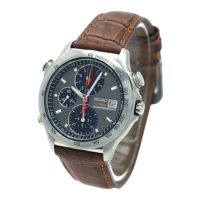
Alarm sub dial
A
B
t
t
t



 To Next Page