PERPETUAL CALENDAR
◆
The date is indicated by the calendar hand.
◆
The day of the week is indicated by the day hand.
◆
The calendar hand can also be used to check the year and month.
◆
There is no need to adjust the date at the end of the month up to February 28, 2100.
●
How to read the calendar
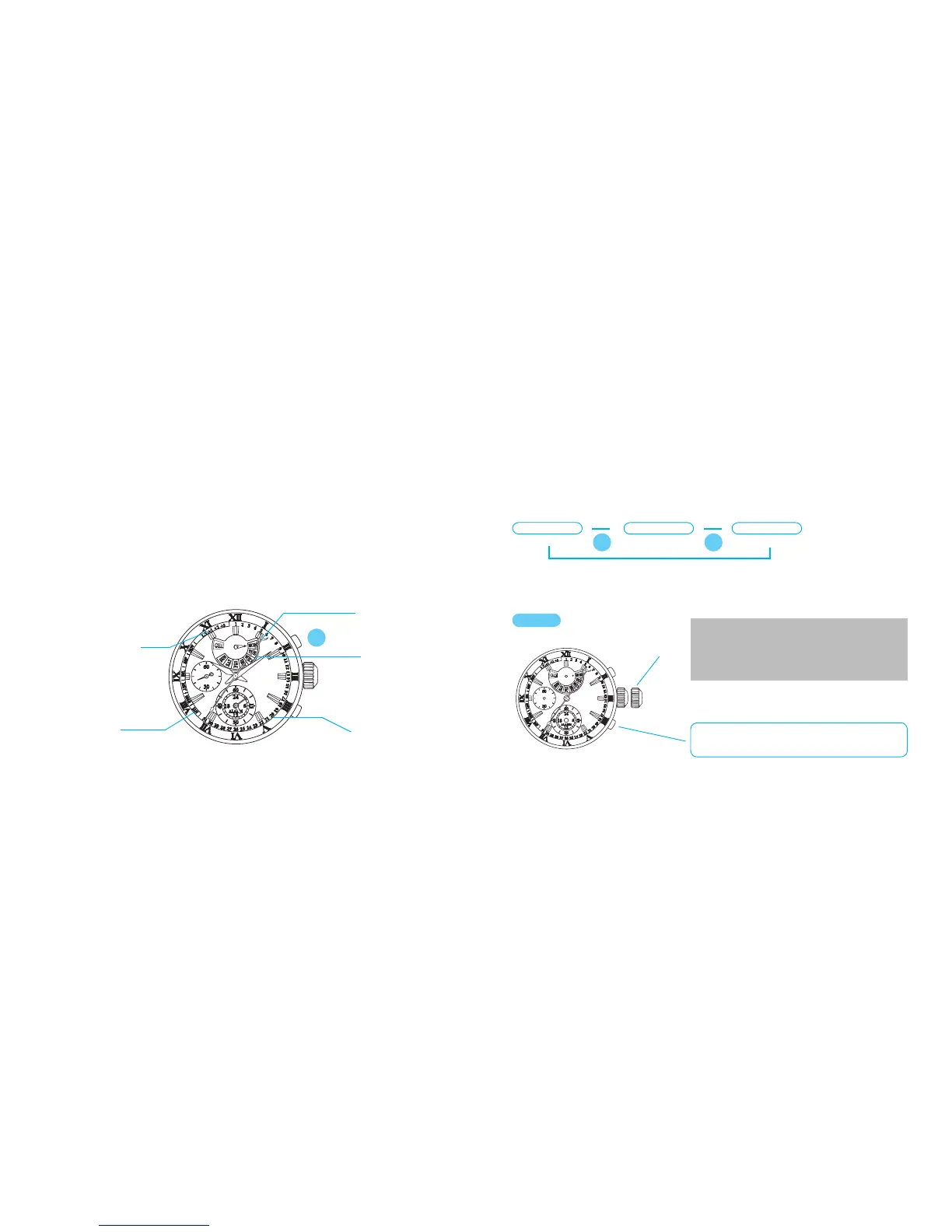
In the CALENDAR/ALARM mode, the day hand indicates the day of the week and the calendar hand
indicates the date.
Year (The number of
elapsed years since
the last leap year)
Date (from 1 to 31)
Month (from January
to December)
Calendar hand
Day of the week
●
How to check the year and month
In the CALENDAR/ALARM mode, with each pressing of the button A, the calendar hand turns to
indicate the date, month and year successively by its base end.
▲
▲
After indicating the month and year, if the button is left untouched for approximately 10
seconds, the calendar hand automatically returns to indicate the date.
Date
▲
Month
Year
●
How to adjust the calendar
It is essential that all the hands are correctly
positioned, otherwis e the watch may not
show the calendar correctly.
CROWN
Pull out to first click.
First click
* Do not press the button B at this point, as it
will lead the watch to the alarm setting mode.
A
[ IMPORTANT ]
A A


 To Next Page