●
Time settings for main dial and alarm sub dial
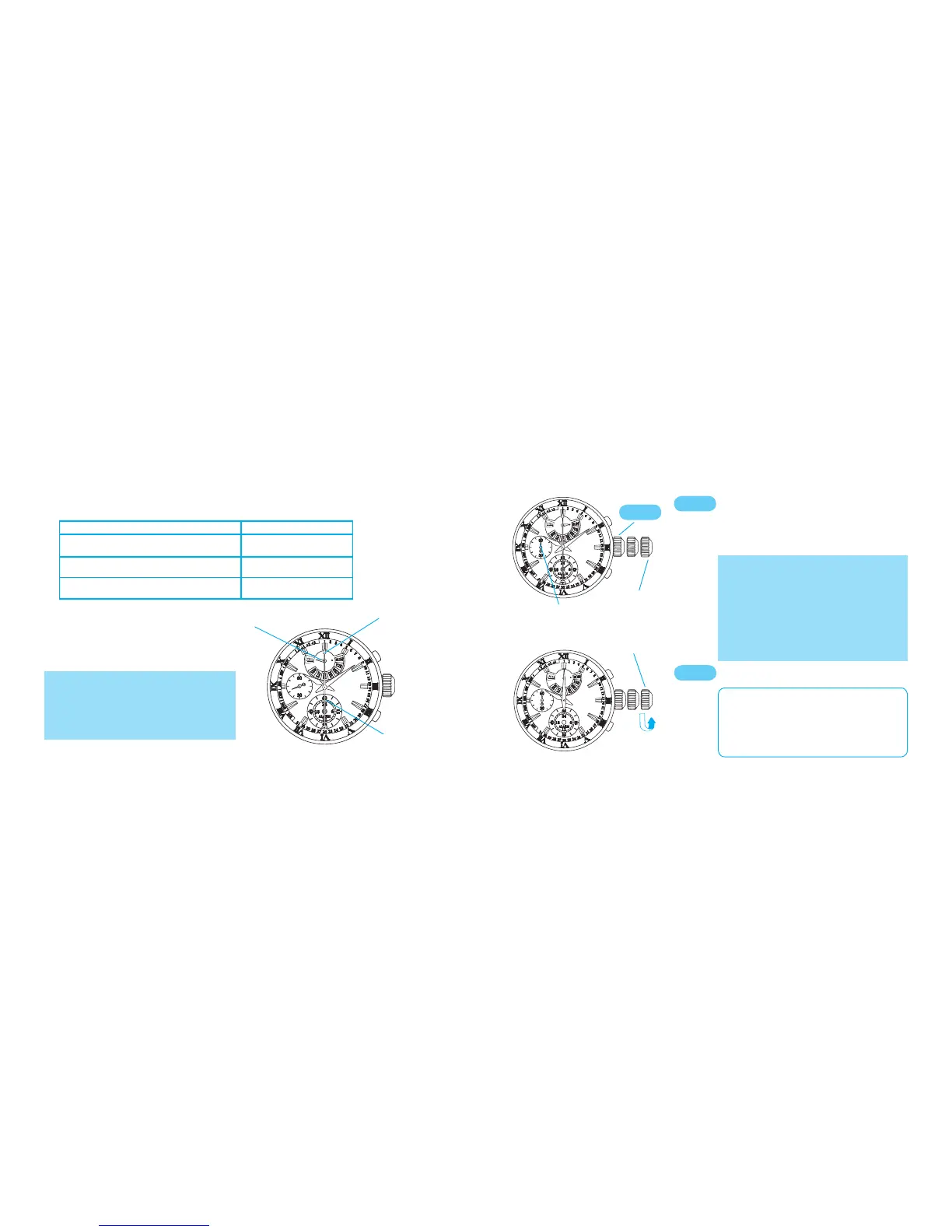
Turn to set the main dial time.
Pull out to second click when the
small second hand is at the 12 o’clock
position.
The small sec ond hand will sto p
immediately.
Small second hand
* If the crown is pulled out while the
stopwatch is counting, the stopwatch will
be automatically reset.
* If the crown is pulled out while the alarm
is set, the alarm will be automatically
canceled.
*
This operation can be performed both
in the CALENDAR
/ALARM mode and
STOPWATCH mode.
Second click
Second click
* It is recommended that the hands be
set to a time a few minutes ahead of the
current time, taking into consideration
the time required to complete the time
setting for alarm sub dial, after which
the crown is to be pushed in.
●
How to check the position of the hands
In the STOPWATCH mode, after resetting the stopwatch, check the position of each
hand, referring to the table below:
Name of hand Correct position
Stopwatch hour and minute hands
(Alarm hour and minute hands)
0:00
Stopwatch second hand
(Calendar hand)
0 second position
Mode indicator hand
(Day hand)
CHR position
t
CROWN
CROWN
CROWN
* When using the watch in a location with
a different time zone, only the time needs
to be set.
* It is necessary to set both the main dial
time and the alarm sub-dial time.
Stopwatch
second hand
Mode indicator hand
Stopwatch
hour and
minute hands


 To Next Page