6
TROUBLESHOOTING
52
English
6
TROUBLESHOOTING
53
English
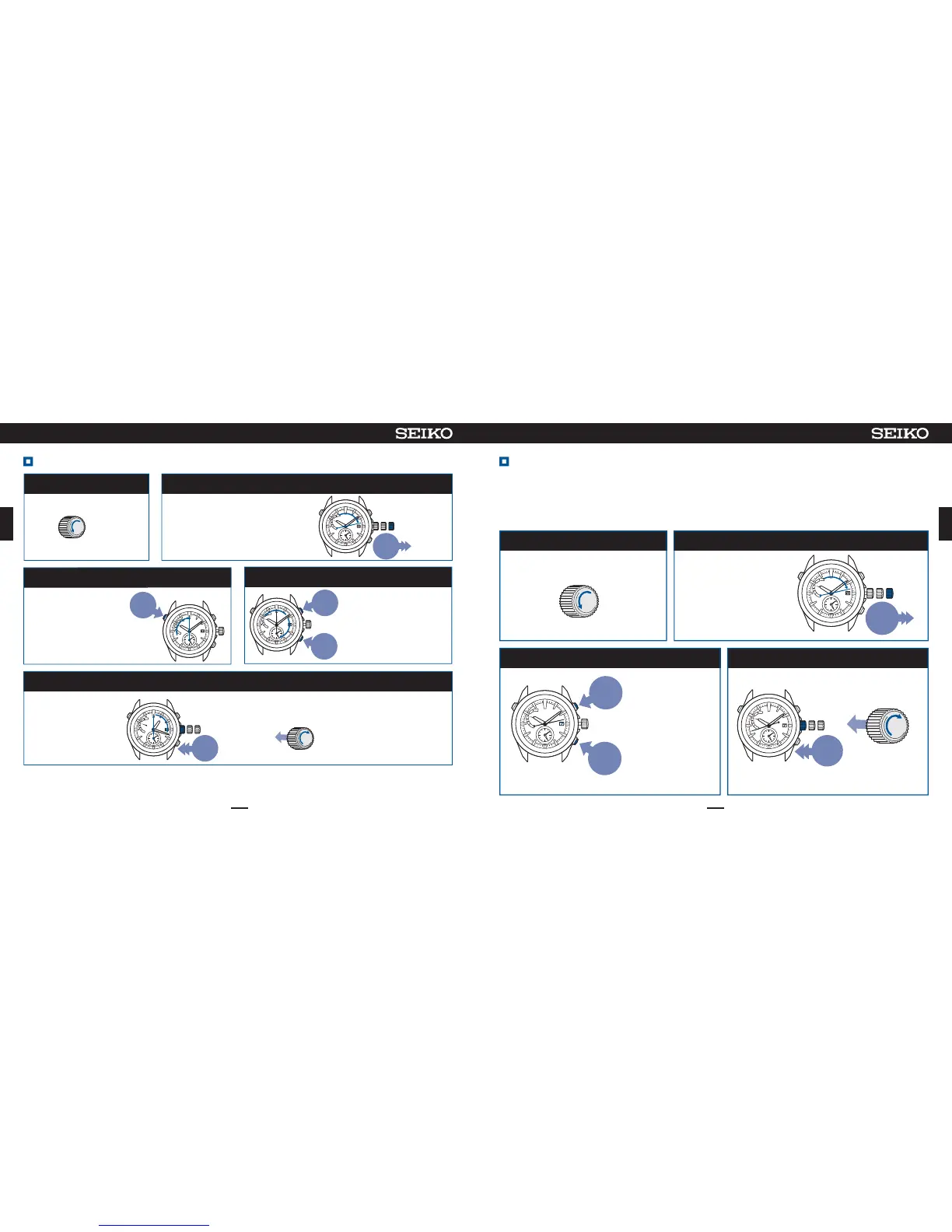
Pulloutthecrowntothesecondclick
PressButtonBorButtonCtosetthedate Pushthecrownbackin
2
34
Operationhasbeencompleted.
※Whenthewatch
entersthemanual
timesettingmode,
thereceptionresult
willbedisplayed
asN,sincethe
receptionresultsdata
willbelost.
※Thedatewillnot
movebyturningthe
crown.
※Duringmovementof
thedate,thebuttons
cannotbeoperated.
WhenthedateisnotautomaticallychangedunderaconditioninwhichthewatchisunabletoreceiveGPS
signals(whenchangingfrommonthswith30daysorlesstomonthswith31days),setthedatemanually.
・Thedatecanbesetindependentlyregardlessofthetime.
・Whenusingthewatchagainunderaconditioninwhichthe watch is abletoreceiveGPSsignals,receive
GPSsignalstosetthetimeanddate.
※
WhenthedateisnotcorrectevenwhenthewatchhassuccessfullyreceivedGPSsignals,thepreliminarypositionofthedatemaybemisaligned.
Thesecondhand
movestothe13-sec
positionandstops.
Unlockthecrown
1
Unlockthecrown
Unscrew
※Lockthecrown.
Whilepressing
thecrownin
Screw
01 2
Pullout
tothe
2ndclick
Press
toreturn
1day
Pressto
advance
1day
Push
back
in
012
WhenthebuttonBiskeptpressedfor2secondsorlonger,thedate
willstarttomovecontinuously.PressthebuttonBagaintostop.
HowtomanuallysetthedateHowtomanuallysetthetime
5
※EvenifGPSsignalscannotbereceived,thewatchcanbeusedwiththesameaccuracyasanormalquartzwatch.(atloss/gain±15 s e c o n d s
permonthonaverage)
※IfthewatchreceivesGPSsignalsaftermanualtimesetting,itdisplaysthereceivedtime.
Unlockthecrown
1
Unlockthecrown
Unscrew
Pulloutthecrowntothesecondclick
2
Thesecondhandmovestothe13-sec
positionandstops.
012
Pullout
tothe
2ndclick
Continue to press Button A(3sec) and then release it
whenthehandmovestothe0-secposition
3
Thesecondhandmovesto
stopatthe0-secposition.
Thewatchentersthe
manualtimesettingmode.
※Whenthewatchentersthemanual
timesettingmode,thereception
resultwillbedisplayedasN,since
thereceptionresultsdatawillbelost.
Press
for
3sec
PressButtonBorButtonCtosetthetime
4
※
Thehandswillnotmovebyturning
thecrown.
※
Thepointinwhichthedatechangesis
at0:00AM(12:00PM).Setthetime
takingintoconsiderationAMorPM.
Press
tosetback
1min
Press
toadvance
1min
Whenthebuttoniskeptpressedfor2
secondsorlonger,thehour/minute
handswillstarttomovecontinuously,
andwhenitispressedagain,they
stopmoving.
Pushthecrownback(insimultaneouslywithatimesignal)
Operationhasbeen
completed.
Push
back
in
012
※Lockthecrown.
Whilepressingthecrownin
Screw













 To Next Page