6
TROUBLESHOOTING
58
English
7
SPECIFICATIONS
59
English
SPECIFICATIONS
1.Basicfunction・・・・・・・・・・・・・・・・・・・・・・Main-dial ;three hands(hour/minute/secondhands), datedisplay,
indicatorhand,sub-dial;twohands(hour/minutehands)
2.Frequencyofcrystaloscillato・・・・・・・・32,768Hz(Hz=Hertz...Cyclespersecond)
3.Loss/gain(monthlyrate)・・・・・・・・・・Loss/gain±15secondsonamonthlyrate(Exceptthecasewhen
the watchis usedwithout an automatictimesettingbyreceiving
GPSsignaland whenit is worn on the wristwithin anormal
temperaturerangebetween5℃and35℃).
4.Operationaltemperaturerange・・・・Between−10℃and+60℃
5.Drivingsystem・・・・・・・・・・・・・・・・・・・・・Stepmotor(hour/minute/secondhandsofmain-dial,date,indicator
hand,hour/minutehandsofsub-dial)
6.Powersource・・・・・・・・・・・・・・・・・・・・・・・Secondarybattery,1piece
7.Durationofoperation・・・・・・・・・・・・・・・Approximately6months(Fullycharged,andthePowerSaveisnot
activated).
※IfthePowerSaveisactivatedafteritisfullycharged,thewatch
continuestorunforapproximately2yearsatmaximum.
8.GPSsignalreceptionfunction ・・・・・Timezoneadjustment,manualtimeadjustment,automatictime
adjustment
9.IC(IntegratedCircuit)・・・・・・・・・・・・・・Oscillator,frequencydivideranddrivingcircuitC-MOS-IC,4pieces
※ Thespecificationsaresubjecttochangewithoutpriornoticeforproductimprovement.
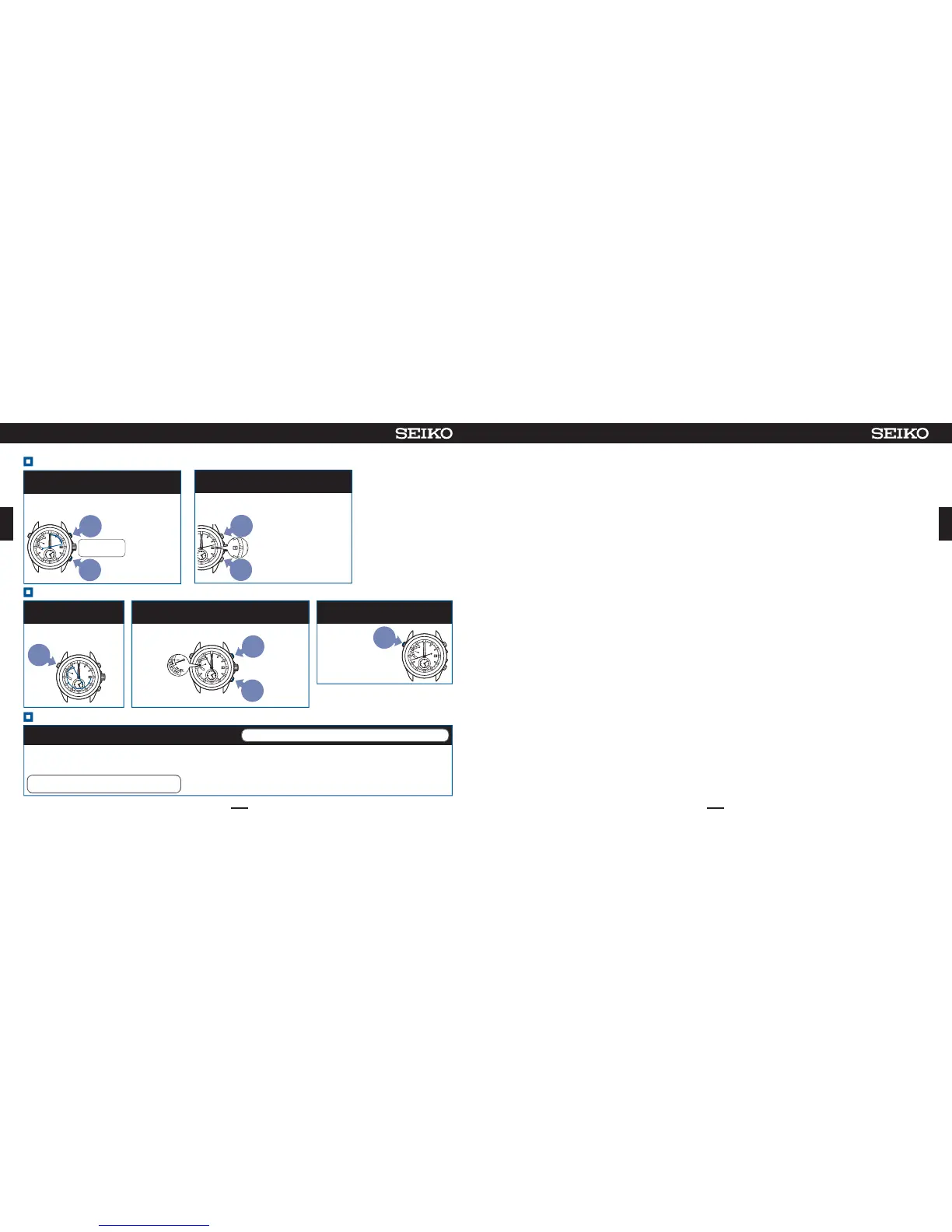
Setthedateto1(1st)( ⑤ ,⑥ )
※
If no operation isperformed
formorethan 1 minute or
whenButtonA is pressed
once,thewatch returns to
thetimedisplaymode.
Whenthewatch has
returnedtothe time display
mode,restartoperation.
※
If the date isstopped
continuouslyfor1 minute or
longer,thewatch automatically
returnstothe time display
mode.Whenthe watch has
returnedtothe time display
mode,restartoperation.
PressButtonBorCtosetthe
dateto1
6
Adjustthedatesothatthepositionof1
willlocateatthecenterofthewindow.
※If1isdisplayed,goto
operationof⑦.
To
return
thedate
slightly
To
advance
thedate
slightly
Ifthebuttoniskeptpressed
for2seconds,thedate
movescontinuously.Press
thebuttonagaintostopthe
date.
ContinuetopressButtonBandCsimultaneously
(3sec)andreleasethemwhenthesecondhand
movestothe13-secposition
5
※
Duringmovementof
thedate,thebuttons
cannotbeoperated.
※Neverpull
thecrown
out.
Thewatchentersthemodetoadjust
thepreliminarypositionofthedate.
Button
C
Button
B
Pressfor3sec
simultaneously
Setthetime( ⑩ )
SetthetimebyreceivingGPSsignals
10
Afteroperationof①to⑨iscompleted,makesuretosetthetime.
WhenyouareinaplacewhereGPS
signalscannotbereceived
① Carryoutmanualtimezonesetting
→P.43
② Manuallysetthetime →P.52
③ Manuallysetthedate →P.53
WhenyouareinaplacewhereGPSsignalscanbe
easilyreceived(P.13),adjustthetimezone.
→HowtoadjustthetimezoneP.40
Whenthetime and dateare set,
operationiscompleted.
IfGPSsignalsarereceivedafterthesystemreset,
leapseconddataarealsoreceived.→
P.48
SettheindicatorhandtoE( ⑦〜⑨ )
PressButtonBorCtoadjustthe
indicatorhandasshowninthefigure
8
Adjusttheindicatorhandtothepositionasshowninthefigure.
※
Theindicatorhandmakesonecomplete
turn,butthisdoesnotmeanafailure.
Tomove
thehand
counter-clock
wise
Tomove
thehand
clockwise
Ifthebuttonis
keptpressedfor
2seconds,the
handmoves
continuously.
Pressthebutton
againtostopthe
hand.
※
Iftheindicator
handpointsas
shownin
thefigure,
goto
operation
of
⑨
.
ContinuetopressButtonA(2sec),
andreleaseitwhenthesecond
handmovestothe55-secposition
Thewatchentersthemodetoadjustthe
preliminarypositionoftheindicatorhand.
Press
for
2sec
7
Whenoperationiscompleted,press
ButtonAandthenreleaseit
Themodetoadjust
thepreliminary
positionis
completed,andthe
secondhandand
hour/minutehands
startmoving.
※
Ifnooperation is performed for more than1
minuteorwhen Button A is pressed once,the
watchreturnstothetimedisplaymode.
Whenthewatchhasreturnedtothetimedisplay
mode,restartoperation.
Button
A
9


 To Previous Page
 Loading...