6
TROUBLESHOOTING
56
English
6
TROUBLESHOOTING
57
English
※
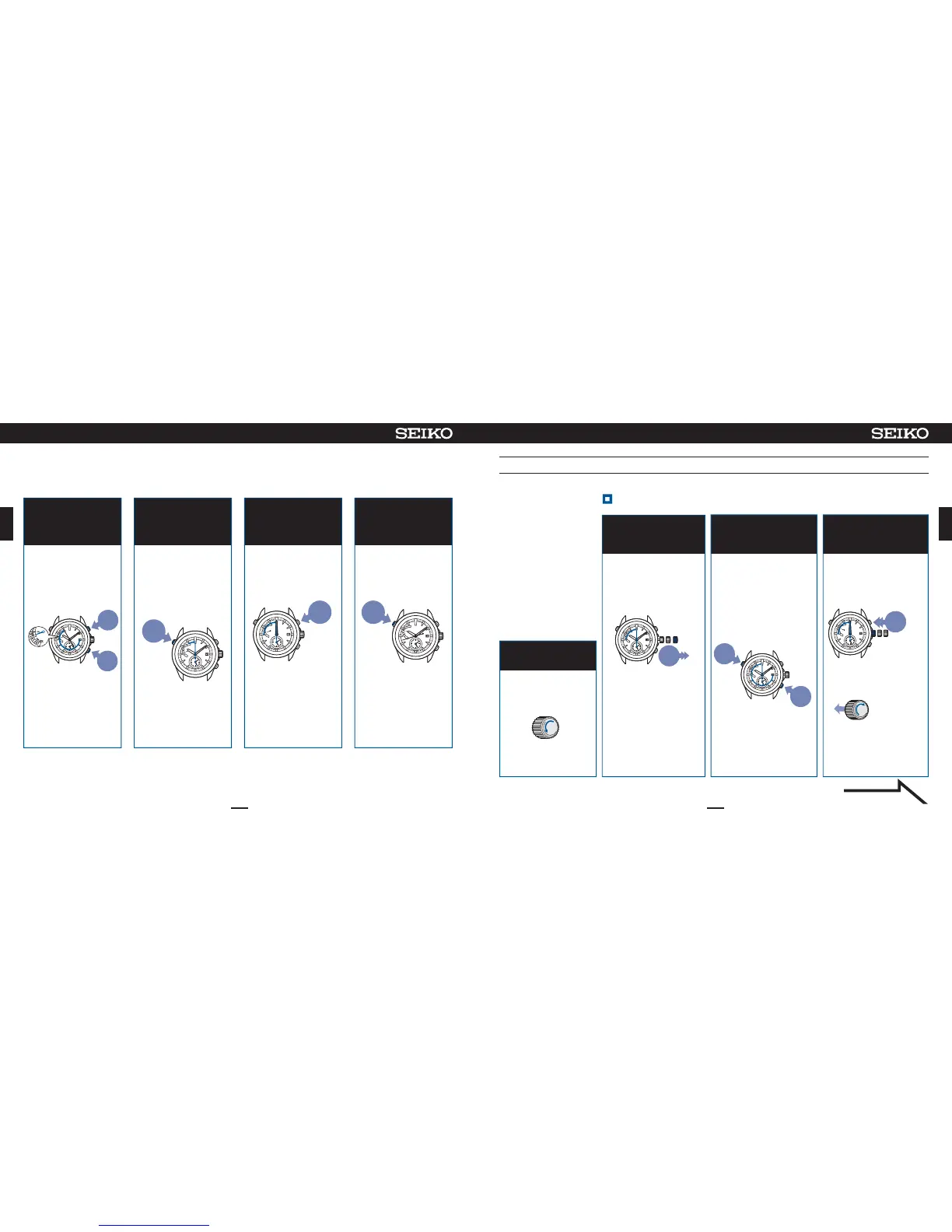
Ifnooperationisperformedformorethan1minuteorwhenButtonAispressedonce,thewatchreturnstothetimedisplaymode.
Whenthewatchhasreturnedtothetimedisplaymode,restartoperation.
PressButtonBorC
toadjusttheindicator
handasshowninthe
figure
4
Adjusttheindicatorhand
tothepositionasshown
inthefigure.
※
Iftheindicatorhandpoints
asshowninthefigure,go
tooperationof⑤.
Tomovethe
handcounter-
clockwise
Tomove
thehand
clockwise
※
Theindicatorhandmakes
onecompleteturn,butthis
doesnotmeanafailure.
Ifthebuttoniskeptpressed
for2secondsorlonger,the
handwillmovecontinuously.
Pressthebuttonagainto
stopthehand.
Incaseofanabnormalmovement(resettingthebuilt-inIC)
Pullout thecrown
tothesecondclick
Continueto pressButton
Aand Csimultaneously
for2sec,andthenrelease
them
Whenthehandsstop
at00:00:00,push
thecrownbackin
2
34
Thesecondhandmoves
from00:00:00.
Whenthebuttonsare
released,thesecond
handmakesone
completeturn,andstops
atthe0-secposition.
Afterthat,thehour/
minutehandsmoveand
stopsat00:00.
※Afterthesystemreset,
thetimezoneissetto
UTC/LON.
※Lockthe
crown.
Inthecase that thewatch
movesabnormallyor that
thewatchdoes not moveat
1-secintervalseven after
fullychargingthe battery,
performtheprocedures from
①to⑨tore-establishnormal
function.
Thesecondhandstopsat
the13-secposition.
Thewatchcan be recovered
totheinitial state bythe
systemresetwhen trouble
occurs.(②〜④ )
Afterthat,adjust the
preliminarypositionof the
dateandindicator hand ( ⑤
〜 ⑨ ) andset the time ( ⑩ )
beforeuse.
Unlockthecrown
1
Unlockthecrown
Unscrew
Whilepressingthecrownin
Screw
Press
for
2sec
Press
for
2sec
Push
back
in
01 2
012
Pullout
thecrown
tothe
secondclick
Resetthesystem( ②〜④ )
Continuedonthefollowingpage
Whenoperationis
completed,press
ButtonAand release
it
Themodetoadjustthe
preliminarypositionis
completed,andthesecond
handandthehour/minute
handsstartmoving.
Press
7
PressButtonB once
andthenreleaseit
Thehour/minutehands
move,andstopat00:00
am.
Press
6
ContinuetopressButtonA
(2seconds)andreleaseit
whenthesecondhand
movestothe0-second
position.
Thewatchentersthe
modetoadjustthe
preliminarypositionofthe
hour/minutehands.
Press
for
2sec
5
※Itthewatchdisplays
theprecisetime,goto
operationof⑦.










 To Next Page