3
BASICOPERATION
40
English
3
BASICOPERATION
41
English
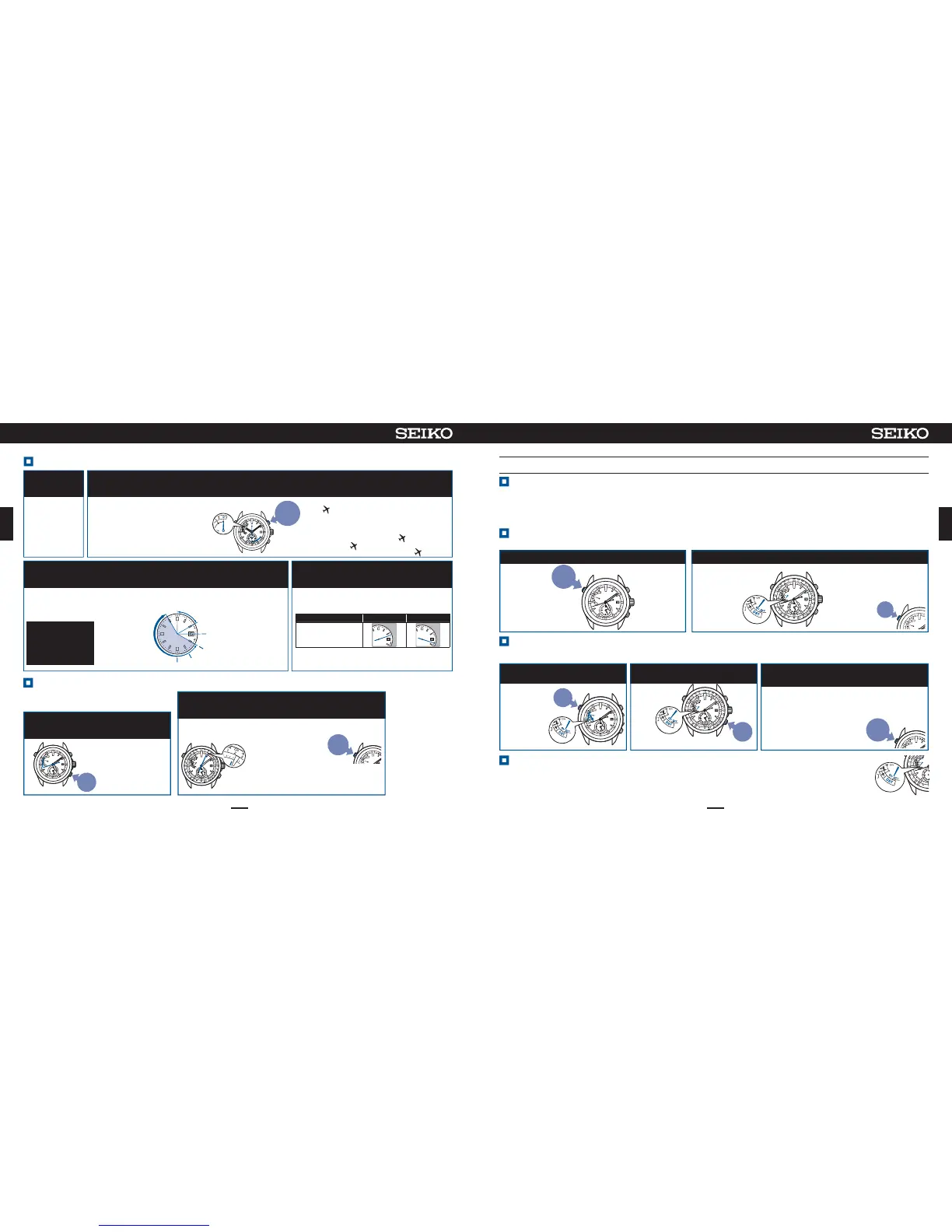
Checkthetimezonesetting.
PressButton Conce andthen
releaseit
Checkthetimezonesetting(within5seconds)
Press
and
Release
[Example]Timezonesetting:+2hoursCAIRO
Thecurrently set timezone is
displayedfor5seconds.
※Tochangethe
timezonesetting
・
Whenyouareina
placewhereGPS
signalscanbe
easilyreceived
→
Howtoadjustthe
timezone
P.40
・
Whenyouareina
placewhereGPS
signalscannot
bereceived
→
Howtomanuallyset
thetimezone
P.43
※
Theindicator
handindicates
theON/
OFFsetting
ofDaylight
SavingTime
(DST).
Thesecondhandindicatesthecurrentlysettimezone.
※Bycontinuing to
pressButton C,
thewatchenters
operationof the
manualtimezone
setting.
※
After5sechaveelapsedor
whenButtonA is pressed,
thewatchreturns to the
timedisplaymode.
Press
Howtoadjustthetimezone
ContinuetopressButtonB(6sec),andthenreleaseitwhenthesecondhandmovesto
the30-secposition.
1
Movetothe
outdoorsunderan
openskywithgood
visibilitywhere
GPSsignalscan
beeasilyreceived.
2
3
Whenthe second hand points toYor
N,receptioniscompleted.
Directthewatchfaceupwardandwait
4
Pressfor
6sec
※
Althoughthesecondhandmovesto
the0-secposition3secafterpressing
ButtonB,continuetopressit.
Checkthatthe reception issuccessful after the
watchreturnstothetimedisplaymode.
→Checkthatthereceptionwassuccessful
P.35
Thereceptionresultisdisplayedfor5seconds.
Then,the hour and minute hands move, and the
timeanddateareadjusted.
Receptionresultdisplay
Y:Successful N:Failed
Display
BP
C
J
J
Y
BP
C
J
J
Y
Whenthesecondhandhas
reachedthe30-secposition,
receptionisstarted.Theindicator
handpointsto4+.
※
Whilethe indicatorhandpointstoE
or
receptionisnotstartedevenwith
operationforreception.
WhenthehandpointstoE,chargethe
watchbyexposetolight.
Whenthehandpointsto
resetthein-
flightmode(
).
→Howtoresetin-flightmode( )P.42
It takesa maximum
of2mintocomplete
reception.
※ Itdepends on the
receivingconditions.
<Displayduringreception>
Thesecondhand
indicatesease
ofreceiving(=
number ofGPS
satellitesfrom
whichGPSsignals
arereceived).
B
P
C
J
J
Y
Mayreceive
E
a
s
y
t
o
r
e
c
e
i
v
e
C
a
n
n
o
t
r
e
c
e
i
v
e
3units
4units
5units
6units
・
・
・
・
・
・
2units
0units
※
Evenwhen
thehand
pointsto4
unitsormore,
reception
maynotbe
allowed.
※
Tocancelthe
reception,
pressButtonA.
※
Pleasenotethatitmay
bedifficulttoreceive
GPSsignalswhileyou
arein
motion.
1
2
Dependingonthearea,DaylightSavingTime(DST)isindividuallyset.
DaylightSavingTimemeanssummertime,whichisasystemtolengthen
daylight timeby advancing1hour when daylighttime is long in summer.Daylightsavingtimehas been adopted inabout 80
countries,mainlyinEuropeandNorthAmerica.Theadoptionanddurationofdaylightsavingtimevarydependingonthecountry.
※DaylightSavingTimeissubjecttochangeowingtocircumstancesofthecountryorregion.
DaylightSavingTime(DST)
PressButtonAonceandthenreleaseit
CheckDaylightSavingTime(DST)setting(within5seconds)
Press
and
Release
Theindicatorhand
indicatesDaylight
SavingTime(DST)
setting.
[Example]
DSTsetting:
ON
DaylightSavingTime(DST)settingisdisplayedfor5seconds.
Press
CheckDaylightSavingTime(DST)setting
12
※After5 sechaveelapsed
or when Button A is
pressed, the watch
returnstothetimedisplay
mode.
TurnOFFDaylightSavingTime(DST)
Carryoutoperationof①to③inthestatewhereDaylightSavingTime(DST)settingisON.
Inoperationof②,adjusttheindicatorhandtotheOFFpositionasshowninthefigureat theright.
Thehourandminutehandsreturnbyonehour.
SetDaylightSavingTime(DST)
PressButtonA
ContinuetopressButtonC(3sec)
within5secafteroperationof①
Whenthe hourand minutehands stopmoving,
theDST settingmode isautomatically
completedafterapproximately5sec.
TurnONDaylightSavingTime(DST)
12
3
Thewatchreturnstothetimedisplaymode.
Theindicatorhandreturnstodisplaythechargingstatus.
Theindicatorhand
movestopointto
ON,
andthe
hour
and
minute
hands
advancebyonehour.
Theindicator
handmoves
toindicate
thecurrent
DSTsetting.
Press
Press
for
3sec
※
ON/OFFoftheDSTisnotautomaticallychangedoverevenwithoperationoftimezoneadjustment/manualtimezonesetting.Whentravelingtoa
regionwhereDaylightSavingTime(DST)isnotadoptedfromaregionwhereitisadopted,turnofftheDSTsetting.
<WhenDST
settingisOFF>
※
Thetimeatwhich thewatchreturnsto thetime displaymode
variesdependingonthepositionof
theindicatorhand.
※
Thewatchreturnstothetimedisplay
modeevenby pressingbuttonA
within5secafterthehourand
minutehandsstopmoving.
Press


 To Next Page
 Loading...