3
BASICOPERATION
42
English
3
BASICOPERATION
43
English
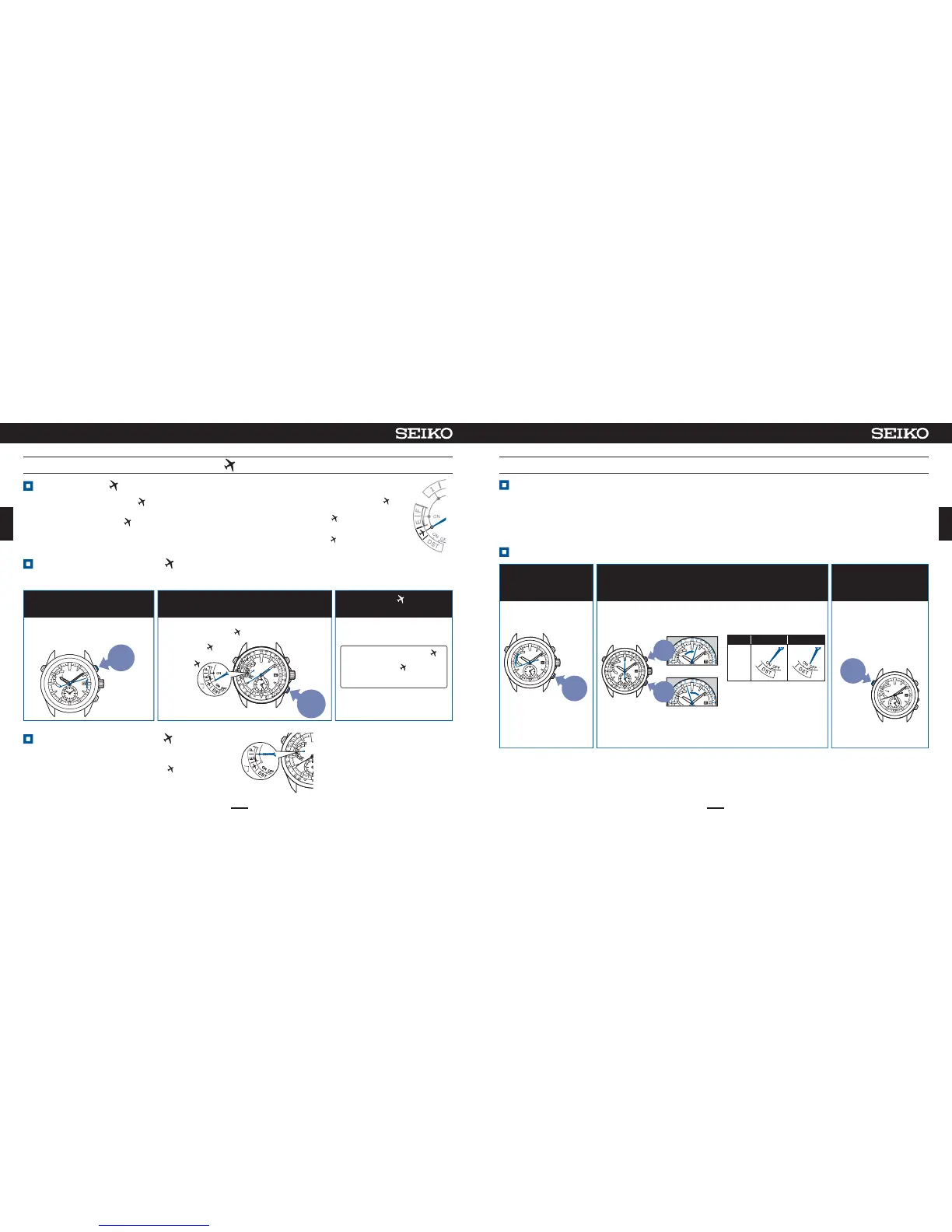
Carryoutoperationof①to③.
In②,whentheindicatorhandpointsto●ONin
thefigureattheright,thein-flightmode(
)canbe
reset.
< In-flightmode( )>
Theindicatorhandpoints
to
※When the in-flightmode
( )isreset, the indicator
handindicatesthecharging
status.
Settothein-flightmode( )wherethereceptionmayinfluence
operationofotherelectronicsdevicesinanairplane,etc.
Inthe in-flightmode(
)theGPS signal reception(time zone
adjustment,manual time adjustment,and automatic time
adjustment)doesnotwork.
In-flightmode( )(Whenboarding)
Manualtimezonesetting(Tosetthewatchtothelocaltimeofthedestinationinanairplane,etc.)
In-flightmode( )
Manualtimezonesetting
Howtomanuallysetthetimezone
Resetthein-flightmode( )
Whenthehourand
minutehandsstop
moving,pressButtonA
PressButtonBorButtonCtoadjustthesecondhand
tothetimezoneofthedestination
132
Thesecondhandstarts
moving.
※
Duringmovement of the
date,thebuttonsandcrown
cannotbeoperated.
Press
<Displayoftheindicatorhand >
DisplaysON/OFF setting of
DaylightSavingTime(DST).
※IfDaylight Saving Time
(DST)isnot correct,
changeoverON/OFF with
referencetoSetDaylight
SavingTime(DST) P.11
afteroperationof③.
※Ifthesecondhandisstoppedforoneminuteorlonger,thewatchwillautomaticallyreturntothetimedisplaymode.
clock
wise
counter
clock
wise
Press
for
3sec
Thesecondhand moves
todisplaythe currently
settimezone.
Whenthebuttonis pressed once,
thesecondhand moves tothe
nextzone.
※
Ifthetimeforpressingis
short,the watch willenter
operationfor checking
thetimezonesetting,so
makecertain to press the
buttonfor3sec.
Inplaceswherethetimezonecannotbeadjusted,thetimezonecanbesetmanually.
※RefertoSetDaylightSavingTime(DST) P.41,tosetDaylightSavingTime(DST).
DST ON OFF
Display
Thesecondhandstopsatthe40-secposition,andthe
indicatorhandpointsto
Thesecondhand indicates the
receptionresult(Y or N),and the
indicatorhandpointstothetypeof
reception(1or4+).
Press
for
3sec
Press
and
Release
<In-flightmode( )state >
Theindicatorhand
pointsto
.
※When5secondsorlongerhaveelapsedafteroperationof① ,thewatchautomaticallyreturnstothetimedisplaymode.When
thewatchreturnedtothetimedisplaymode,restartoperationfrom①.
Settothein-flightmode( )
PressButton Band then
releaseit.
ContinuetopressButtonC(3sec)within
approximately5secafteroperationof①.
12 3
In-flightmode
( )
setting
automaticallyendsafter5sec
Thewatchreturns to thetime
displaymode.
Whenthein-flightmode( )
isbroughtabout,theindicator
handpointsto
evenafter
thewatchhasreturnedtothe
timedisplaymode.
→Manualtimezonesetting(Tosetthe
watchtothelocaltimeofthe
destinationinanairplane,etc.)
P.43
Continueto press
ButtonC (3sec), and
whenthe second hand
hasstopped,releaseit.










 To Next Page