23
English
English
22
NOTE ON POWER SUPPLY
l
The battery used in this watch is a rechargeable battery, which is different
from ordinary silver oxide batteries. Unlike other disposable batteries such as
dry-cell batteries or button cells, this rechargeable battery can be used over
and over again by repeating the cycles of discharging and recharging.
l
The capacity or recharging efficiency of the rechargeable battery may
gradually deteriorate for various reasons such as long-term use or usage
conditions. Worn or contaminated mechanical parts or degraded oils may
also shorten recharging cycles. If the efficiency of the rechargeable battery
decreases, it will be necessary to have the watch repaired.
l
Do not remove the rechargeable battery yourself. Replacement of the
rechargeable battery requires professional knowledge and skill. Please
ask a watch retailer for replacement of the rechargeable battery.
l
Installation of an ordinary silver oxide battery can generate heat that can
cause bursting and ignition.
CAUTION
IMPROPER FUNCTION
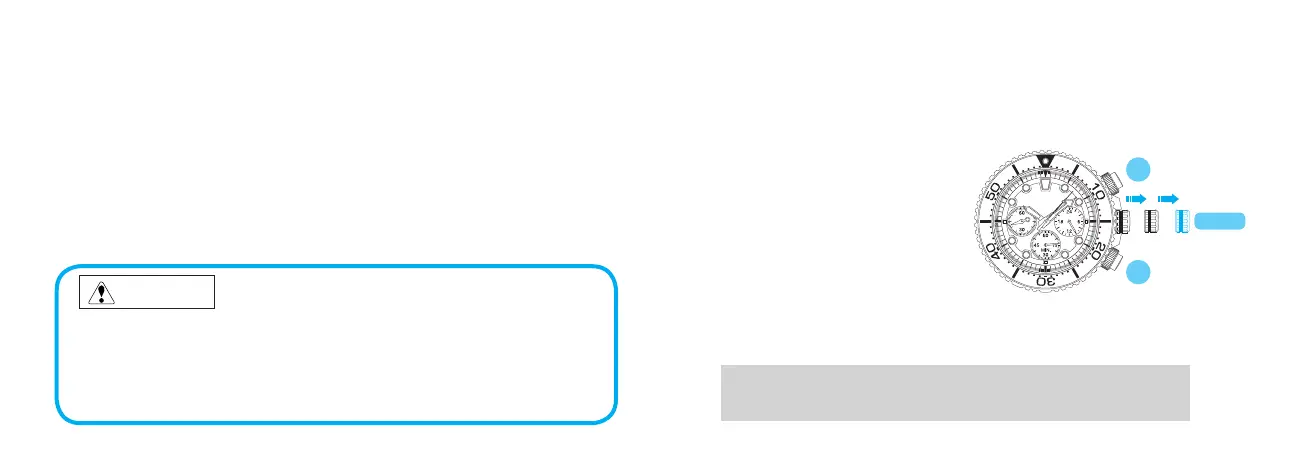
When an abnormal display appears, follow the procedures below to reset the built-
in IC. The watch will resume its normal operation.
<HOW TO RESET THE IC>
1.
Unlock the crown and buttons.
2. Pull out the crown to the second
click.
3. Keep pressing down Button A and B
for 3 seconds or longer.
4. Push the crown back into the normal
position and check if the small
second hand moves as normal.
5. Screw all the way in until it is
locked.
B
A
CROWN
• ResettingtheICwillinitializethewatch.Beforestartingtousethewatch,itwillbe
necessarytosetthetimeandadjusttheSTOPWATCHhandstothe“0”position.
Referto“SETTINGTHETIMEANDADJUSTINGTHESTOPWATCHHAND
POSITION”sectionofthismanual.



 To Next Page