9
English
English
8
a b c
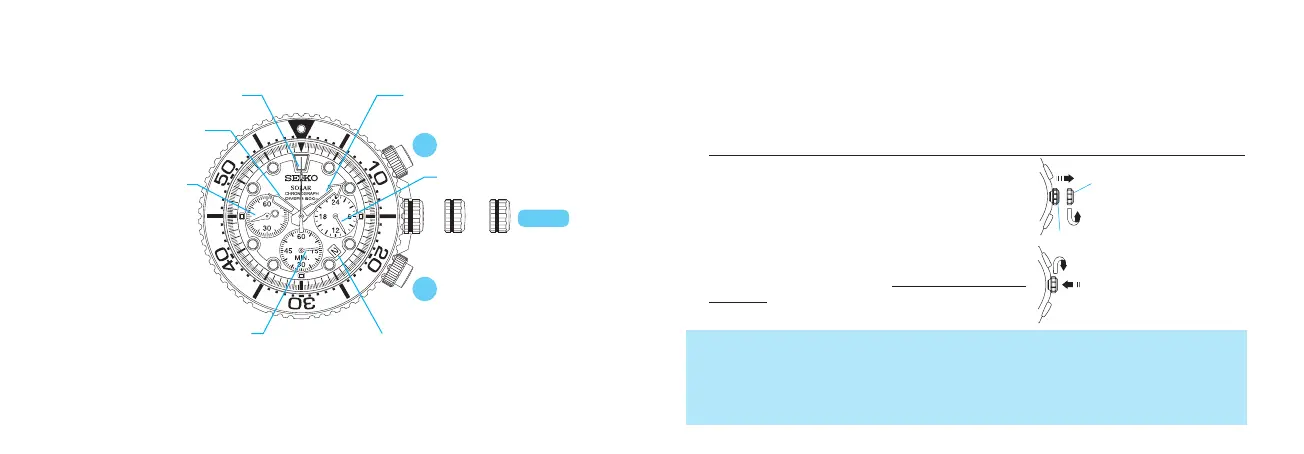
CROWN
Hour hand
Minute hand
STOPWATCH 1/5-second hand
STOPWATCH minute hand
Small second hand
Date
a: Normal position
(after the crown is released)
b: First click
c: Second click
DISPLAY AND BUTTONS
• Somemodelsmayhaveascrew-lock-typecrown.Ifyourwatchdoes,refertothe
“SCREWDOWNCROWN”sectiononthenextpage.
• Simpliedillustrationsmaybeusedinthefollowingsectionsofthismanual.
A
B
SCREW DOWN CROWN
•
Your watch has a screw down crown to prevent accidental operation and help
maintain water-resistant quality.
•
To use the crown, it is necessary to unlock the crown first before pulling it out,
and it is important to securely screw the crown in after each use.
HOW TO OPERATE THE SCREW DOWN CROWN
The crown must be securely locked in the case except when you use it to set the watch.
<How to unlock the crown>
Turn the crown counterclockwise to unscrew it.
The crown is released and projected outward
from its original position.
<How to lock the crown>
Turn the crown clockwise while pressing it to
the case until it is screwed all the way in and
locked.
Thecrownislocked.
Thecrownisunlocked
andcanbepulledout.
1. Beforediving,makesurethatthecrownislockedtightlyinplace.
2. Donotoperatethecrownwhenthewatchiswetorinwater.
3. Whenscrewingthecrownin,ensurethatthecrowniscorrectlyalignedandturnit
gently.Ifitishardtoturn,unscrewitrst,andthenrewindit.Donotscrewitinby
forceasitmaydamagethethreadofthescreworthecase.
24-hour hand



 To Next Page