13
English
English
12
1. Whenthestopwatchisorhasbeenmeasuring,ifthecrownispulledouttothesecondclick,itwill
automaticallyresettheSTOPWATCHhandsto“0.”
2. The24-hourhandmovescorrespondinglywiththehourhand.
3. Itisrecommendedthatthehandsbesettothetimeafewminutesaheadofthecurrenttime,taking
intoconsiderationthetimerequiredtoadjusttheSTOPWATCHhandpositionifnecessary.
4. Whensettingthehourhand,besuretocheckthatAM/PMiscorrectlyset.Thewatchdesignedso
thatthedatechangesoncein24hours.
5. Whensettingtheminutehand,rstadvanceit4to5minutesaheadofthedesiredtimeandthen
turnitbacktotheexactminute.
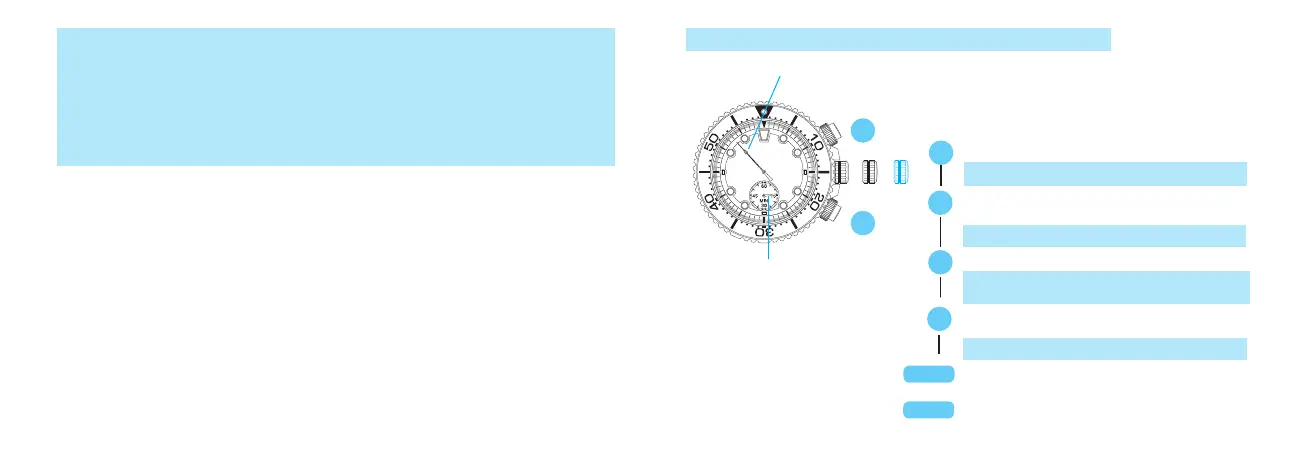
2. STOPWATCH HAND POSITION ADJUSTMENT
STOPWATCH minute hand
t
t
Press for 2 seconds.
TheSTOPWATCHminutehandturnsafullcircle.
Press repeatedly to set the STOPWATCH
minute hand to the "0" position.
STOPWATCH 1/5-second hand
I If the STOPWATCH hands are not in the "0"
position, follow the procedure below to set
them to the "0" position.
ThehandmovesquicklyifButtonBiskeptpressed.
A
B
A
B
Press for 2 seconds.
Press repeatedly to set the STOPWATCH
1/5-second hand to the "0" position.
t
TheSTOPWATCH1/5-secondhandturnsafull
circle.
t
ThehandmovesquicklyifButtonBiskeptpressed.
A
B
t
Push back into the normal position in
accordance with a time signal.
CROWN
CROWN
Screw all the way in until it is locked.
Unlock the crown and buttons.



 To Next Page