23
22
English
English
SCHEDULE ALARM MODE
l
The schedule alarm can be set to ring at 30 different times. Year, month, date,
hour, and minute can be set for each schedule.
l
A message up to 14 characters can also be set. It is displayed at the same
time when the alarm sounds.
l
A personalized message can be input or a message can be selected from
among 10 preset messages.
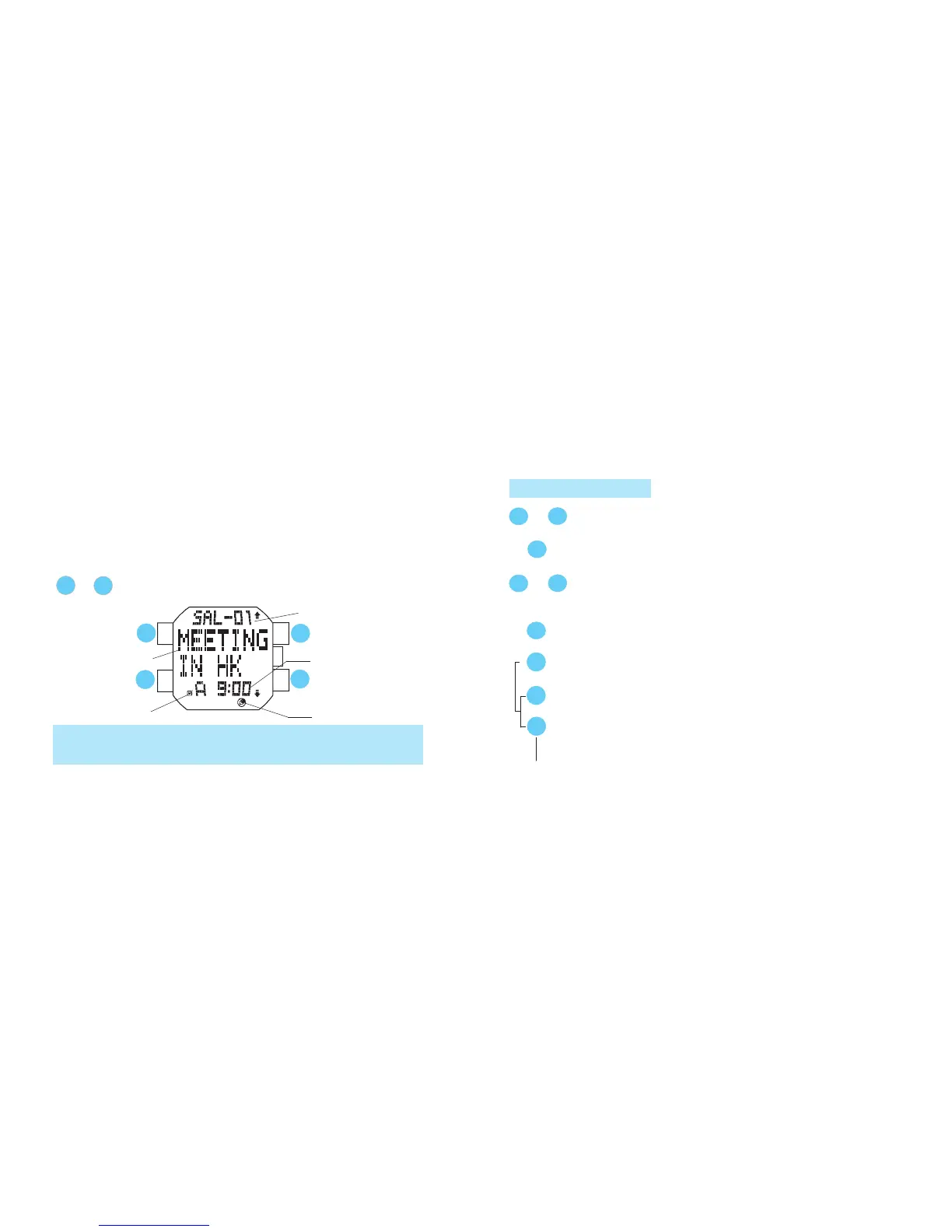
Press in MENU display to show SCHEDULE ALARM mode.
B
D
C
A
Message
Schedule alarm
channel
A
B
or
Schedule alarm time
(Hour & minute / Date &
month / Year)
Schedule mark
Mode indicator
SCHEDULE ALARM SETTING
s
B
s
Press for 2 seconds to show SCHEDULE ALARM SETTING display.
Press to select the item to be edited (flashing).
C
D
or
l
Hour and minute, date and month, and year can be alternately displayed in one-second
increments.
l
The schedule mark is displayed if any schedule alarm has been set for the day.
[When editing TIME:]
A
Press to show TIME SETTING display when TIME is flashing.
s
C
D
or
Press to select the desired schedule alarm channel (
from
SAL-01 to SAL-30).
Set the flashing digits. (Increasing digits)
Set the flashing digits. (Decreasing digits)
C
D
or
s
Press to select the digits to be adjusted (minute/hour/date/
month/year).
A
s
s



 To Next Page