27
26
English
English
SETTING MODE
[ECO MODE]
l
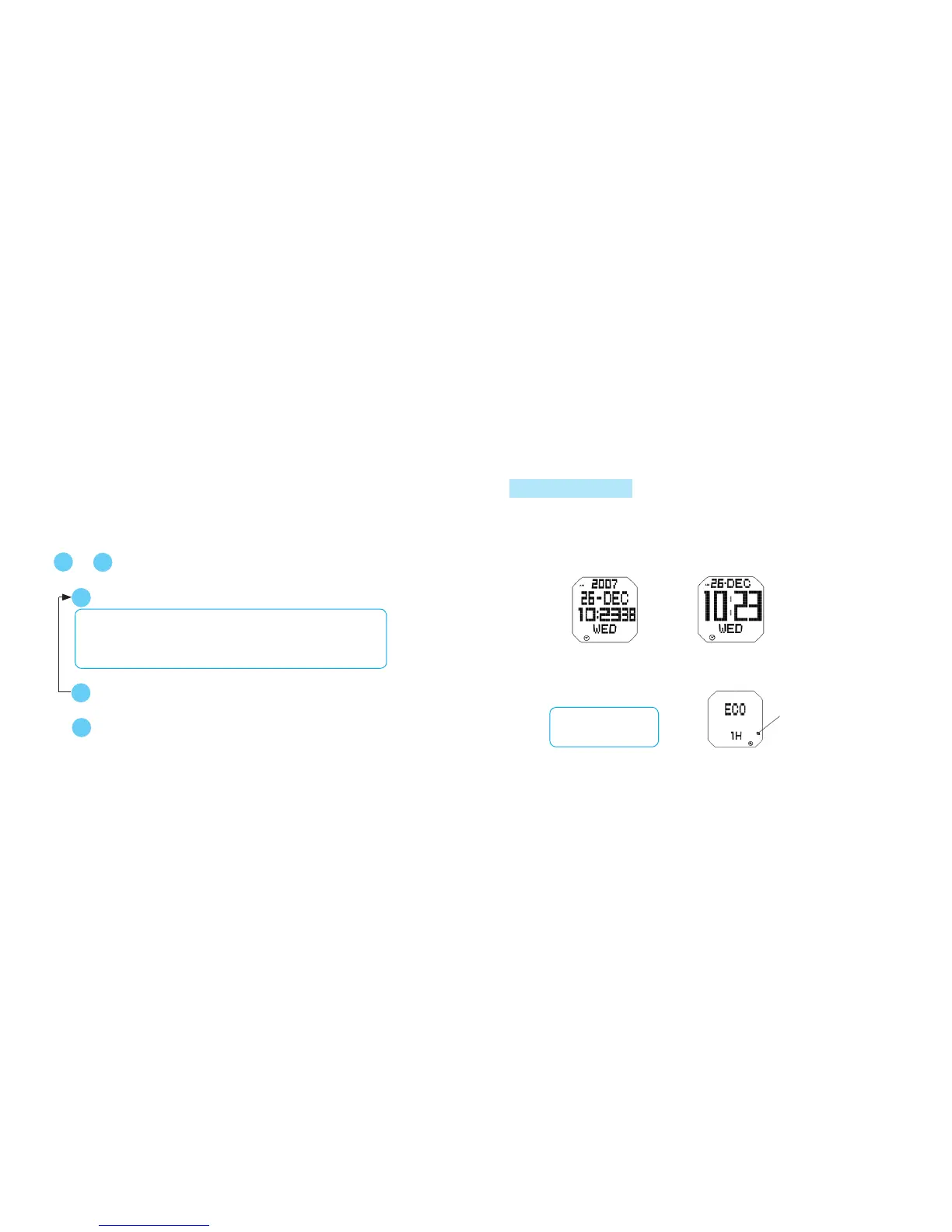
The watch display automatically shuts down to reduce electricity consumption after
no button operation is made for a certain period of time (ECO mode). Time until
Eco mode is activated can be set.
OFF 1 hour
3 hours 2 hours
l
The setting of the following functions can be adjusted: Opening animation display,
time display, eco mode, LCD contrast, LED color, key sound (confirmation sound for
button operation), alarm sound, schedule alarm sound, and preset messages.
Press in MENU display to show SETTING mode.
A
B
or
Select the item to be adjusted.
C
D
s
Selection of items
Time mode
Animation
Schedule sound
Alarm sound
Key sound
LED color
LCD contrastEco
➾ ➾➾ ➾
➾
➾
➾
➾ ➾
Message
Adjust the item.
s
s
A
Return to MENU display.
➾
➾
➾
➾
Eco mode mark
[ANIMATION]
l
The opening animation display can be engaged (ON) or disengaged (OFF).
[TIME MODE]
l
The time display can be selected between normal and enlarged displays.
A: Normal display B: Enlarged display
[Ex. : In Time/Calendar mode]
ADJUSTING EACH ITEM



 To Next Page