TCD02B0001SE 034070 130220
7
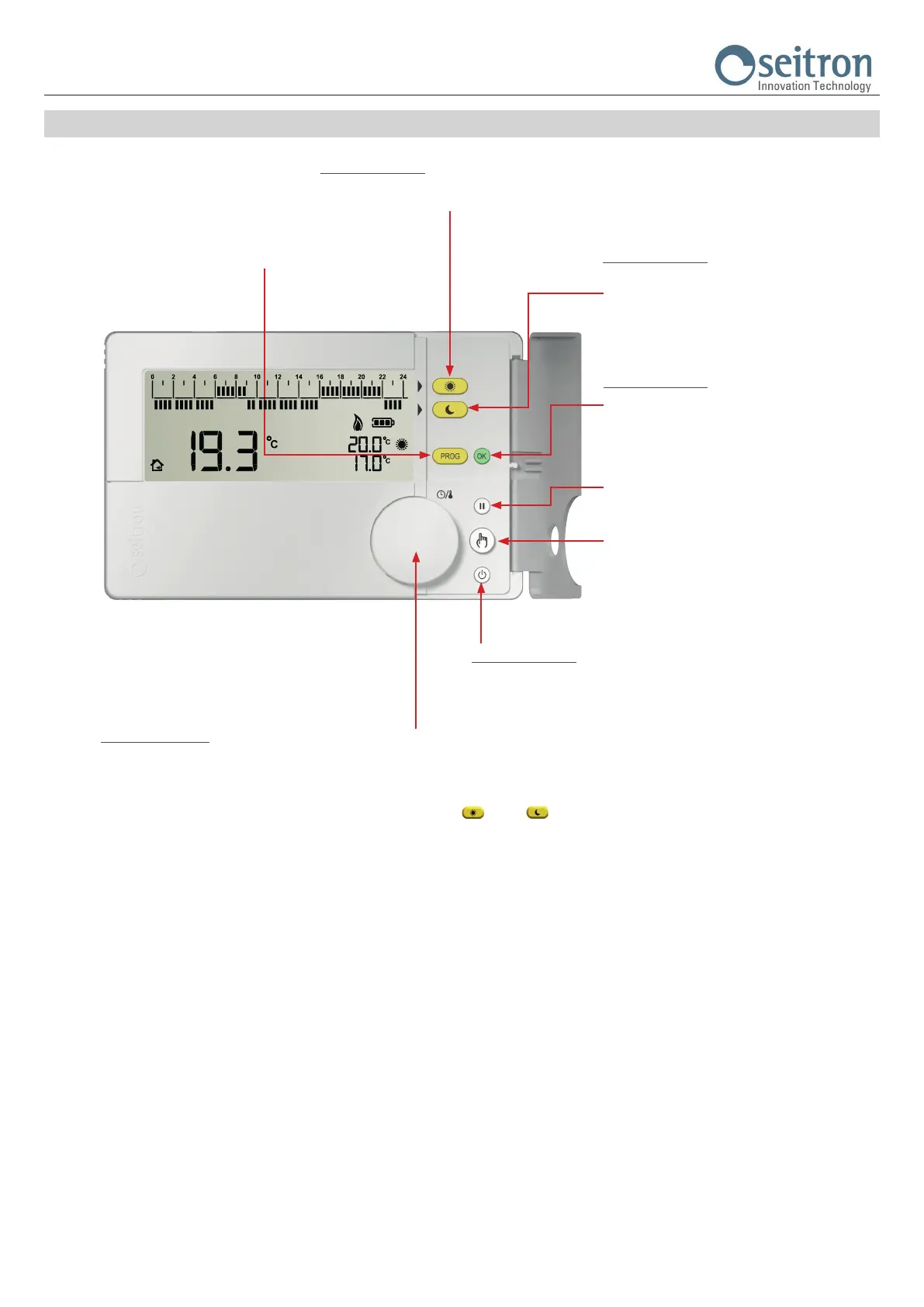
KEYS AND KNOB FUNCTIONS
Double function key:
- Access the setting of the Comfort temperature (Set-Point)
- On “Time program setting” set the regulation in comfort mode
Double function key:
- Access the setting of the Economy temperature
(Set-Point).
- On “Time program setting” sets the regulation on
Economy mode.
Double function key:
- Conrms the settings.
- Pushed for 2 sec. enters the clock regulation mode.
Enters the “Time program setting“ mode
Start the “Pause“ mode (temporary stand-by).
When pushed repetedely cycles through the modes:
Manual 24 hours
Manual Permanent
Automatic
Double function key:
- Turns on / off the freetime evo.
- On “hourly program” / “user parameters settings“ exits from edit mode.
Multi-functions knob:
- On normal operation:
- By pushing the knob, shows the time of the detected room temperature.
- If the backlight is off, by rotating the knob it activates the display backlight.
- On “Comfort / Economy temperature setting” (when the keys “
” or “ ” are pressed) by rotating the knob it is possible to set the
temperature of the selected mode.
- On “Hourly Program Setting”, by rotating the knob towards right/left, shifts the hour-cursor through the 24 hours.
- By pushing the knob for 10 seconds, it enters the mode “Setting User Parameters” and then:
- Rotating the knob, the display shows all the advanced parameters of the freetime evo.
- When a “User Parameter” is selected, pushing the knob it enters edit mode of the selected parameter:
- By rotating the knob, it is possible to set the desired value/data.
- By pushing the knob again the chosen setting is conrmed.
- On mode “Manual 24 hours” / “Manual Permanent” by rotating the knob it is possible to set the desired temperature (Set-Point) on “manual” mode.


 To Next Page