TCD02B0001SE 034070 130220
8
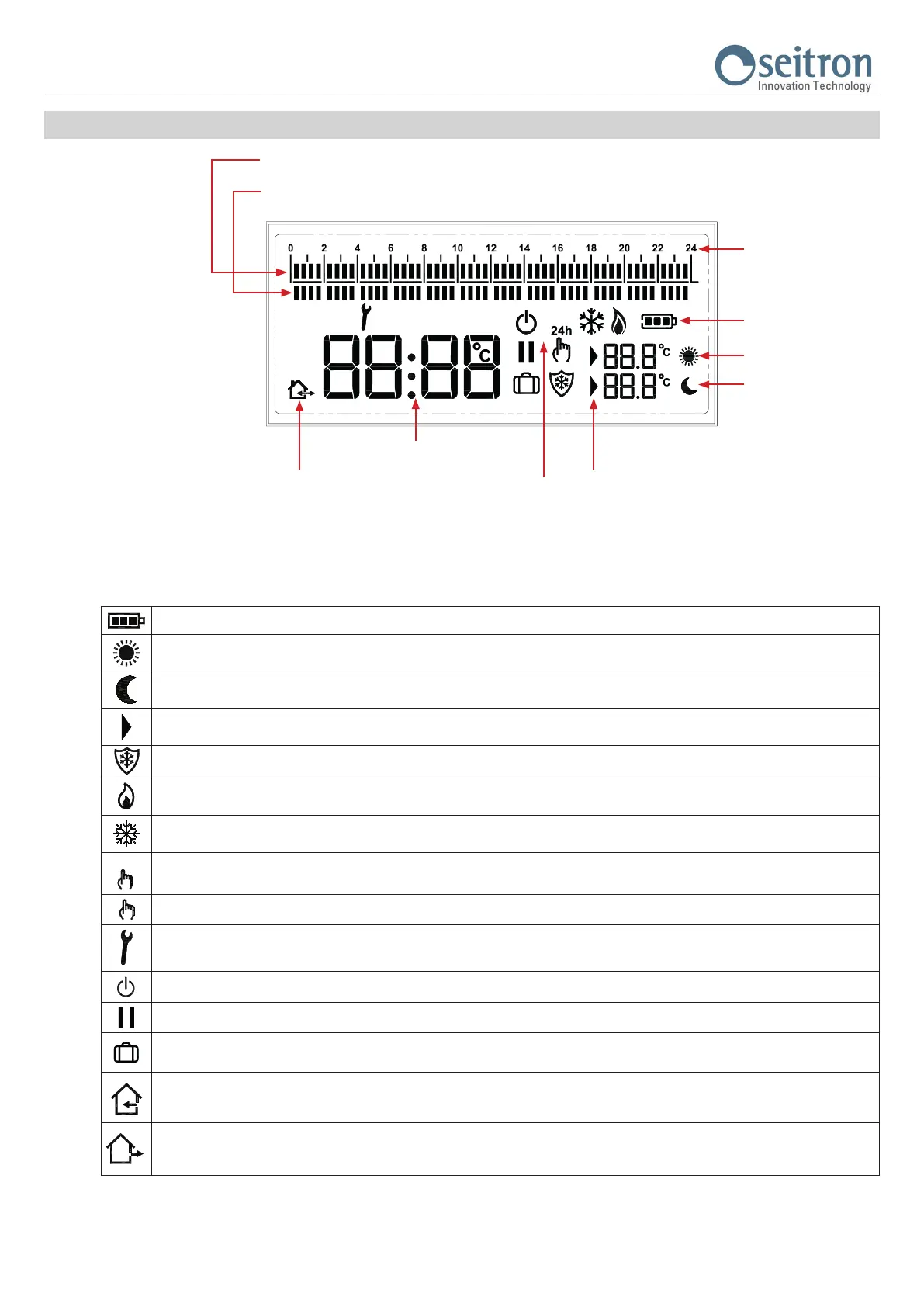
DISPLAY
Symbols
On the table below, are shown the symbols which can appear on the display and their meaning:
Time Slots
0-24 hours
The segments shows the time slot set to Economy temperature
The segments shows the time slot set to Comfort temperature
Time / room temperature indication
Set Comfort temperature
(Setpoint)
Set Economy temperature
(Setpoint)
The cursor shows the
temperature which is being set
Indicates that the room temperature regulation is
performed via external or internal sensor
Battery life indicator
Operation mode
Battery life.
Comfort mode temperature setting (Set-Point).
Economy mode temperature setting (Set-Point).
Shows that the regulation temperature (Set-Point) is on edit mode.
Anti-freeze mode activated, the display also shows the writing OFF (programmable thermostat off).
Activation in heating mode (relay activated).
Activation in cooling mode (relay activated).
Room temperature regulation on Comfort mode for 24 hours.
Room temperature regulation on Comfort mode permanently.
The programmable thermostat is on “User parameters setting” or the freetime evo shows a fault condition.
Programmable thermostat off.
Regulation interrupted (Pause mode) for less than 96 hours; when the time is nished the programmable thermostat automatically restarts.
Regulation interrupted (Vacation mode) for more than 96 hours (4 days); when the time is nished the programmable thermostat
automatically restarts.
The displayed room temperature is the one detected by the internal sensor.
This symbol is only visible if a remote sensor is connected to the freetime evo. On the contrary the symbol will not be displayed because
the only temperature shown is the one detected by the internal sensor.
The displayed room temperature is the one detected by the remote sensor connected to terminals 4 and 5.


 To Next Page