The EXPLORER 23 is a compact, robust blackbox designed as a chartplotter and multifunction controller, primarily for fishermen. It requires connection to an external monitor and is available in two versions: EXPLORER 23 and EXPLORER 23 WiFi.
Product Description and Features:
The device functions as a chartplotter and a multifunction controller, making it suitable for marine navigation and various other applications. Its robust design ensures durability in demanding environments. The EXPLORER 23 is designed to be connected to an external monitor, providing flexibility in display size and type. The WiFi version offers additional wireless connectivity capabilities.
Key Technical Specifications:
- Dimensions: 172.5 x 106.5 x 84.4 mm (6.8" x 4.2" x 3.3") with holder.
- Weight: 350 g (12.3 oz).
- Memory Slot: MicroSD, allowing for expandable storage and data transfer.
- Wireless LAN Connection: Compatible with wireless LAN for the EXPLORER 23 WiFi version, enabling network connectivity.
- Mounting Options: Supports both bracket and flush mount installations, offering versatility in placement.
- Waterproof Rating: IPX6, indicating strong resistance to water ingress, suitable for marine environments.
- Supply Voltage: 10-35 Vdc, accommodating a wide range of power sources typically found on boats.
- Operating Temperature: -10°C to +60°C, ensuring reliable operation in various climates.
- Storage Temperature: -20°C to +80°C, allowing for safe storage in extreme conditions.
- Transmitting Frequency Range: 2400 - 2483 MHz, relevant for wireless communication.
- Maximum Transmitting Power: 1mW (or 100mW for the WiFi version), indicating its wireless signal strength.
- Maximum Power Consumption: 4W (or 6.5W for the WiFi version), reflecting its energy efficiency.
- Keyboard: Back-lit for visibility in low-light conditions.
- Remote Control Receiver: Integrated (radio IF 2.4 Ghz) for convenient remote operation.
- External GPS Connector: Allows connection to an external GPS antenna for enhanced positioning accuracy.
- NMEA 2000: Supports NMEA 2000 for integration with other marine electronic devices.
- NMEA 0183: Features 2x Rx/Tx on the power cable for NMEA 0183 communication, enabling compatibility with a wide range of legacy marine instruments.
- External Alarm: Provides an external alarm output for critical alerts.
- HDMI Video Input Cable: Built-in, compatible with any HDMI display, simplifying connection to external monitors.
Usage Features:
The EXPLORER 23 is designed for intuitive operation with a comprehensive keyboard and joystick.
- Joystick: Used to move the cursor on the map or navigate through menu items (UP, DOWN, LEFT, RIGHT).
- [ZOOM OUT] / [ZOOM IN]: Dedicated buttons to change the map scale for zooming out or in.
- [ENTER]: Confirms selections and, when on the map page, opens the contextual menu of a map object.
- [CLEAR]:
- Short press: Exits the current menu (back).
- Long press: Returns to the main page or, if the cursor is away from the boat position on the map page, centers the map on the boat position (home mode).
- [MENU] - [PAGE]:
- Short press (Menu): Opens the main menu from any main page (Map, Fish Finder, GPS status, Engine monitor). It also selects the top bar control buttons on full menu pages like Marks, Routes, Tracks.
- Long press (Page): Shows the main pages, providing a quick way to switch between them.
- [MOB]: A dedicated key for Man Over Board situations. Pressing it places an MOB mark on the current boat position and initiates navigation to that point.
- [POWER] – [DAY / NIGHT]:
- Short press: Toggles between Day/Night modes for optimal screen visibility.
- Long press: Turns the device on/off.
- Function Keys (F1-F4): These are special keys with dual functions:
- Short press: Performs the fixed function labeled on the unit face.
- Long press (hold): Executes a second, customizable function.
- [F1]-[WP]: Short press inserts a new waypoint at the cursor position.
- [F2]-[MARK]: Short press adds a new mark.
- [F3]-[TRACK]: Short press starts and stops the track recording.
- [F4]-[GOTO]: Short press initiates navigation to a destination (desired position on map).
Installation and Connectivity:
The device supports both bracket and panel mounting. The MicroSD card slot is easily accessible for insertion and removal.
Connection Scheme:
- Power & I/O Connector (Port A and C):
- PIN 1: PWR-/GND (Black wire)
- PIN 2: POWER INPUT + (10-35 Vdc) (Red wire)
- PIN 3: INPUT A (White wire)
- PIN 4: COMMON (Green wire)
- PIN 5: OUTPUT C (Gray wire)
- PIN 6: OUTPUT A (Yellow wire)
- PIN 7: INPUT C (Brown wire)
- PIN 8: EXTERNAL ALARM OUTPUT + (Blue wire)
- GPS Connector (Port B):
- PIN 1: POWER OUTPUT + (10-35 Vdc)
- PIN 2: OUTPUT B
- PIN 3: INPUT B
- PIN 4: NOT CONNECT
- PIN 5: NOT CONNECT
- PIN 6: GND / SIGNAL RETURN
- NMEA 2000 Connector:
- PIN 1: NOT CONNECT
- PIN 2: POWER +
- PIN 3: POWER -
- PIN 4: SIGNAL H
- PIN 5: SIGNAL L
- HDMI OUT: For connecting to an external display.
Specific Connection Examples:
- Power Supply Connection: Uses Black (PWR-/GND) and Red (POWER INPUT +) wires, each protected by a 1A fuse.
- Autopilot Connections (Port A and C):
- Connects PWR-/GND (Black), POWER INPUT + (Red), COMMON (Green), and OUTPUT A (Yellow) or OUTPUT C (Gray) to the autopilot.
- WARNING: Do not connect the COMMON connections (green wires) of the I/O ports to the power cables of external devices to prevent hardware damage.
- External Alarm Connection: Uses Black (PWR-/GND), Red (PWR +), and Blue (OUTPUT EXTERNAL ALARM - Open Collector) wires. The external alarm output has a maximum current of 300 mA.
- NMEA0183 Connections (Port A and C):
- Connects PWR-/GND (Black), POWER INPUT + (Red), INPUT A (White) or INPUT C (Brown), COMMON (Green), and OUTPUT A (Yellow) or OUTPUT C (Gray) to external NMEA devices for data transmission (TX+) and reception (RX+).
Maintenance Features:
The installation manual emphasizes the importance of proper installation for optimal performance and safety. It is highly recommended that the installation be performed by a qualified maintenance technician. This ensures that the device is set up correctly and in compliance with all regulations, minimizing the risk of improper use or damage. The manual serves as a guide for correct installation procedures.

 Need help?
 General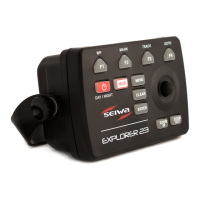

 To Next Page