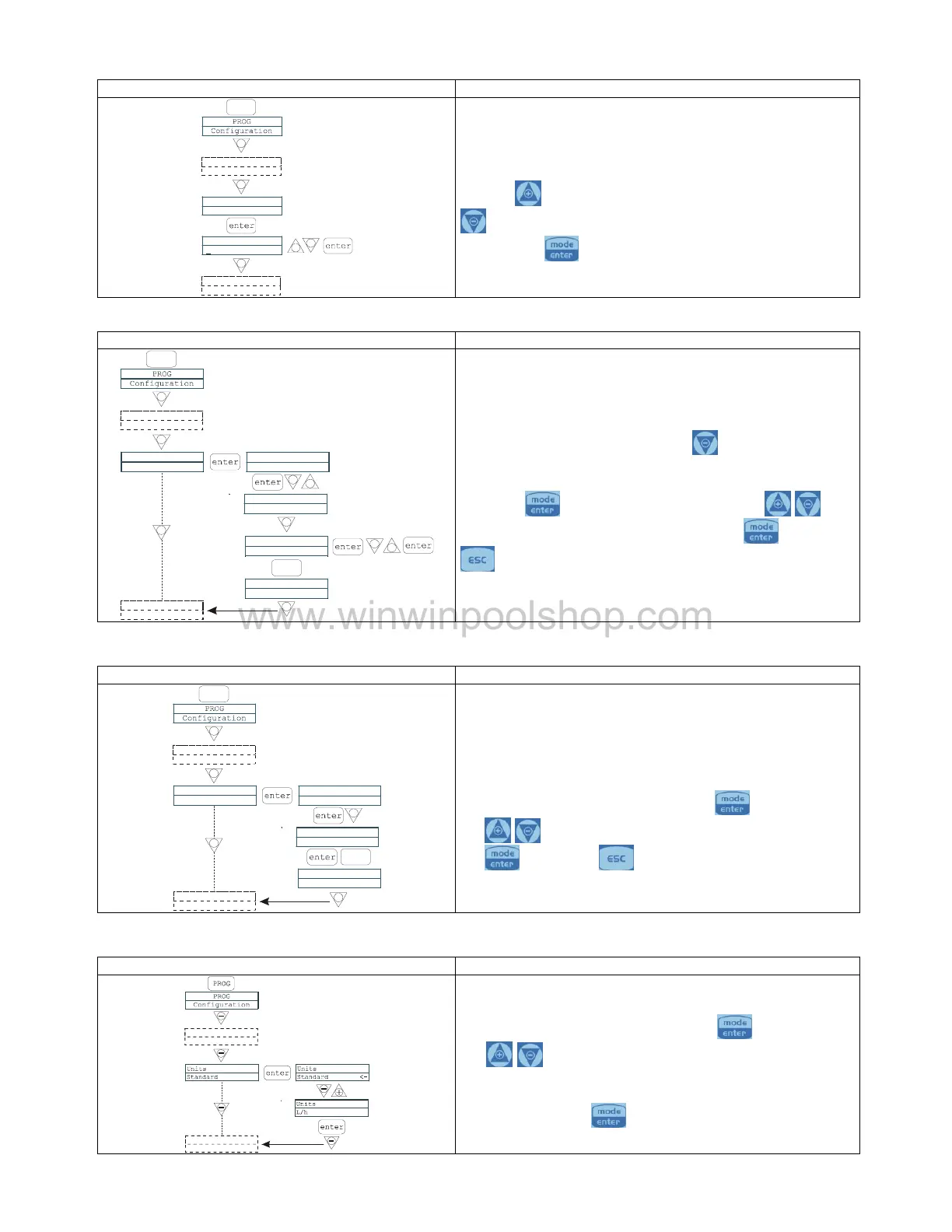
By entering the password, you can enter the programming
menu and see all the set values. The password will be
requested whenever you seek to modify them.
The flashing line indicates the number than can be modified.
key to select the number (from 1 to 9), and the
key to select the number to be modified. Confirm by
By setting “0000” (default), the
This makes it possible to activate (deactivate) the flow
When activated (On), press the
request for the number of signals that the pump waits for
before an alarm is triggered.
The number flashes when you
key, and you can then use the
to set the value. Confirm by pressing the
to return to the main menu
This makes it possible to set the pump whe
sensor alarm is activated. In other words you can decide
whether to stop dosage (Stop) or simply activate the alarm
signal without stopping dosage.
Changes can be made by pressing the
keys to set the alarm type.
to return to the main menu
This makes it possible to set the dosage unit of
measurement on the display.
keys to set the unit of measurement, choosing
between L/h (liters/hour), Gph (Gallons/hour), ml/m
(milliliters/minute) or standard (% or frequency, depending
to confirm and return to the main


 To Next Page