EasyManua.ls Logo

Seko TEKNA EVO TPG - Setting the Pause; Alarms; Alarm Indicator and Cause Explanations

Seko TEKNA EVO TPG
12 pages
Print Icon
To Previous Page IconTo Previous Page
Loading...
EM00136061
rev. 2.5
EN
11
Paragraph 17
-
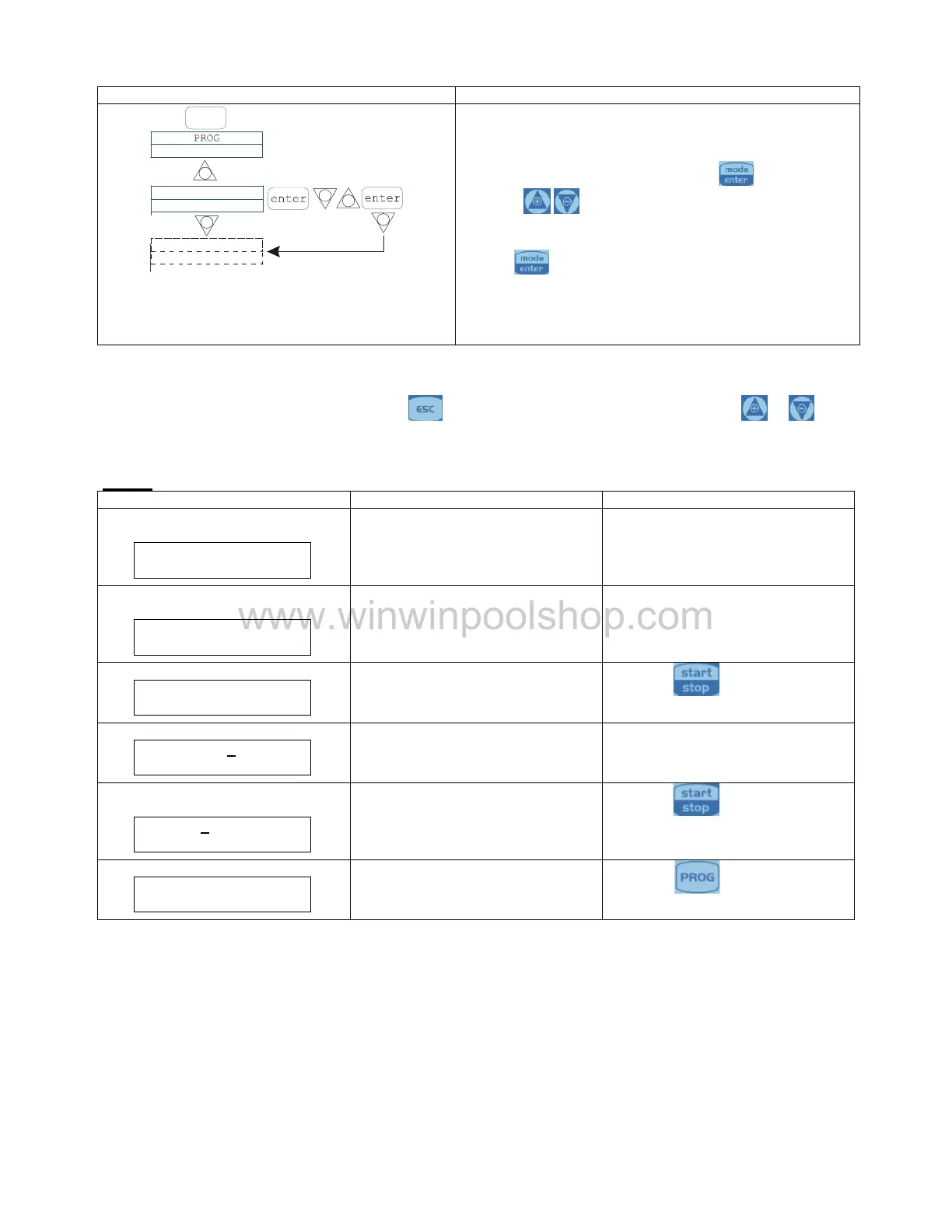
Setting the Pause
Programming
Operation
-
-
Paus
N.Open
PROG
+
-
Configuration
+
The pump can be paused by remote input.
The factory setting is Normally Open.
Changes can be made by pressing the
key, then
using the
keys to set the ne
w value ( N. OPEN or
N. CLOSED).
Press
to confirm and return to the main menu.
Display contrast adjustment.
For adjusting the display contrast keep the key
pressed and within 5 seconds press the keys
to
increase or decrease the co
ntrast.
Alarms
Display
Cause
Interruption
Fixed alarm LED
Flashing word “Lev”
End of level alarm, without
interrupting pump operation
Restore the liquid level.
I.e.
Man
Lev
P100%
Fixed alarm LED
Flashing words “Lev”
and “stop”
End of level alarm, with interruption
to pump operation
Restore the liquid level.
I.e.
Man
Lev Stop
P100%
Flashing word “Mem
The pump receives one or more
pulses during dosage with memory
function on Off
Press th
e
key
I.e.
1:n 6
Mem
Flashing word “Mem
The pump receives one or more
pulses during dosage with memory
function on On
When the pump finishes receiving
external impulses, it returns the
memorized strokes
I.e.
1:n
M
6
Mem
Fixed alarm LED
Flashing word “Flw”
Active flow alarm. The pump has
not received the programmed
number of signals from the flow
sensor.
Press the
key
I.e.
Man
F
Flw
P
100%
Internal CPU communication error.
Press the
key to restore the
default parameters.
I.e.
Parameter Error
PROG to default
www.winwinpoolshop.com

Related product manuals