EasyManua.ls Logo

Seko TEKNA EVO TPG - Timed Dosage (Trigger Signal Not Activated); Setting the Maximum Flow

Seko TEKNA EVO TPG
12 pages
Print Icon
To Next Page IconTo Next Page
To Previous Page IconTo Previous Page
Loading...
EM00136061
rev. 2.5
EN
8
Paragraph 8
Timed Dosage
(
Frequency signal input “TRIGGER” not activated)
Programming
Operation
+
-
-
-
-
+
-
+
-
+
-
Tempo
Quantity 100ml
Delay 0.01.50
Interval 0.01.50
PROG
Time
Time g.hh.mm
Time g.hh.mm
Configuration
Pum functions
Configuration
Pum functions
-
-
Trigger Mode
Pause Input Mode
Disable
Restart Timer
+
-
-
Pause Input Mode
Restart Timer
-
Pause Input Mode
Freeze Time
Pause Input Mode
Pause Dosing
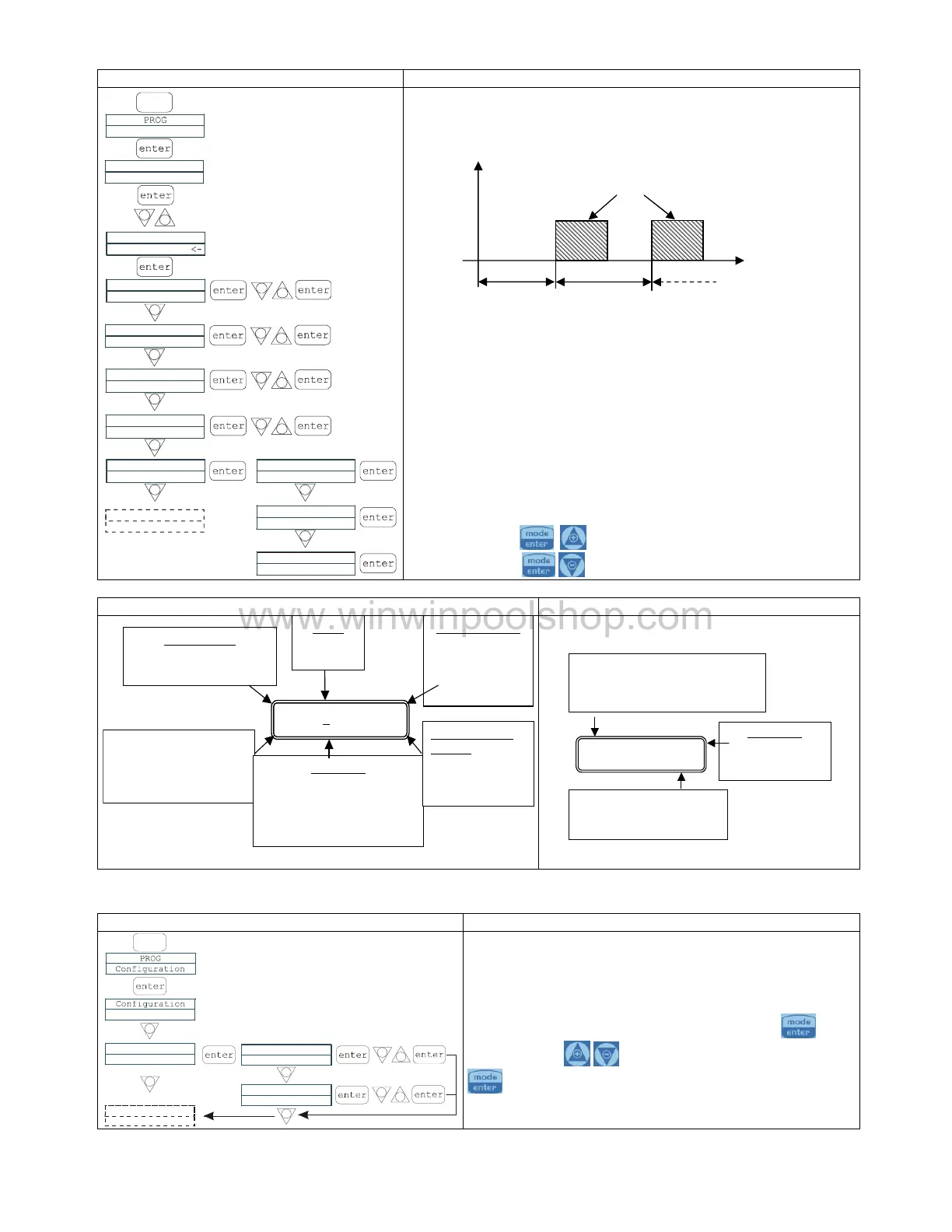
The pump doses a programmed quantity in ml. It is possible to set a
pump delay time (
Del
) when the pump is started and an interval
between two successive dosings (
Interval
), as illustrated in the
diagram:
The
Delay
and
Interval
times are in dd.hh.mm (days, hours,
minutes)
The
Pause
input can be programmed in three di
fferent modes:
1.
FreezeTime:
when the pause is activated, the system cuts
out the current time count and restarts it when the pause is
deactivated.
2.
Pause Dosing:
with the pause activated, the system
continues to count time the and stops the dosing.
3.
Restart T
imer
: when the pause is activated, the system
stops the dosing and when the pause is deactivated the
count starts again from the beginning.
The dosage frequency can be modified while the pump is operating,
by pressing the
keys at the same time to incre
ase the
frequency, or the
keys to decrease it.
Display during Operation
Display at start
-
up (MODE key)
Timer
FFF
7.0 ml
Liv Stop P 0%
Operatingmode
Timer
AlarmsandLevel
statuses = level alarm
Flow= flowalarm
FLOW
sensor
status
Programmed value
Quantityin ml
Pumpstatus
Dry= pump startingup
Stop = pump stopping
Restart
=pump restarting
Valueof dosingin
progress:
Percentage of
strokes/minmax
Q. 20,0ml
20,0ml P 100%
Operating mode
The following are shown in sequence:
quantity to dose, delay in d.hh.mm.
and interval in d.hh.mm
Dosing value
Programmed
quantity in m
l
Value of the dosing percentage,
which can be modified by
pressing the + or
keys
Paragraph 9
Setting the Maximum Flow
Programming
Operation
-
-
-
Pump Functions
Max flow rate
Max flow rate
Max flow rate
P100%
P100%
F320s/m
PROG
-
+
-
+
-
This makes it possible to set the maximum flow offered by
the pump, and the programmed mode (% or frequency) is
used as the standard unit of measurement when displaying
the flow.
Changes can be made by pressing the
key,
then using the
keys to set
the new value.
Press
to confirm and return to the main menu

Delay
Interv.
Quantity
www.winwinpoolshop.com

Related product manuals