-8-
EXTERNAL SCHEMATIC AND INSTALLATION
Back Panel
Note: The graphics are for representation only.
HDMI
1
1
2
3
SIDE AV IN
75 ANT
4
5
6
2
78
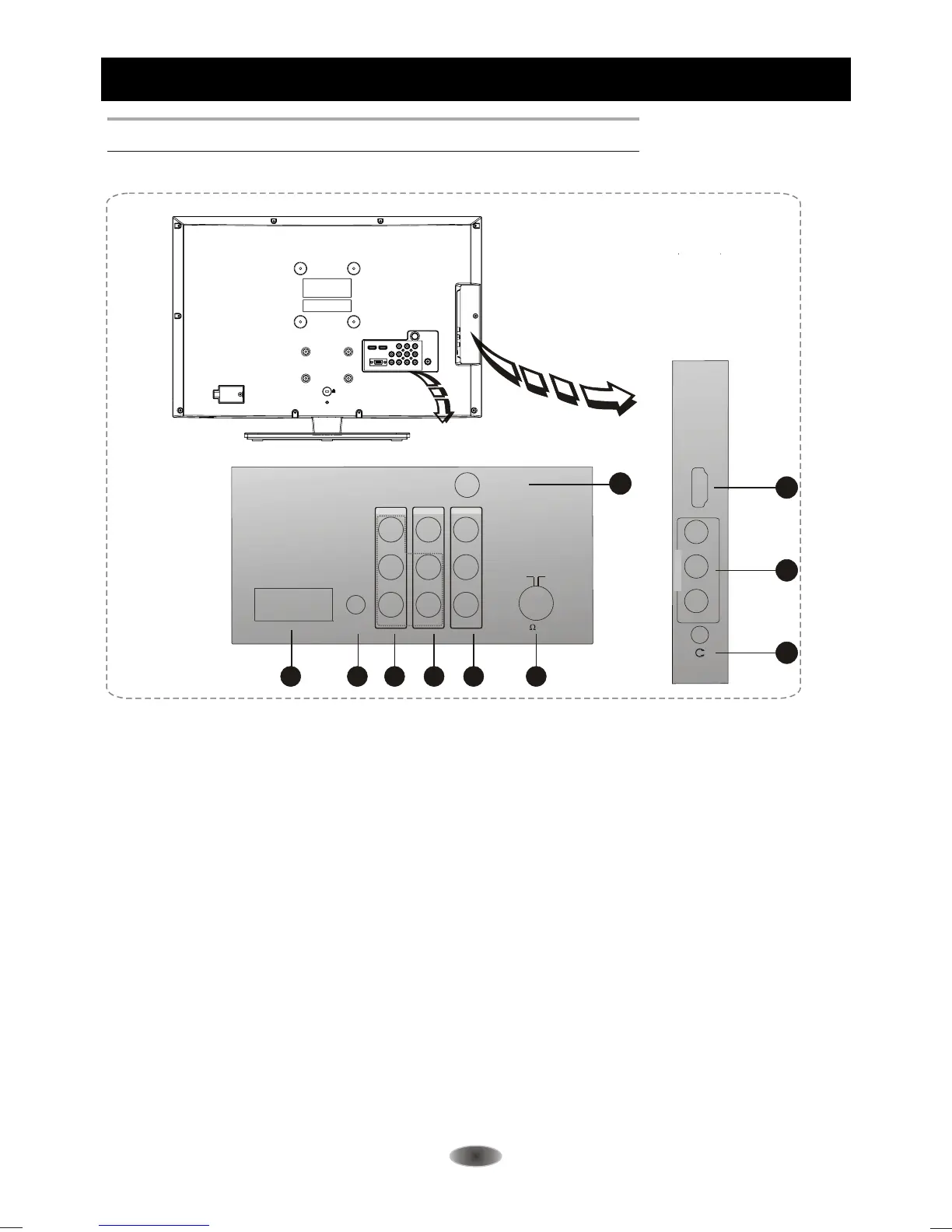
1. HDMI:Connect HDMI input signal from signal source such as DVD.
2. SIDE AV IN\AV IN: Connect audio and video input signal from signal source such as DVD.
3. EARPHONE
VGA IN: Connect a PC via a VGA cable.
5 VGA AUDIO IN:
6.Y Pb Pr
hares the same audio input as AV2.
7. AV OUT:
8. ANTENNA IN: Connect a coaxial cable to receive signal from the antenna or cable.
9. S-VIDEO: Connect S-VIDEO Share the same AUDIO input with AV.
: Audio output, speakers will be muted when earphone plugged in.
4.
.
Audio input for PC and audio input for HDMI when the signal is DVI timing.
(Component input): Connect YPbPr signal from signal source such as DVD.
S
Connect audio and video output the signal.
9
L -AUDIO- R
VIDEO
VGA IN
VGA
AUDIO IN
P
B
P
R
Y
VIDEO
LEFT
RIGHT
VIDEO
LEFT
RIGHT
AV IN AV OUT
YPBPR IN
S-VIDEO



 To Next Page