SVENSKA ENGLISH GERMAN FRENCH DUTCH
13
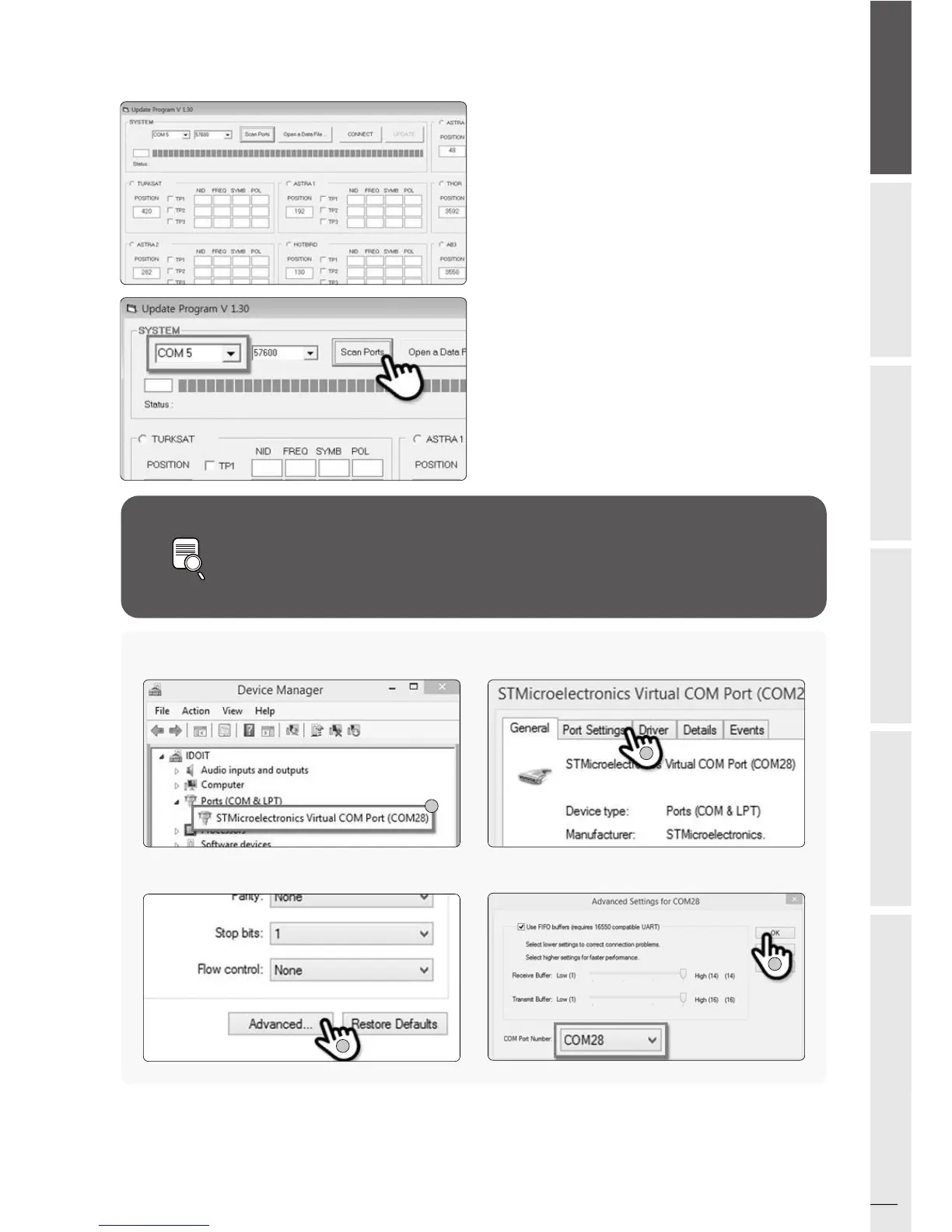
If you see [Invalid port] message after clicking [scan ports], please check if
you selected the correct port, and if you see [Invalid port] message even if
you chose the correct one, please change the setting as below; you do not
need to follow until 5-3 if you do not see [Invalid port] message.
NOTE
Proceeding Updatev.
Open the installed update program and you will
see the screen.
01.
Turn on the controller and click [Scan Ports].
The Port name might be different depending on
the PC models.
02.
Click the com port on the [Device manager] and
click properties.
02-a.
Go to [Port Settings]
02-b.
Go to [Advanced…]
02-c.
Change the COM Port Number to one of the low
numbers and select [OK].
02-d.
a
b
c
d



 To Next Page