8
Operation
i.
ii.
i.
ii.
iii.
Function Description Operation
B. Selecting the satellite
“OK” Button
“Satellite
Up / Down button” Light
C. Searching the satellite
3-2. Functional Description
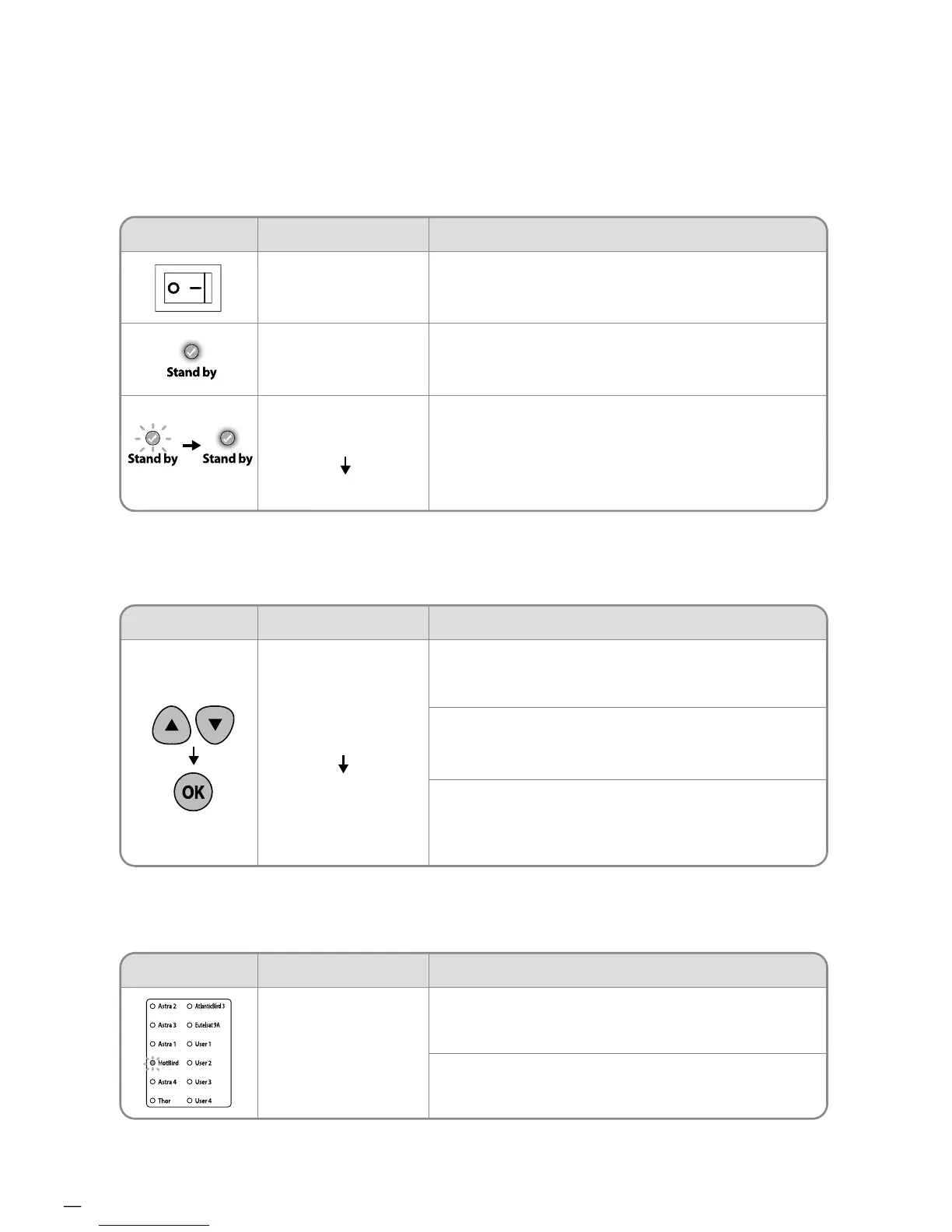
A. Power On
When the all cable connections are completed, switch on
with the “Power Switch” button on the top of the controller.
If the position of antenna was in Basic position, “STAND BY
state light” will be solid on to show it is STAND BY to use.
If the position of antenna was not in the Basic position,
“STAND BY state light” will flash, and the antenna will return
to the Basic position within a maximum 2 minutes. Then
“STAND BY state light” will be solid on.
Function Description
“Power” Switch
“Stand by”
Light Solid ON
Solid ON
“Stand by”
Light Solid ON
Operation
Once antenna and controller are connected, you can select
& change the satellite as you require.
Select the desired satellite using the “Up/Down” buttons,
then press the “OK” button to accept the setting.
If you select the wrong satellite, you can re-search target
satellite using the “Up/Down” button, then press the “OK”
button to accept the new setting.
i.
ii.
iii.
After the satellite selection, “Stand by State” light will go off
and the LED light of the selected satellite will start flashing.
Once selected satellite has been found, the LED light of the
satellite will become solid.
Function Description
“Satellite” light








 To Next Page