User operations
NETfon 300/350 - User Guide 723142003-A0-LM
47
(1) It is a SAMBuilder customation data from (contact your system administrator).
(2) The headset mode means that a headset is connected to the headset connector and the headset
button is lit.
IMPORTANT!
- Call waiting tone in a multi-line phone, will be played on the audio device you are using (loudspeaker,
headset or handset).
- The caller ID of the second call ("flash") is displayed for a few seconds on the display by adding the
character "*" asterisk at the end of the number received, in place of the caller ID of the call in progress.
- In the case of an incoming call while the headset is on, the ringing tone will be produced in both
headset speaker on the speakerphone. In case the user set the Silent mode, the tone will be heard
only from headset.
8.3. Listening to your voice messages
The flashing Voice Mail button indicates a new voice message in your voice mailbox, to listen to it
press the voice mail button and follow the voice instructions.
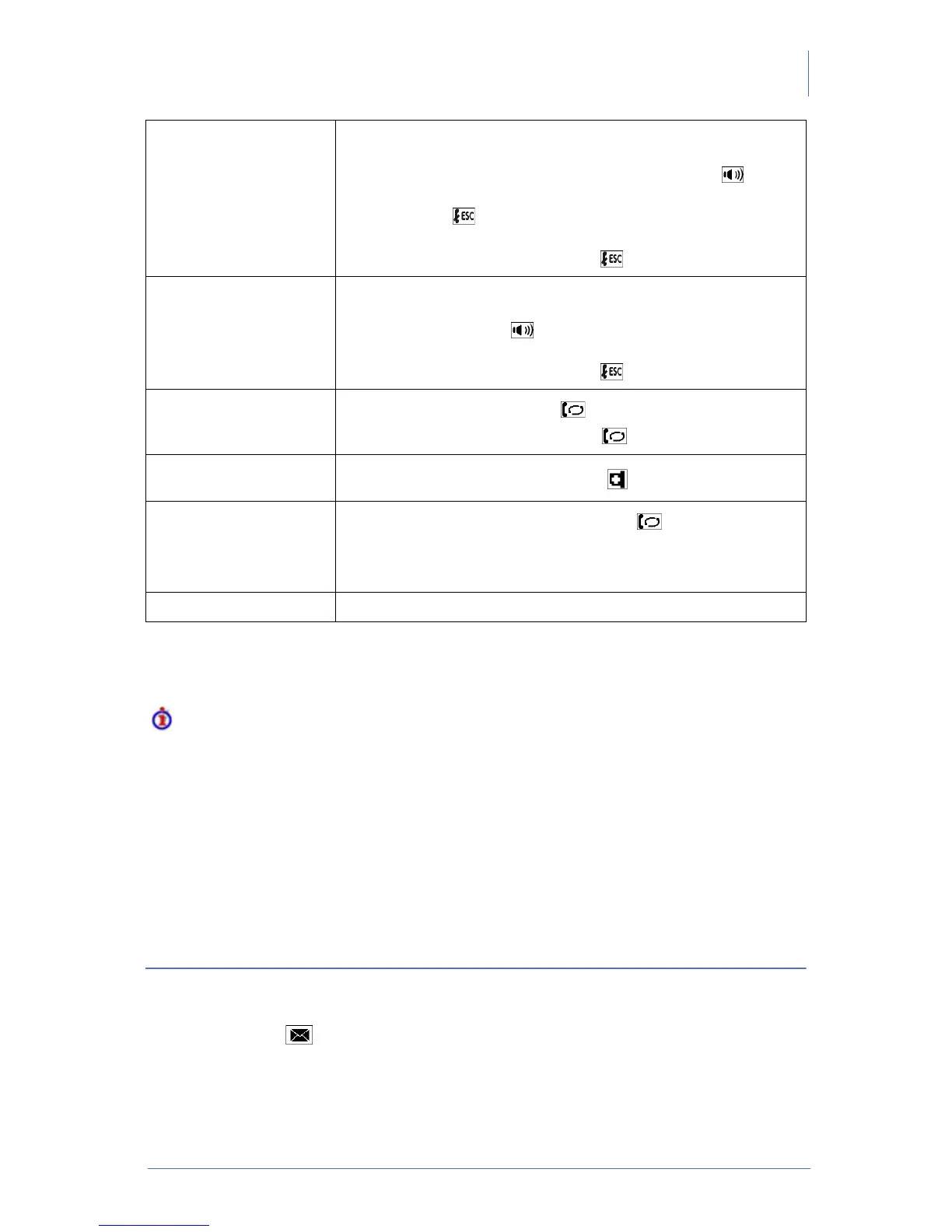
End a phone call • return the handset to its cradle.
or
• from automatic handsfree mode press speakerphone
or
• press ESC
or
• from headset mode(2): press ESC .
Answer a phone call • lift the handset
or
• press speakerphone
or
• from headset mode(2): press ESC
Hold and resume the call
1. put the call on hold with hold button
2. resume the call from hold with hold button.
Enable/Disable
microphone (mute)
1. enable and disable the feature with MUTE button.
Transfer the phone call
in progress
1. put on hold the call in progress with hold button
2. dial the number of the extension to call
3. wait for the answer and hang up or without waiting for the answer,
hang up, only if the telephone is enabled to automatic transfer (1).
Redial last number 1. press pound [#].



 To Next Page