6 |
Instructions for use
EN
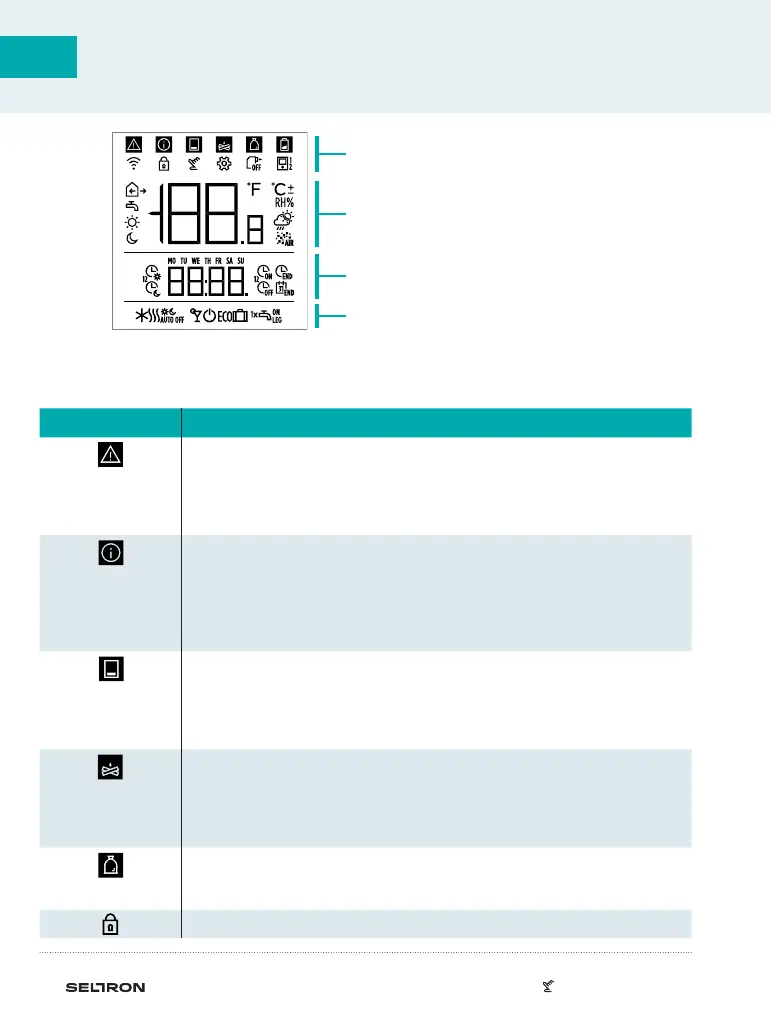
ROOM UNIT DISPLAY
DESCRIPTIONS OF SYMBOLS ON SCREEN
Event display symbols
Operating mode display
Display of measured and requested
temp. and other information
Display of time, day of the week
and state of time programmes
Symbol Description
Warning.
When an error occurs on the heating controller, the room unit
makes two long beeps, and the symbol starts flashing. When the
error is no longer present, the symbol is lighted. When we read
the error in the error list on the controller, the symbol turns o.
Heating controller safety function turning on notification.
When a protective function occurs on the controller, the room
unit makes a single long beep, and the symbol starts flashing.
When the protective function is no longer present, the symbol is
lighted. When we read the protective function in the notification
list on the controller, the symbol turns o.
Notification about the heat accumulator.
When accumulator temp. does not meet heating needs, the room
unit makes two short beeps, and the symbol starts flashing. When
accumulator temp. falls below minimum temp., the room unit
makes three short beeps, and the symbol lights up.
Log or wood chip boiler notification.
When boiler temp.e does not meet heating needs, the room unit
makes two short beeps, and the symbol starts flashing. When
boiler temp. falls below minimum temp., the room unit makes
three short beeps, and the symbol lights up.
Pellet storage room notification.
When the pellet storage room is nearly empty or empty, the room
unit makes three short beeps, and the symbol starts flashing.
Locked buttons.
EVENT DISPLAY SYMBOLS



 To Next Page