14 |
Instructions for use
EN
ADDITIONAL AND
SERVICE SETTINGS
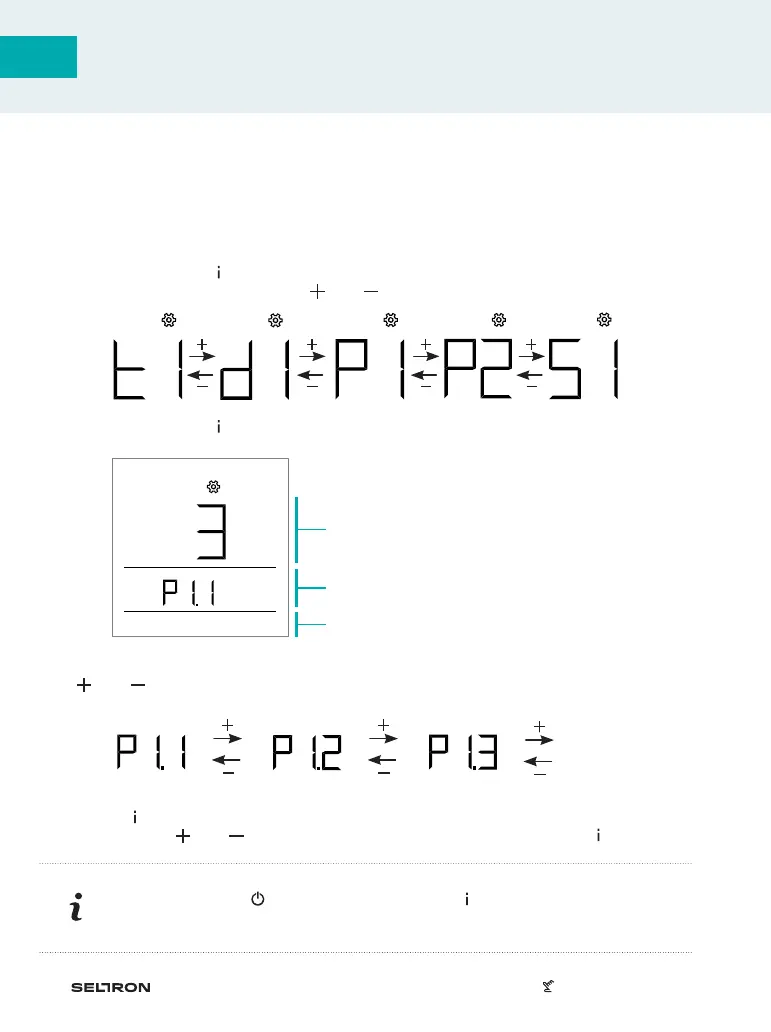
Menu symbol
Information or parameter value dis-
play for setting
Group name display and consecutive
parameter number
Access to additional settings is enabled through the menu.
Data and parameters are located in five groups in the menu:
t1 - measured and requested temperatures,
d1 - data on room unit and heating controller,
P1 - user settings (parameters),
P2 - user settings (parameters)
S1 - service settings (parameters).
By pressing the button for 2 seconds, we enter the menu.
Move between groups with buttons and .
By pressing the button , we enter the selected group.
Move between information and parameters for settings in individual groups with but-
tons and . Only parameters in groups P1, P2, and S1 can be changed.
By pressing , the setting value starts flashing. Now we can change the parameter
value with button and . Confirm the set value by pressing the button .
By pressing button or by pressing the button for 2 seconds, we move one
level back in any level of settings.
...



 To Next Page