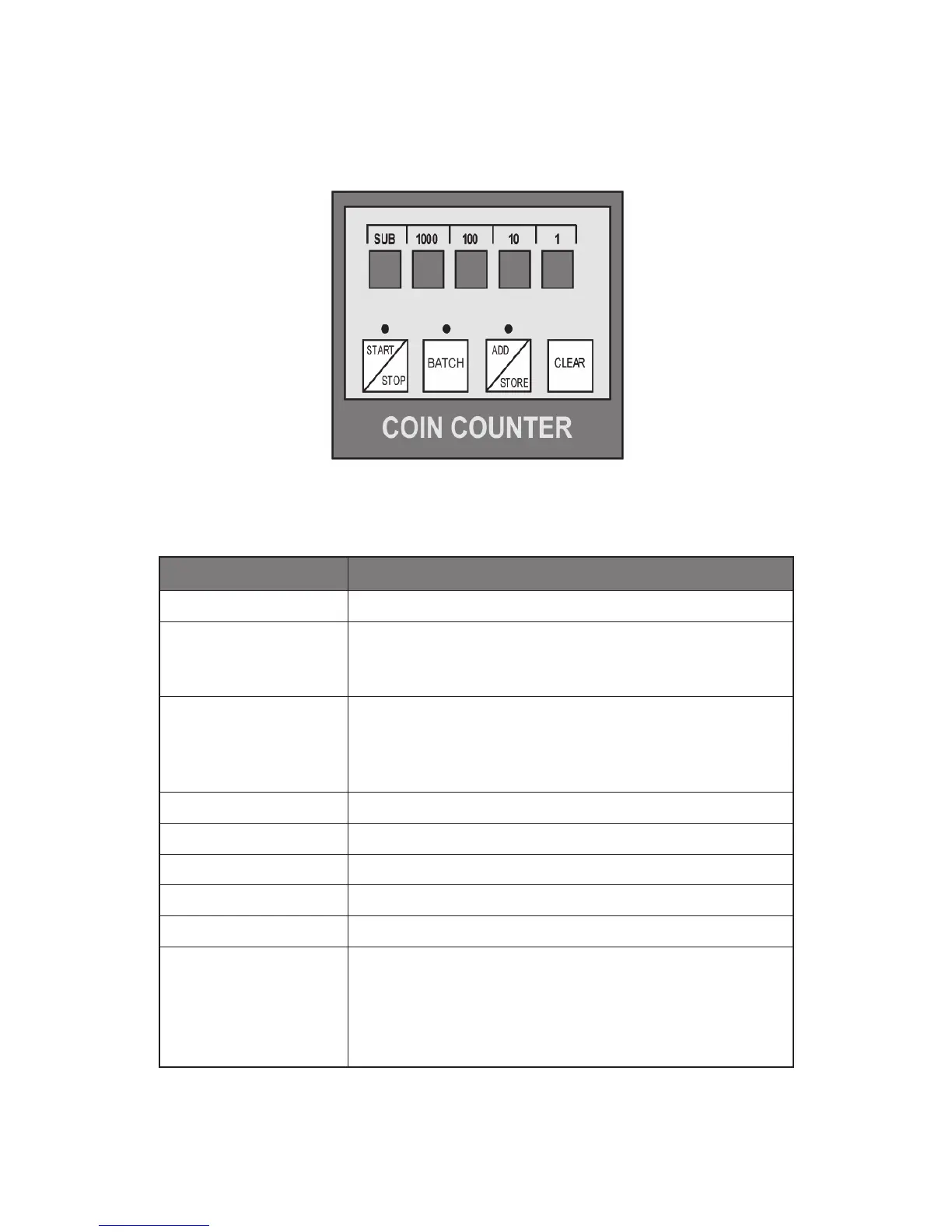
Control Panel Functions
KEY FUNCTION
START/STOP
Start or stop the counting.
BATCH
Select Batch mode when you want the counter to stop
after a selected number of coins is reached when bagging
or packaging/wrapping coins.
ADD/STORE
Select Add mode when you want the counter to
continuously add (accumulate) the total counts. Press this
button for 2-3 seconds to store the current coin count in
the subtotal list.
CLEAR
Clears the count display.
1
Set the batch number (from 1 to 9)
10
Set the batch number (from 1x to 9x)
100
Set the batch number (from 1xx to 9xx)
1000
Set the batch number (from 1xxx to 9xxx)
SUB
Press this button to enter the subtotal list display mode.
Continue pressing the button to step through the saved
subtotals. The grand total will be displayed at the end of
the subtotal list. Press this button for 2-3 seconds to exit
the subtotal list display mode.
Figure 2
4



 To Next Page