7
Attaching A Coin Bag
Slide the metal ring on the bag holder upward and place a plastic or cloth coin bag around the
bagging attachment. Then lower the metal ring around the top of the bag firmly so the bag is
secure.
Attaching A Coin Packaging Tube
To package coins into a paper coin wrapper, attach the appropriate size packaging tube to the
counter by inserting the larger end of the tube into the front bagging attachment and then
tightening the thumbscrew. Then set the appropriate batch stop setting by following the
instructions in the “Batch Counting Mode” section. Following are the Packaging Tube sizes
and colors:
Penny: Red, Light Gray or Black
Nickel: Blue
Dime: Green
Quarter: Orange
Half-Dollar: Dark Gray
Dollar or Loonie: Gold
Toonie: Brown or Dark Gray
Setting the Diameter and Thickness Adjustment Knobs
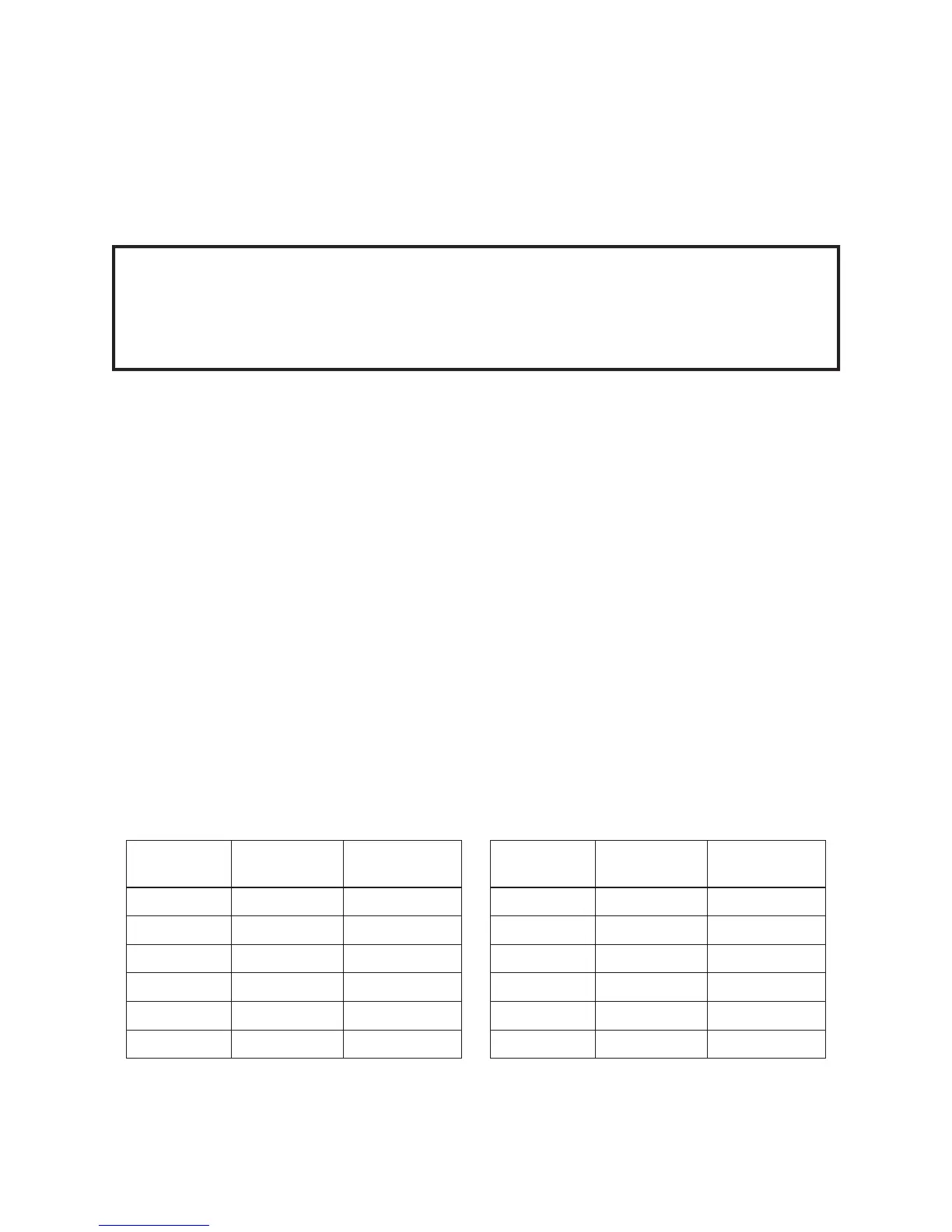
For US and Canadian coins, set the Diameter and Thickness Adjustment Knobs as shown
below. These settings are marked in red on the control panel.
WARNING!
Always support the coin bag from the bottom of the bag. Failure to properly support
the bag from the bottom could cause the coin counter to tip or fall or cause the bag to
detach from the bag holder. A chair or stool may be used for this purpose.
US Coin Size Diameter
Setting (mm)
Thickness
Setting (mm)
Penny 19.0 1.6
Nickel 21.2 2.0
Dime 17.8 1.4
Quarter 24.2 1.8
Half-Dollar 30.6 2.2
Dollar 26.6 2.0
Canadian
Coin Size
Diameter
Setting (mm)
Thickness
Setting (mm)
Penny 19.0 1.6
Nickel 21.4 1.8
Dime 18.2 1.2
Quarter 24.0 1.6
Loonie 26.6 1.8
Toonie 28.0 1.8



 To Next Page