92
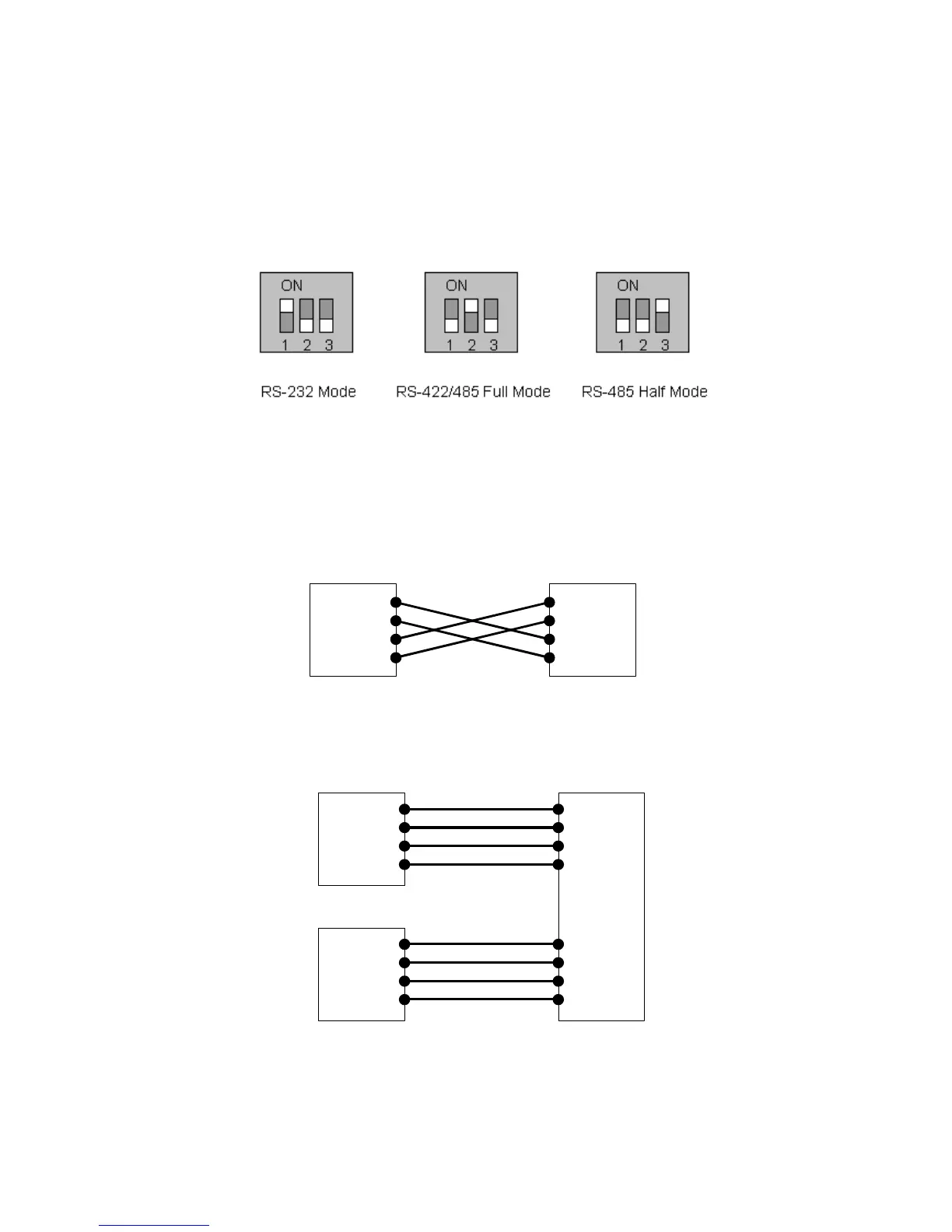
The serial communication type can be set by DIP switch near by serial port. (Only for PS110 and
PS410) To change the serial communication type, change the position of each DIP switch as shown
below. But please note that the power of the Pro Series should be turned off before changing the serial
communication type.
Figure A-3 Serial communication type and DIP switch configuration
A 1.3. Ethernet Wiring Diagram
Figure A-4 Ethernet direct connection using crossover Ethernet cable
Figure A-5 Ethernet connection using straight through Ethernet cable
Tx+(1)
Tx-(2)
Rx+(3)
Rx-(6)
HelloDevice
Hub
Tx+(1)
Tx-(2)
Rx+(3)
Rx-(6)
Remote Host
Tx+(1)
Tx-(2)
Rx+(3)
Rx-(6)
Tx+(1)
Tx-(2)
Rx+(3)
Rx-(6)
Tx+(1)
Tx-(2)
Rx+(3)
Rx-(6)
HelloDevice
Remote Host
Tx+(1)
Tx-(2)
Rx+(3)
Rx-(6)


 To Next Page