Tufftalk Lite User Guide
(Industrial Bluetooth Communication System)
1. GETTING STARTED
1.1 Powering On and Off
To power on the headset, press the Center Button and the (+) Button at the same time while
hearing ascending beeps and a voice prompt, “Hello”. To power off the headset, press the Center
Button and the (+) Button at the same time while hearing descending beeps and a voice
prompt, “Goodbye”.
1.2 Charging
You can charge the headset by connecting the supplied USB cable into a computer’s USB port or
USB wall charger. You can use any standard micro USB cable to charge the unit. You can also
charge it on the road using the cigarette charger. The charging LED turns red while charging and
turns blue when fully charged. It takes about 2.5 hours to be completely charged.
1.3 Checking the Battery Level
Checking the Battery Level When the headset is powering on, the red LED flashes rapidly
indicating the battery level.
4 flashes = High, 70 ~ 100%
3 flashes = Medium, 30 ~ 70%
2 flashes = Low, 0 ~ 30%

 Need help?
 General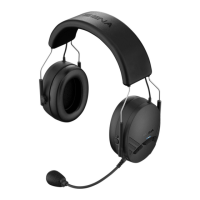

 To Next Page











