EN 11
EN
Revision 09/2016Copyright © 2016, Fast ČR, a. s.
Device
Move backward: moving in the menu upward or going to ahigher channel number
Note:
To switch the input source select MENU/OPTION/SOURCE (Menu/Options/Source),
select souce and press the joystick in medium position (OK).
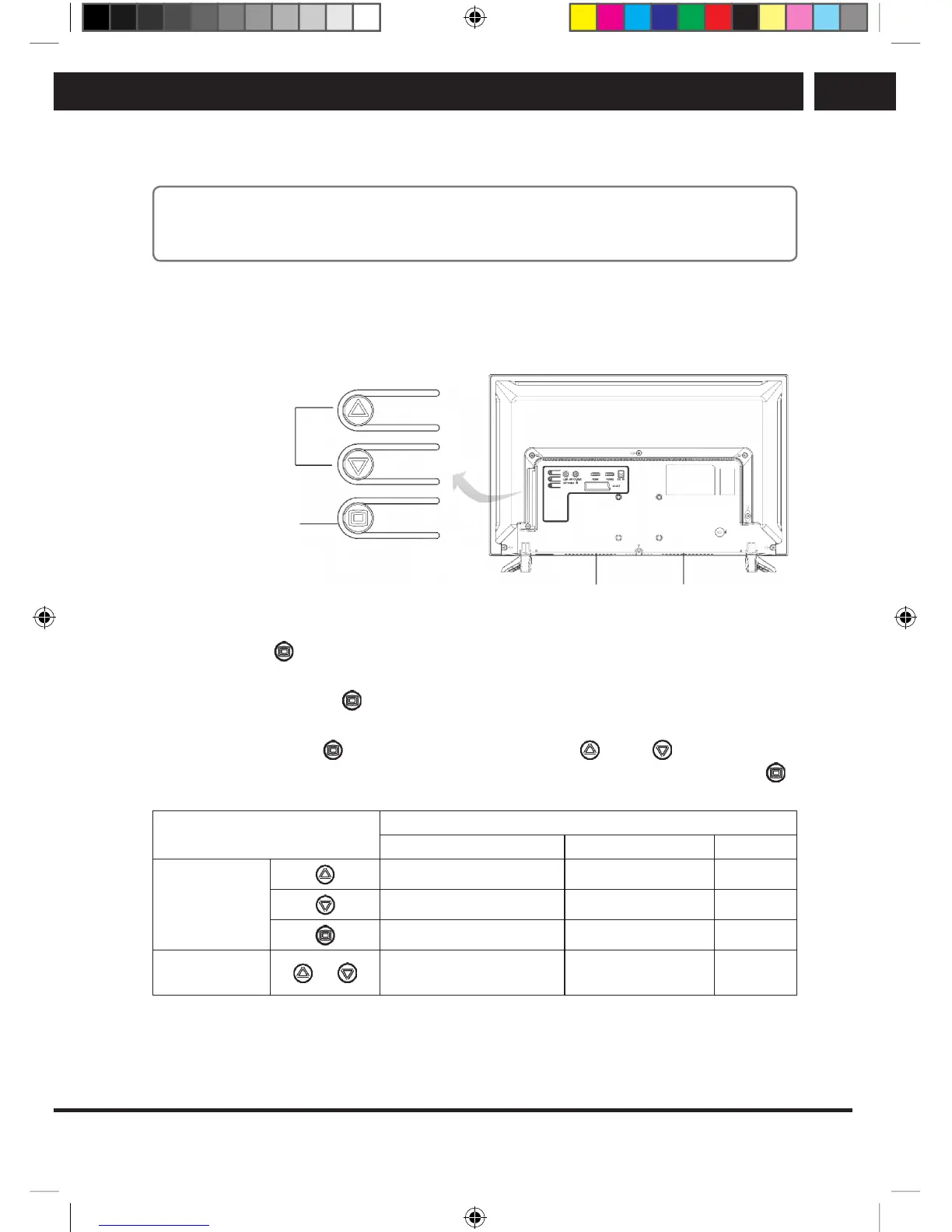
3.2. Button controls (only SLE 2464TCS)
Rear view
Up/down
left/right
Enter/back/off/on
SpeakerSpeaker
TV set on:
Press the button
and wait 2 sec.
TV set off:
Press and hold the button
2 sec.
Working in the menu:
Press briefly the button
and select using the buttons Up /Down among Main
menu, Input sources and Volume and enter the item with another press of the button
.
BUTTON
MENU FUNCTIONS
Main menu Menu Sources Volume
Press
Left or up Up Left
Right or Down Down Right
Enter/Back (Back) Enter/Back (Back) –
Press and hold
or
Setting selection/value
and confirmation
– –
SLE SLE 2464TCS + SLE 3258TCS EN+CZ+SK+HU+PL.indb 11 08.09.2016 0:57:27



 To Next Page