EN - 7
6. Assembly
CAUTION!
Risk of injury!
Improper handling of the paper shredder may cause injury.
- Do not connect the paper shredder to a socket during assembly.
- The main unit of the paper shredder contains sharp edges. Be very careful when assembling the
paper shredder.
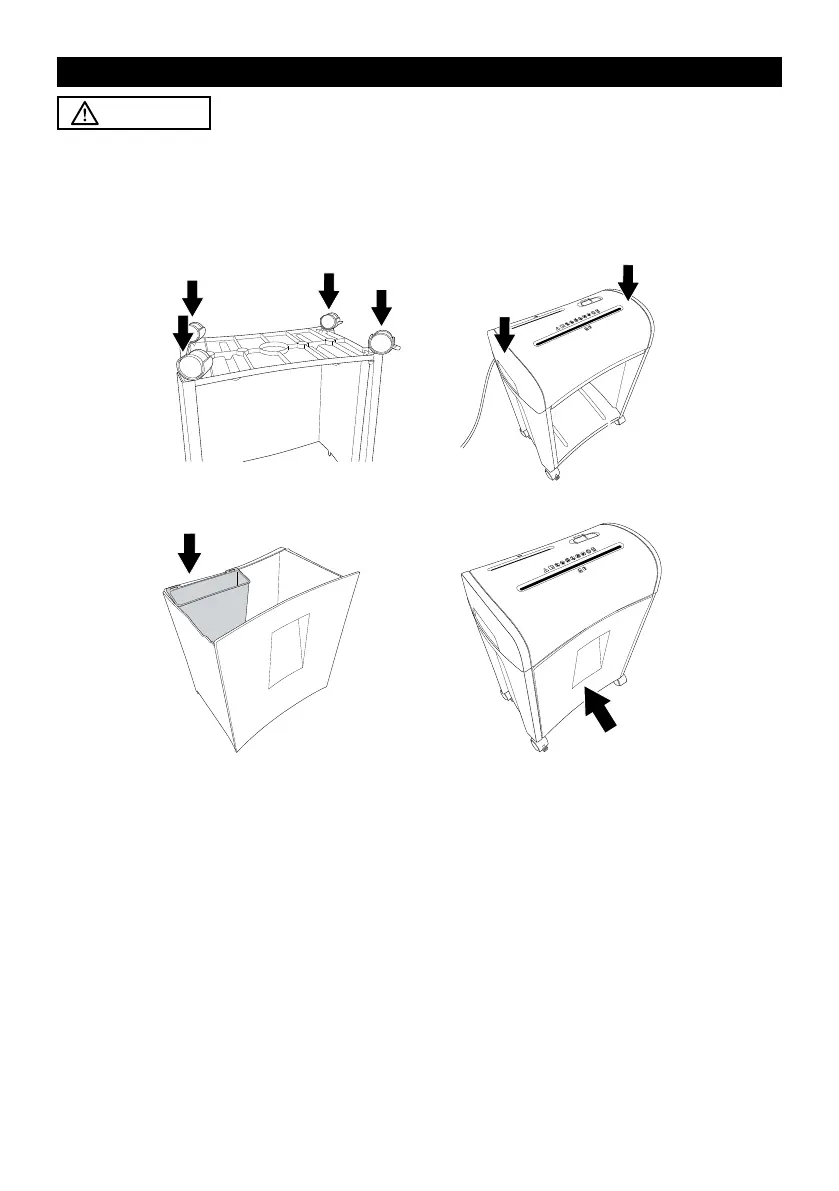
fig. A fig. B
fig. C fig. D
1. Place the base unit qf upside down so that the bottom side is facing upwards.
2. Install the castors 0 at the right side and the castors with locking levers qa at the left side of the
base unit. Push the castors downwards into the holes on the base unit until they lock into place
(see fig. A).
3. Turn the base unit over after the installation of the castors.
4. Install the main unit 5 on top of the base unit. Firmly push the main unit downwards until it locks
into place (see fig. B).
A loud click sound can be heard on each side when the main unit has been securely installed.
5. Install the CD waste bin qs in the paper / credit card waste bin qd (see fig. C).
6. Slide the paper / credit card waste bin into the base unit (see fig. D).
You must fully slide the paper / credit card waste bin into the base unit until a click sound is heard.
This indicates that the safety switch 6 has been deactivated for normal operation.
The paper shredder is now assembled. Please note that the base unit should not be
disassembled.



 To Next Page