EN – 8
TIME SETTING MODE
– In standard mode, press and hold MODE button for 3 seconds to enter time setting
– The setting item flash at a frequency of 1HZ. Short press the MODE button to select the setting items.
The order is: Language →button tone ON/OFF→RCC ON/OFF(ON:ZONE±12HR)→Year→DM/
MD→Month→Day→ 12/24HR→Hours→Minutes→Barometric pressure unit→exit
– In time setting mode, when the setting item flashes at 1HZ frequency, short press the UP button to add 1,
and press and hold the UP button to quickly add up at 8 steps/second.
– In the time setting mode, when the setting item flashes at a frequency of 1HZ, short press the DOWN button
to decrease by 1, and press and hold the DOWN button to quickly decrease at 8 steps/second.
– In time setting mode, if you do not operate for 1minute or press the SNOOZE button during the setting
process, you can save the current setting value and exit the time setting.
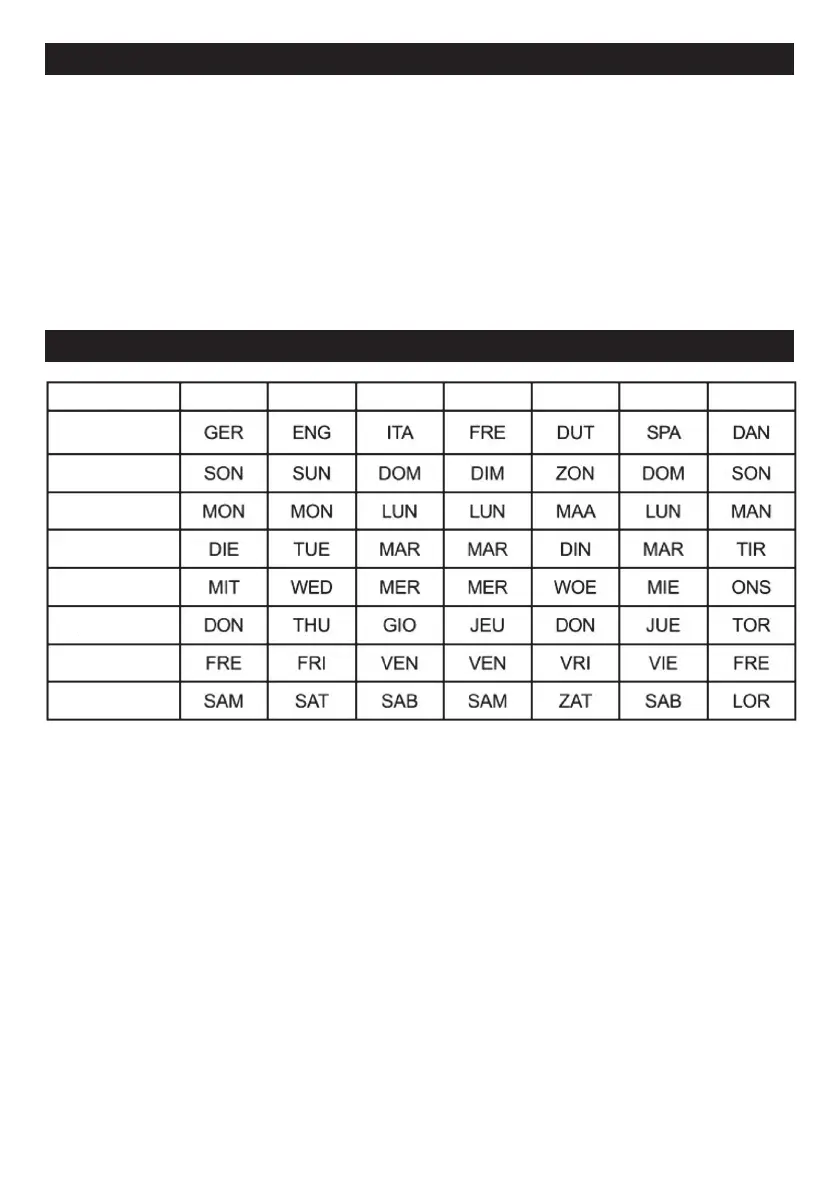
7 LANGUAGES OF WEEKDAY DISPLAY
Language German English Italian French Dutch Spanish Denmark
SUNDAY
MONDAY
TUESDAY
WEDNESDAY
THURSDAY
FRIDAY
SATURDAY
CITY SET
– In time display mode, press the CITY button to enter the city scrolling selection , press the UP/DOWN
button to scroll up/down the city. There is 150cities for choice (please see the city list in the last
pages).
– In time display mode, press and hold the CITY button for 2 seconds to enter the city setting. If there is
no operation for 1minute, it will return to the time display mode.
– In city setting mode, press the CITY button once to make the first letter of the city flash. Press the ▲/
CH button to scroll the letters from A~Z. Press ▼/RCC from Z-A, Then press the CITY button again
to confirm and move to the next letter setting.
– After setting the three letters, the sunrise and sunset times will be automatically calculated.
– During the city setting process, the sunrise and sunset positions will display “--:--”
– After confirming and exiting the settings, the sunrise and sunset are being calculated, and the “--:--”
will flash.
– When setting a city that is not in the list, after exiting the setting, both the city and sunrise and sunset
positions will display “--:--”, which means the city is wrong.
– The calendar range is from January 1, 2000 to December 31, 2099.



 To Next Page