EN – 7
Function firmware version: 1.00
WiFi firmware version: 1.00
nist.time.gov
Server URL:
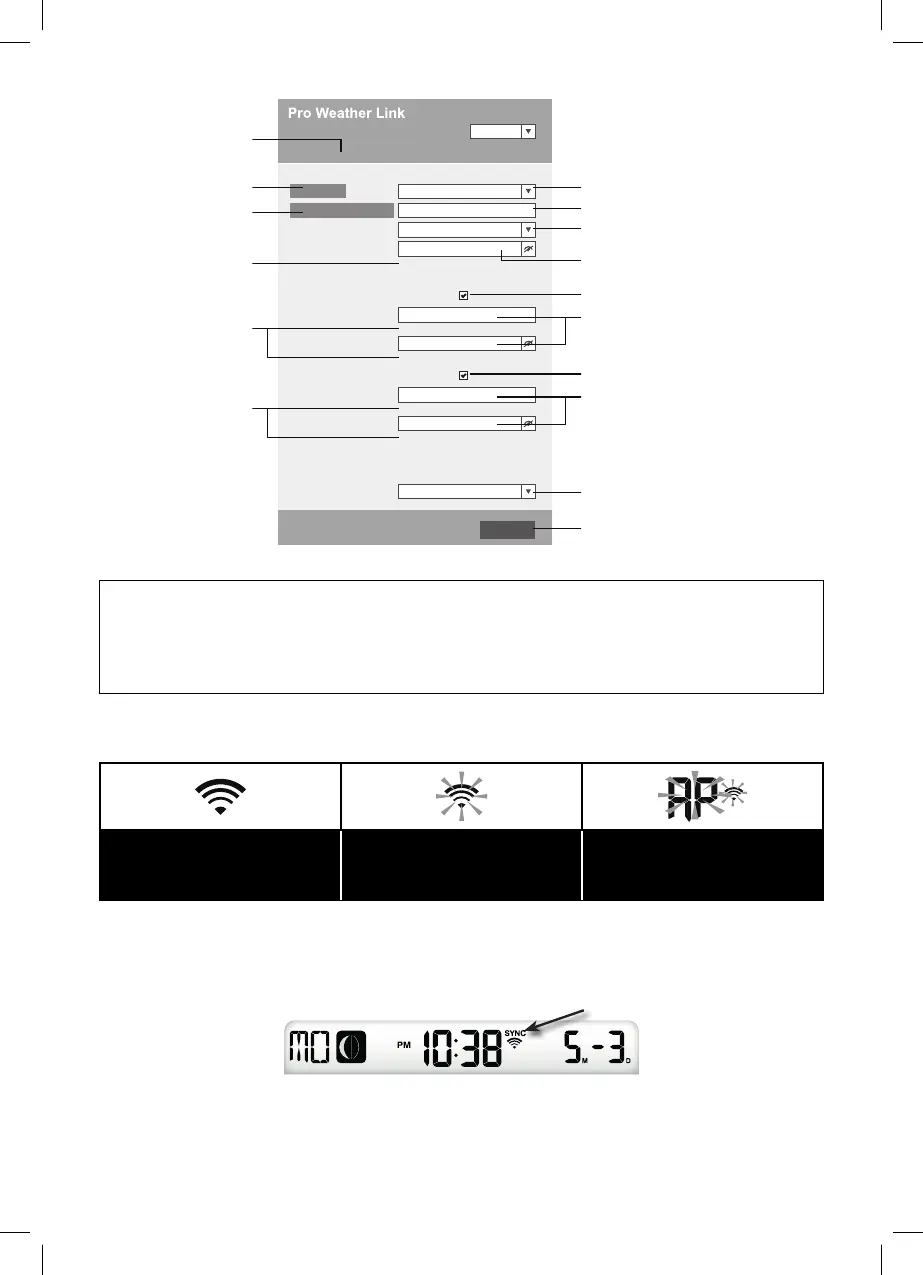
Time server setup
WiFi Router setup
SETUP ADVANCED
Wunderground
Station ID:
WDw124
******
******
******
IPACIR23Wc
Weather server setup
Station key:
Router:
Add Router
Search
Security type:
Router Password:
WAP2
ROUTER_A
Apply
Language: English
Weathercloud
Station ID:
Station key:
Mac address 00:0E:C6:00:07:10
Select the (Wi-Fi network/SSID) that you want
to connect to
Enter the SSID manually if it is not in the list
Select the security type of the router (usually
WAP2)
Router password (leave blank if not
secure)
Check to confi rm the upload to Weather
underground
Enter the new Station ID and Station Key
assigned by Wundeground
Enter the new Station ID and Station Key
assigned by Wundeground
Check to confi rm the upload to Weathercloud
Current ID and recorded key
(if any)
Current ID and recorded
key (if any)
Note on password entry
(if you entered
a password)
Press to allow the router
to be added manually
Press to search for a router
Press the "SETUP" icon to
display the SETUP page
Select a time server
Press to complete the setting
SETUP page
NOTE:
• Your default WI-FI connection will be restored after completing the WI-FI Weather
Station setup.
• In AP mode, you can press and hold the button for 6 seconds[SENSOR / WI-FI] to
exit AP mode – and restore previous settings.
WI-FI CONNECTION STATUS
The following are the status of the WI-FI icon on the device's LCD display:
Stable: The device is
connected to a WI-FI router
Flashing: The device is
trying to connect to a WI-FI
router
Flashing: The device is
currently in Access Point
(AP) mode
TIME SERVER CONNECTION STATUS
After the device connects to the Internet, the device tries to connect to an Internet time
server and obtain UTC time. If this connection is successful and the device time is updated,
the “SYNC” icon will appear on the LCD display.
Time zone: To display the time of your time zone, change the time zone from "00" (default)
to your time zone in the time setting mode (e.g. 08 for Hong Kong).
1. Press and hold the button [CLOCK SET] for 2 seconds to open the time setting mode.



 To Next Page